Munshi and Instagram
Munshi Social, the AI content marketing engine for small teams, writes and publishes posts toInstagram from the same weekly plan as every other channel. Each post gets a caption written for Instagram, goes out with its image or video, and is measured daily.
14-day free trial · No card required · 7-day money-back
A post with its image or video and a caption written for Instagram. The hook goes in the first line and the detail below it. Hashtags go where they belong, not pasted from another network.
How the connection works
You sign in to the network in its own window and give Munshi permission to post for you. Munshi never sees your password. You can revoke the connection from the network's own settings at any time.
What comes back
Munshi reads reach, engagement and follower growth for every post it publishes. The numbers are captured daily onto the Results page, next to your other channels. Comments on your posts come into Munshi, and you can reply from there. On Instagram you can also delete a comment from Munshi.
Instagram's rules, checked first
- Every post needs a photo or a video, so Munshi will not schedule a text-only post to Instagram
- Captions are kept under Instagram's 2,200 characters
What to know
- One Instagram account per workspace
- A Story carries one photo or video, and Instagram does not show its caption
Munshi schedules Instagram feed posts, carousels, Reels and Stories, with a caption written to Instagram's 2,200 characters. Comments come back into Community, where you can reply and delete without opening the app. Reach, likes and comments come back on their own.
To connect, you need a Business or Creator account. Instagram only lets those accounts publish through an app, and Munshi checks this once, when you connect.
Instagram refuses more than the other networks do. It takes no text-only post, and it stops a caption at 2,200 characters. Munshi checks these rules in the composer, before anything is scheduled. So you see a refusal while you can still fix it, not when the post was meant to go out.
What you can post to Instagram
| Format | What goes out |
|---|---|
| Single photo | One JPG, PNG, WebP or GIF image with a caption of up to 2,200 characters. Post type is Post. Instagram publishes pictures as JPEG, so any other format is converted on the way out. |
| Carousel | Two to ten images in one post, sharing one caption. You drag them into the order the carousel opens in. An eleventh image is refused, with the number to remove. |
| Reel | One MP4 or MOV video of up to 1 GB, with the caption kept. Thumbnail in Instagram settings sets the cover shown before it plays. |
| Story | An image or a video sent as a Story, chosen from Post type in the Instagram tab. Instagram shows a Story without a caption, so put the words that matter in the picture. |
| Text on its own | Not possible. Instagram publishes nothing without something to show. Munshi holds the post with Instagram needs a photo or video. until you add media or take Instagram off the post. |
How to connect Instagram
-
Open Integrations
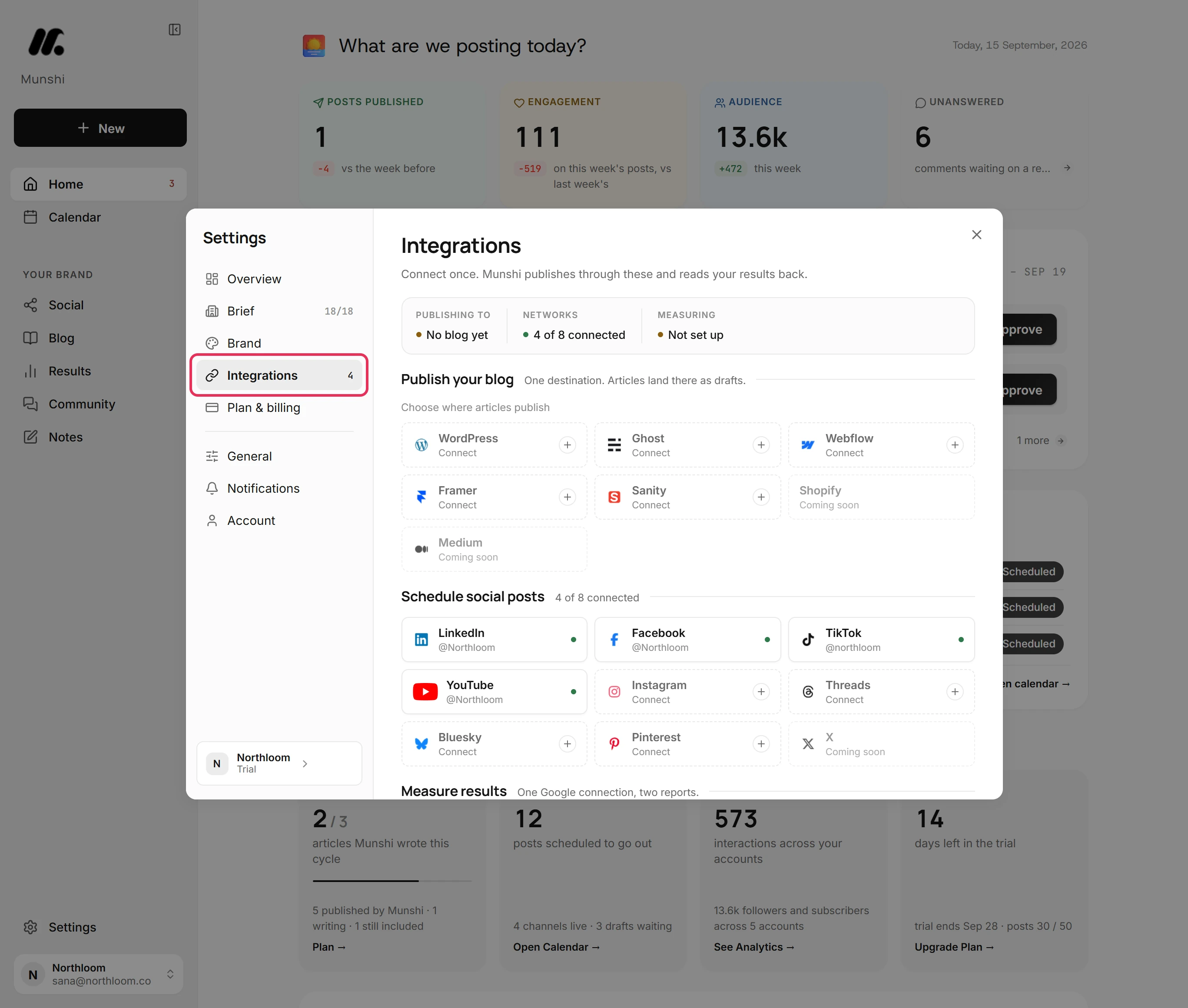
Click Settings at the bottom of the sidebar, then Integrations. Your blog is at the top, the networks sit under Schedule social posts, and Google is under Measure results. The Instagram tile reads Connect until an account is on it.
-
Read the three things Meta checks
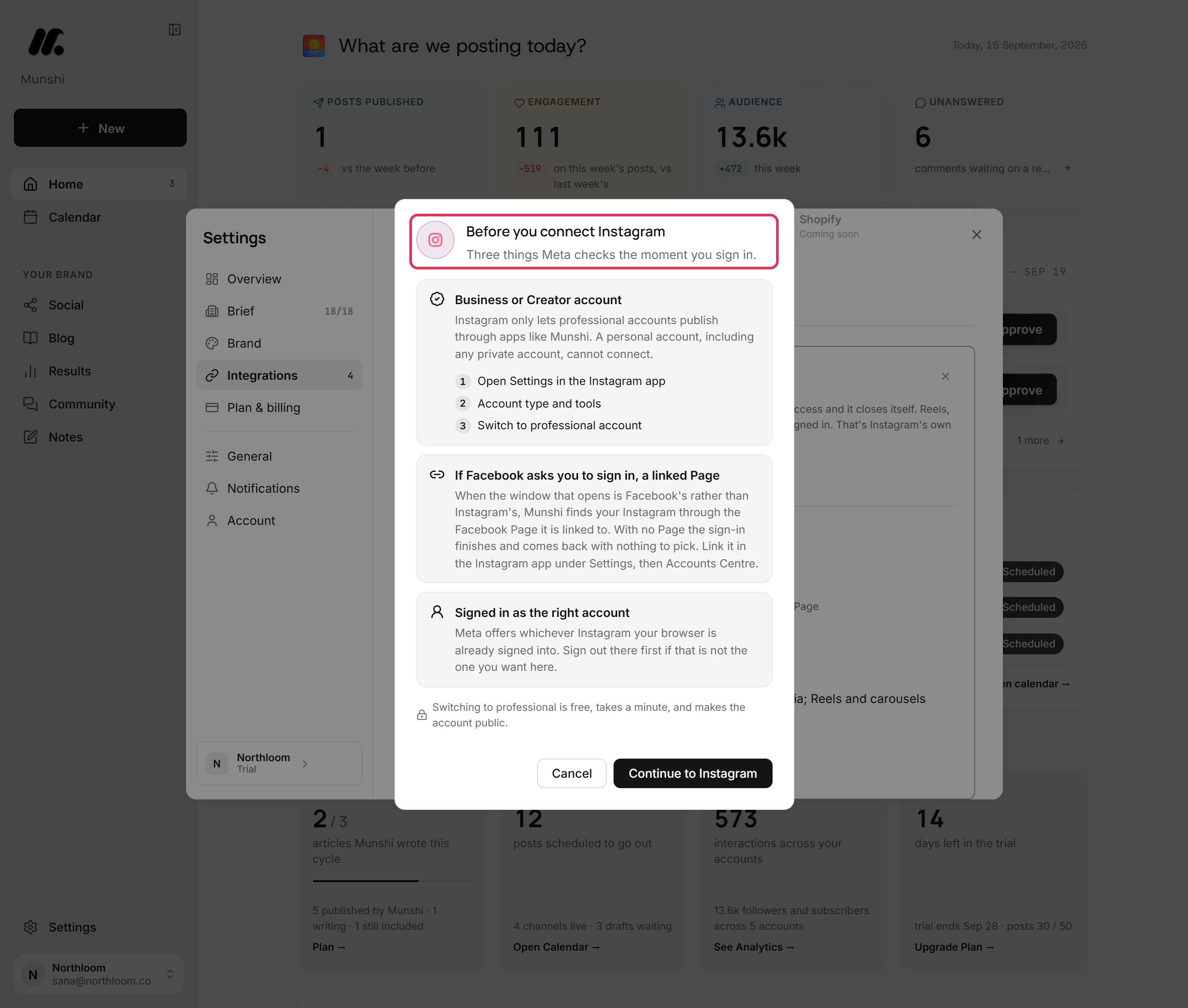
Click the tile, then Connect Instagram. Before any window opens, Munshi shows Before you connect Instagram. It names the three ways a connect goes wrong. The account has to be a Business or Creator account. If the window that opens is Facebook's, a Facebook Page has to be linked. And Meta offers whichever Instagram your browser is already signed into.
-
Continue to Instagram and sign in
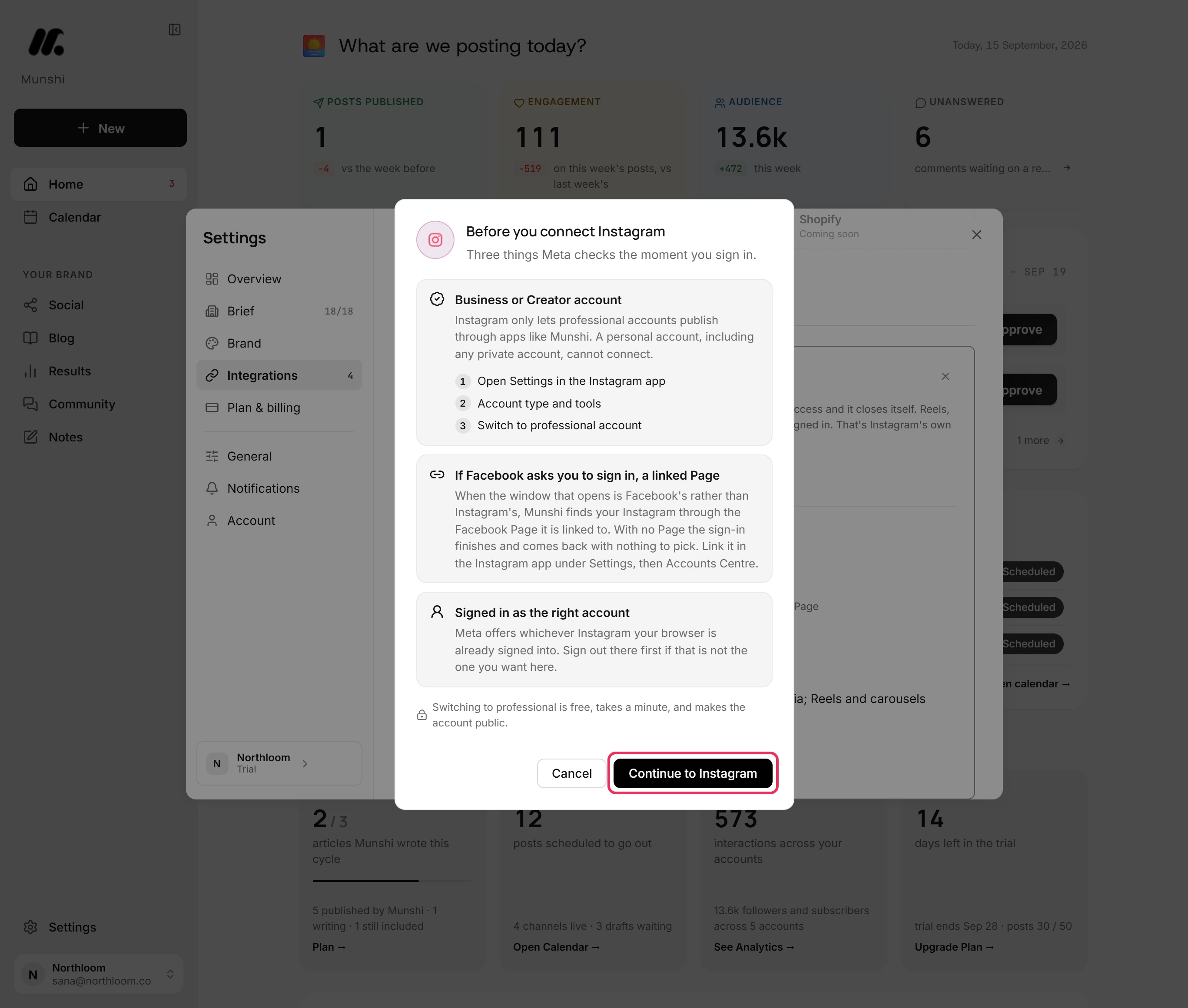
Click Continue to Instagram. Instagram's own window opens. Sign in and approve the access Munshi asks for, and the window closes itself. Instagram asks for the password even when you are already signed in. That is Instagram's rule, not Munshi's. On a phone the window opens as a tab, so finish there and come back.
-
Check the tile
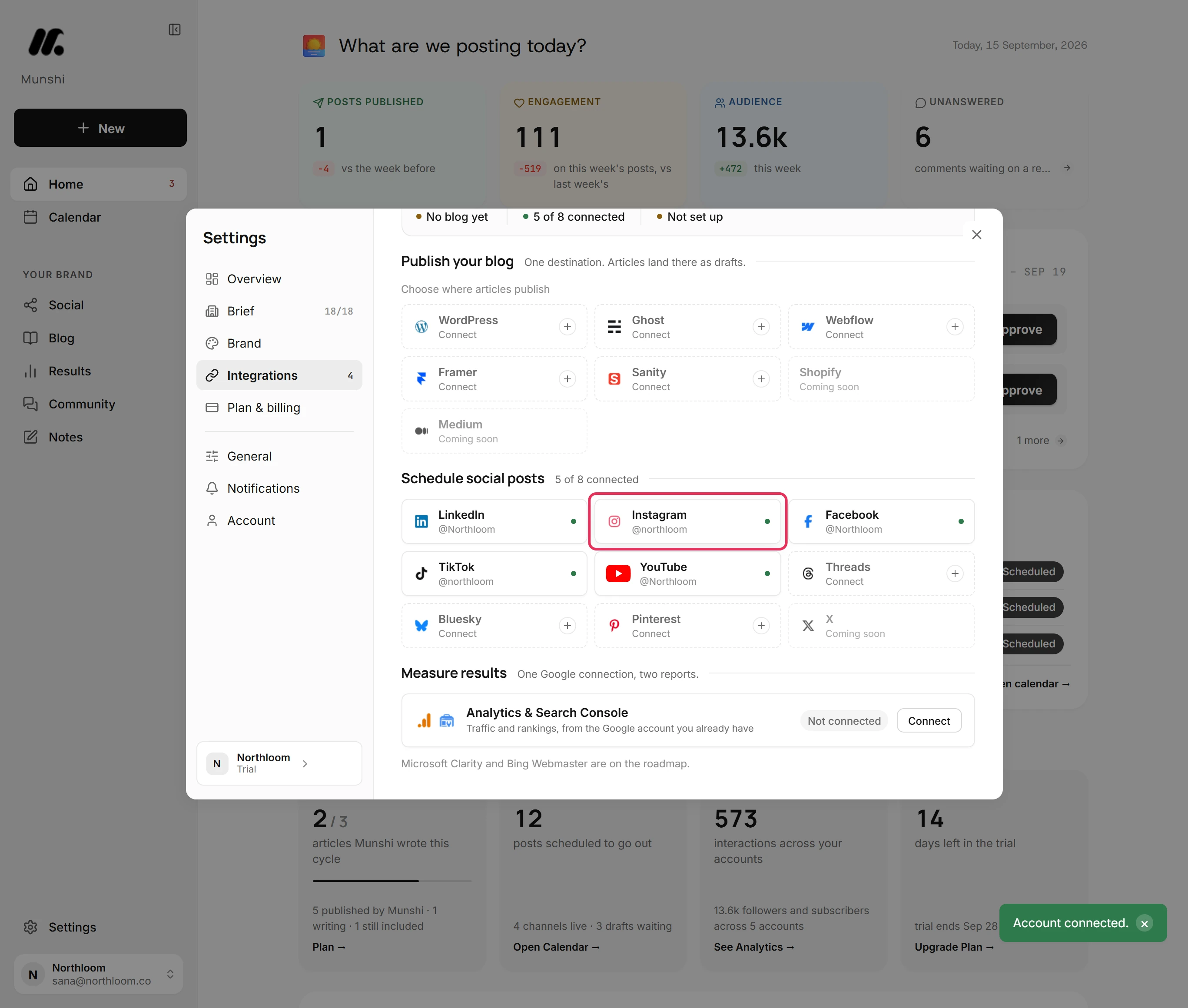
Munshi shows Account connected. The Instagram tile shows the handle with a green dot, and the count beside Schedule social posts goes up by one. Drafts you approve now publish to that account. Munshi starts reading its numbers and bringing in its past posts.
What does the Instagram tab check?
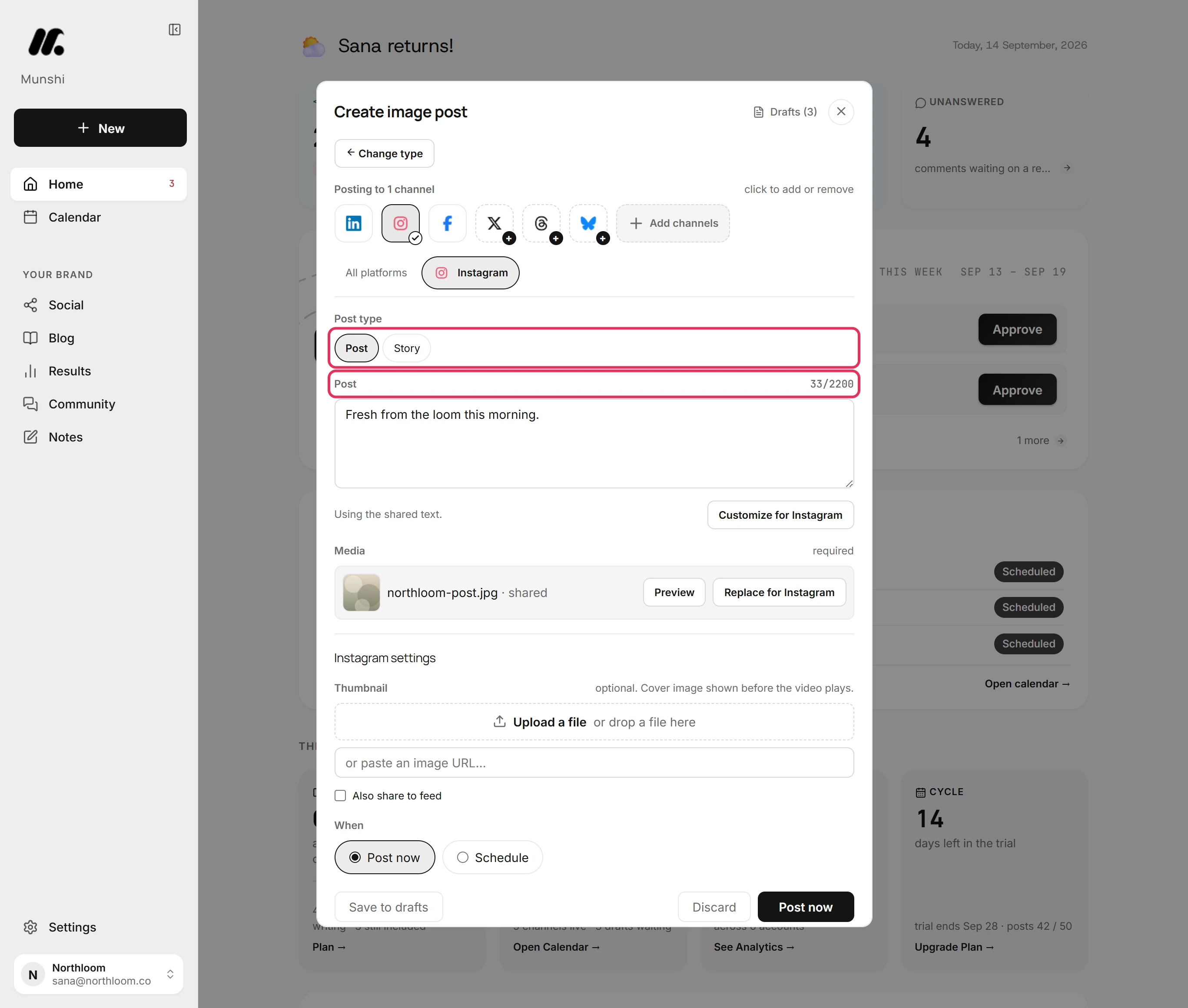
You write the post once in All platforms, and each network checks its own version. The Instagram tab counts the caption against 2,200 characters, offers Post type, and lists anything missing. If the post breaks a rule, the tab shows a mark and the reason above the buttons. For example: “12 characters over Instagram's 2200 limit.” Nothing is scheduled until it passes.
Optimize per platform takes the text you typed once and writes a caption for each network you picked. Each caption fits that network's limit. Edit the Instagram one by hand and only Instagram changes.
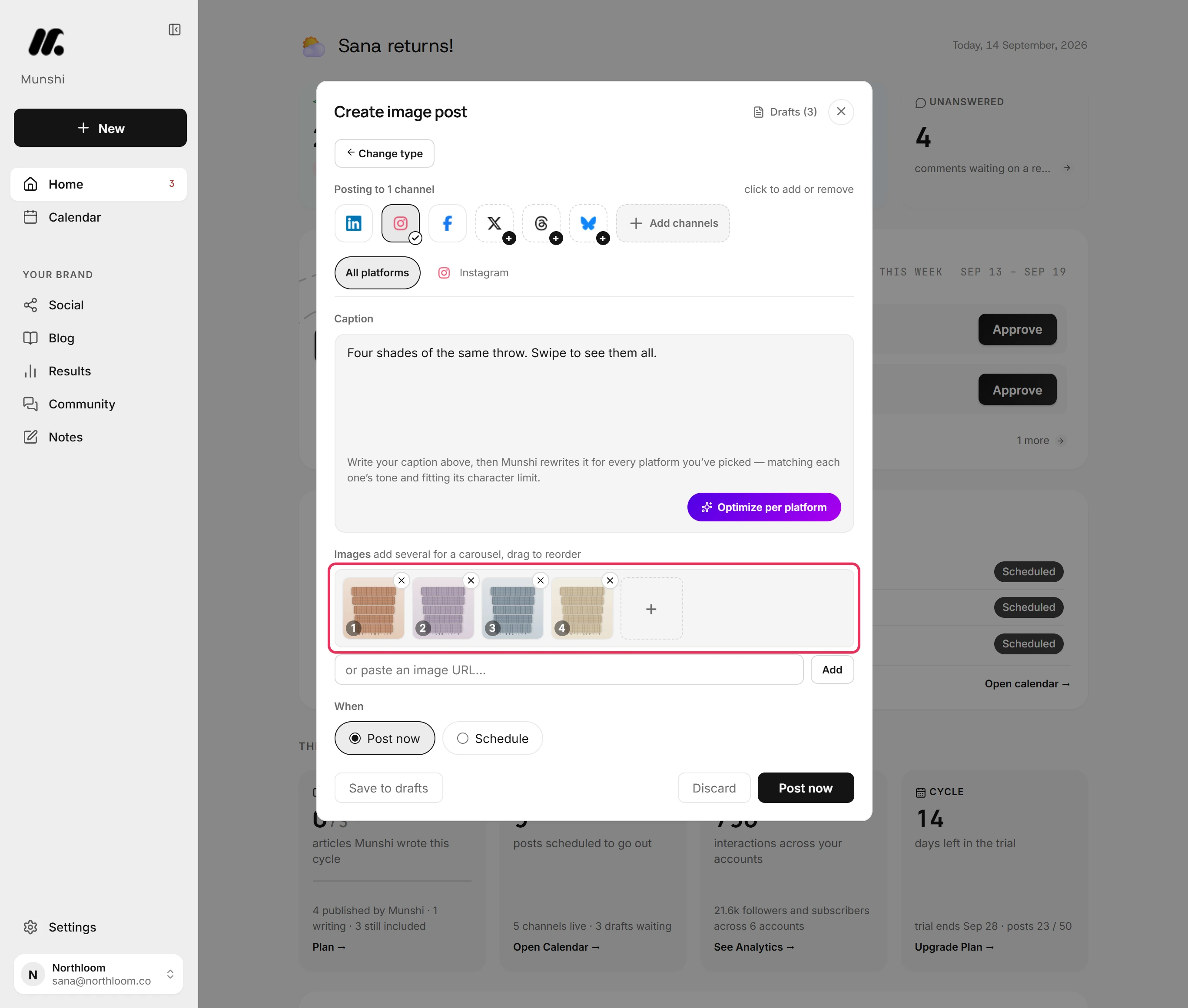
Can Munshi post an Instagram carousel?
Yes. Upload several pictures to an image post and Instagram receives them as one carousel. They appear in a numbered row, and dragging one changes the order the carousel opens in. Instagram takes up to ten. An eleventh is refused on the Instagram tab, with the number to remove, before anything is scheduled.
The same pictures can go to Facebook and LinkedIn in the same post. Facebook takes up to ten of them and LinkedIn up to twenty.
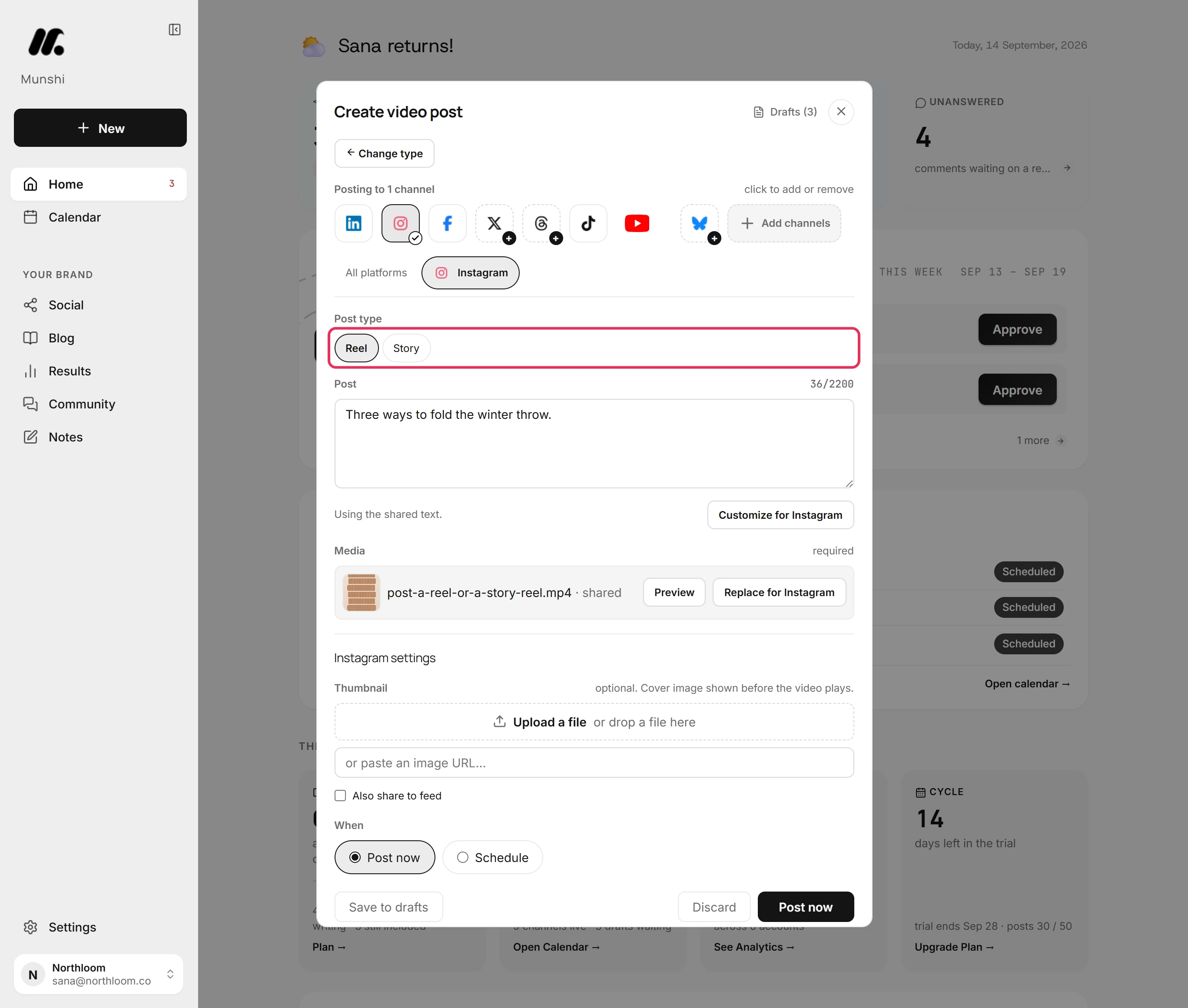
How do I post an Instagram Reel or Story?
Use the same composer. Start a video post and the Instagram tab's Post type starts on Reel, with Story beside it. A Reel carries the caption, and a Story goes out without one. Further down, Thumbnail takes a picture to use as the cover before the Reel plays.
Instagram takes MP4 and MOV video, so convert a WebM file to one of those first. One video post carries one video of up to 1 GB. An image post offers Post and Story instead, because a Reel is always a video.
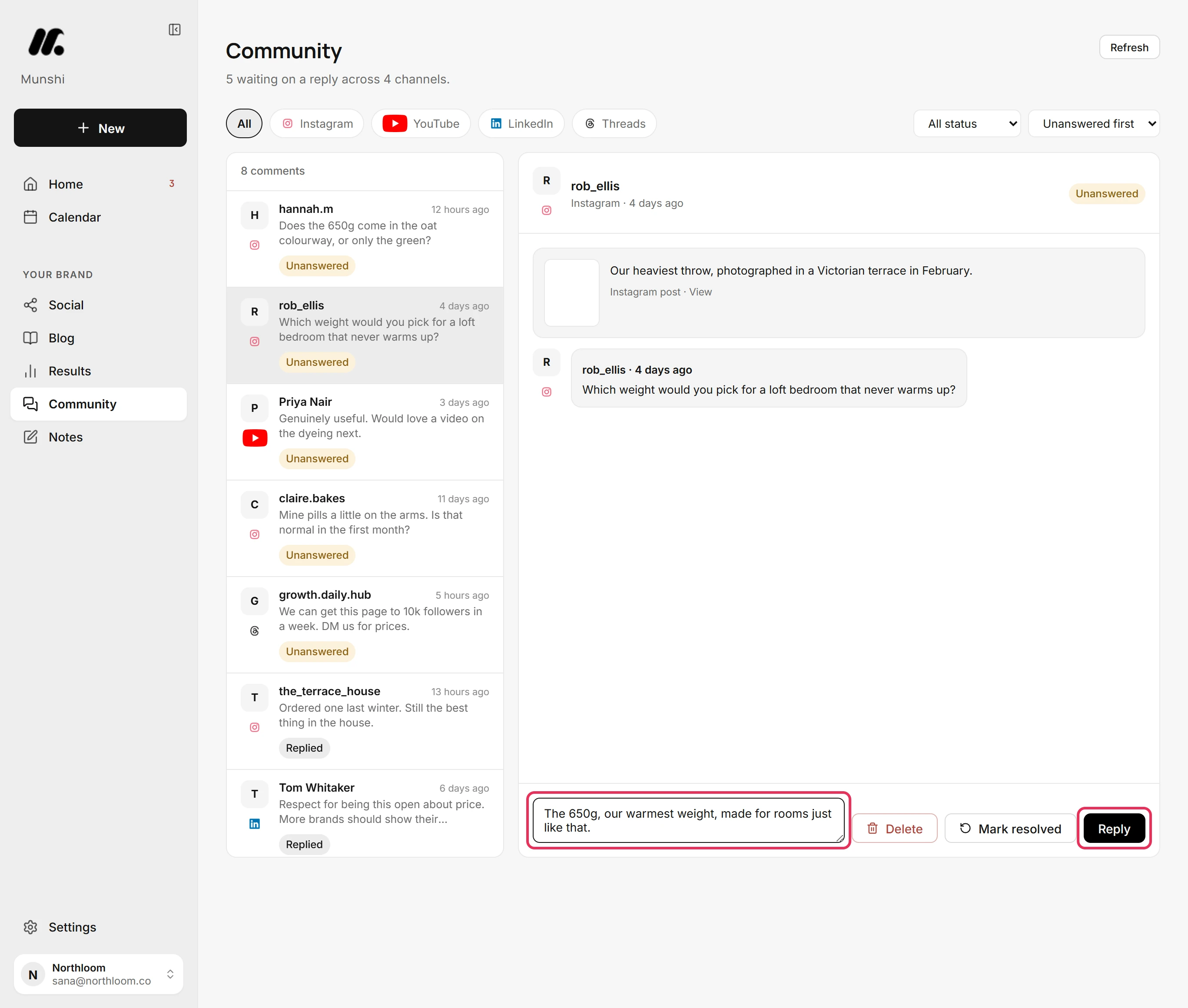
Reply to Instagram comments in Community
Instagram is one of the networks you can answer from Munshi. Comments on your recent posts arrive in Community. The number waiting on a reply sits under the title, and picking Instagram above the list shows only its comments. Type in Reply publicly… and click Reply. The reply goes live on Instagram and the comment is filed as Replied.
A comment that should not stay has a red Delete beside Mark resolved, and it leaves the inbox at once. Munshi reads your 60 most recent tracked posts. It reads them again when you open Community and the last read is more than 15 minutes old.
Where do Instagram results show up?
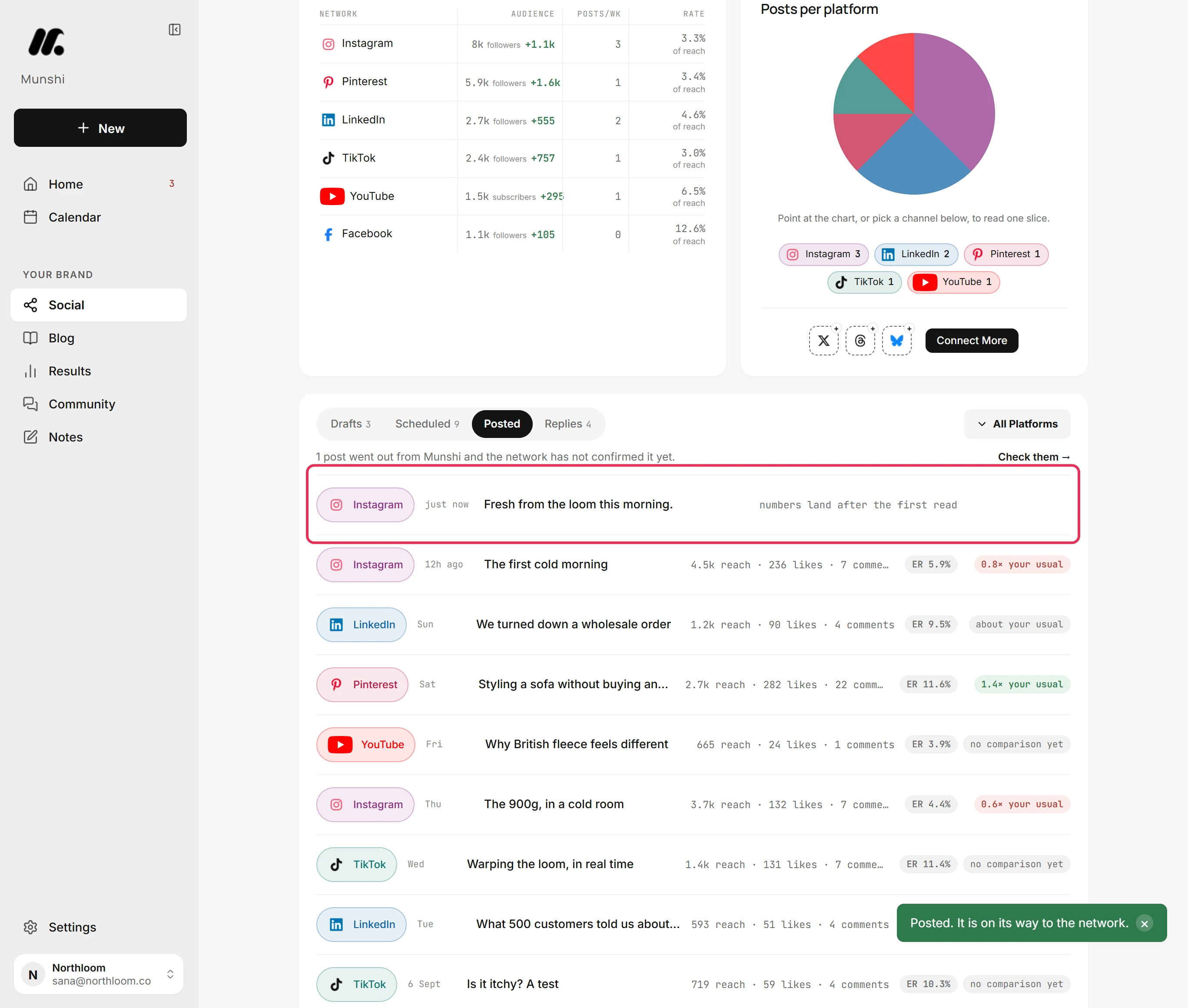
Results come back on their own. A post that has gone out appears under Posted on the Social page straight away, marked just now. A line says its numbers land after the first read. Reach, likes and comments then fill in, and each post shows its engagement rate and how it compares with your usual.
How many Instagram posts can Munshi send a day?
Up to 100 a day on Instagram, and 25 an hour to any one account. Networks read a burst of posts as spam, so Munshi limits how fast one account posts. Both limits run on the UTC clock.
A post that hits the limit is not sent. It waits under Drafts on the Social page, marked Failed, with the reason and Retry now on its card. This limit is separate from your plan's monthly allowance of posts, which has its own message.
Munshi and Instagram, answered
Does Munshi work with Instagram?
Yes. A post with its image or video and a caption written for Instagram. The hook goes in the first line and the detail below it. Hashtags go where they belong, not pasted from another network.
Can Munshi post to Instagram automatically?
Yes. An approved post goes out at its scheduled time, whether or not you are online. It can be a feed post, a carousel, a Reel or a Story. Nothing publishes before you approve it.
Do I need a Business or Creator account?
Yes. Instagram only lets professional accounts publish through apps like Munshi, and a private account is always a personal one. To switch, open Settings in the Instagram app, then Account type and tools, then Switch to professional account. It is free, takes a minute, and makes the account public.
Do I need a Facebook Page to connect Instagram?
Only when the sign-in window that opens is Facebook's, not Instagram's. Munshi then finds your Instagram through its linked Facebook Page, so an account with no linked Page returns nothing to pick. When the window is Instagram's own, no Page is needed.
Can Munshi schedule Reels and Stories?
Yes. Post type in the Instagram tab offers Reel and Story on a video post, and Post and Story on an image post. A Reel carries the caption and can take a cover picture under Thumbnail. Instagram shows a Story without a caption.
How long can an Instagram caption be in Munshi?
Up to 2,200 characters, which is Instagram's own limit. The Instagram tab counts as you type and says how many characters are over. Nothing is scheduled until the caption fits.
Can I reply to Instagram comments from Munshi?
Yes. Comments on your recent Instagram posts come into Community. There you can reply publicly, mark a comment resolved, or delete one. A workspace can send 20 replies an hour.
Can I connect two Instagram accounts?
No, not in one workspace. A workspace holds one account per network. The Studio plan covers three brands, each with its own connected accounts and calendar, so a second Instagram account belongs to a second brand.
When Instagram says no
These are the messages people see most often, and what each one means.
“Instagram needs a photo or video.”
Instagram does not take a text-only post. Add a picture or video in the All platforms tab so every network gets it, or in the Instagram tab for Instagram only. Or take Instagram off the post and let the other networks go out as text.
Instagram's window shows an error and never comes back
Meta is turning away a personal account. The refusal stays on Meta's own screen, so Munshi never hears back. In the Instagram app, open Settings, then Account type and tools, then Switch to professional account, and connect again. Switching is free, takes a minute, and makes the account public.
“None of your Facebook Pages has an Instagram professional account linked to it.”
You signed in through Facebook, and Munshi finds your Instagram through its linked Page. Link the account to a Page you manage, in the Instagram app under Settings, then Accounts Centre. Check that you signed in with the profile that manages that Page, then connect again.
“That account is already connected to another workspace.”
An Instagram account belongs to one workspace at a time, including your own other workspaces. Disconnect it in the workspace that holds it, then connect it here.
Munshi connected a different account than the one I meant
Meta offers whichever Instagram account your browser is already signed into. Open Integrations, click the Instagram tile and click Disconnect. Sign out of Instagram in the browser, sign in as the right account, and connect again.
“Instagram takes up to 10 media items. Remove 2.”
The post holds more than ten pictures. Remove the extras with the cross on their thumbnails in the All platforms tab, and the mark on the Instagram tab clears.
Instagram, step by step
Each guide walks through one task in the real app, with a screenshot at every step.
- How to connect Instagram 2 min · 8 steps
- Instagram: switch to a professional account and link a Page 2 min read
- “None of your Facebook Pages has an Instagram professional account linked” 2 min read
- How to post to Instagram from Munshi 2 min · 8 steps
- How to post a carousel to Instagram 3 min · 9 steps
- How to post a Reel or a Story to Instagram or Facebook 3 min · 8 steps
- “Instagram needs a photo or video” 2 min read
- How to reply to comments from Munshi 3 min · 8 steps
- Which networks bring comments in, and which do not 2 min read
- How to reconnect a network that signed you out 2 min · 7 steps
Other networks: TikTok · X (coming soon) · LinkedIn · Facebook · Pinterest · Threads · YouTube · Bluesky · all integrations