On this page11 sections
How many brands each plan covers
Founding covers one brand at $15 a month, and Studio covers three at $29. In Munshi, a brand is a workspace with its own brief, strategy, connected accounts and calendar. No content, connection or calendar crosses between them.
In the workspace that pays, Plan & billing has a card headed Workspaces on this plan. It lists the brands the plan covers, how many of the three are in use, and what each used this period. A workspace you own shows Attach when it is not on the plan, and Detach when it is.
Past three brands there is no fourth card to buy. One login reaches up to five workspaces, and the plans stop at three. A bigger portfolio becomes a conversation rather than a checkout.
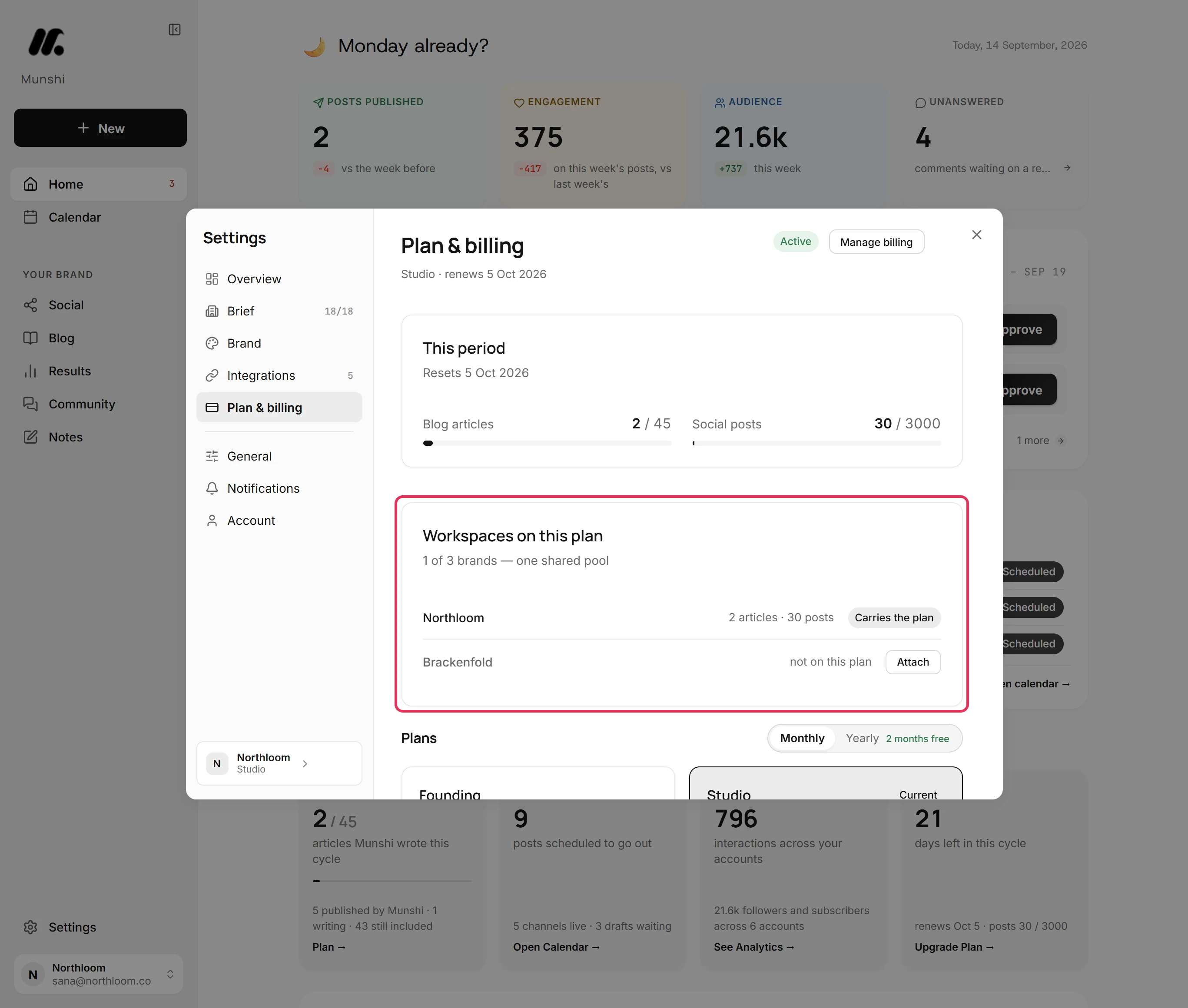
Step by step: How to run several brands on one Studio plan
One shared pool, plus a daily cap
The allowance comes with the plan, not with the brand. Founding includes 15 articles and 1,000 posts a month. Studio includes 45 articles and 3,000 posts a month across all three brands.
The meters under This period show the whole pool. The line under each one shows what this workspace used.
An article counts once, the first time Munshi writes it. Rewriting it does not count again, and deleting it does not give it back. A post counts once per network it goes to, so one post sent to LinkedIn, Instagram and Facebook uses three. A post you unschedule, or one that fails, stops counting, and nothing unused carries over.
Know the second limit before you plan a big month: each workspace can use about $5 of AI model usage a day. Past that, generation pauses until 00:00 UTC. It is the same on every plan, and no plan lifts it. Scheduling, publishing and reading results carry on, because they use no model.
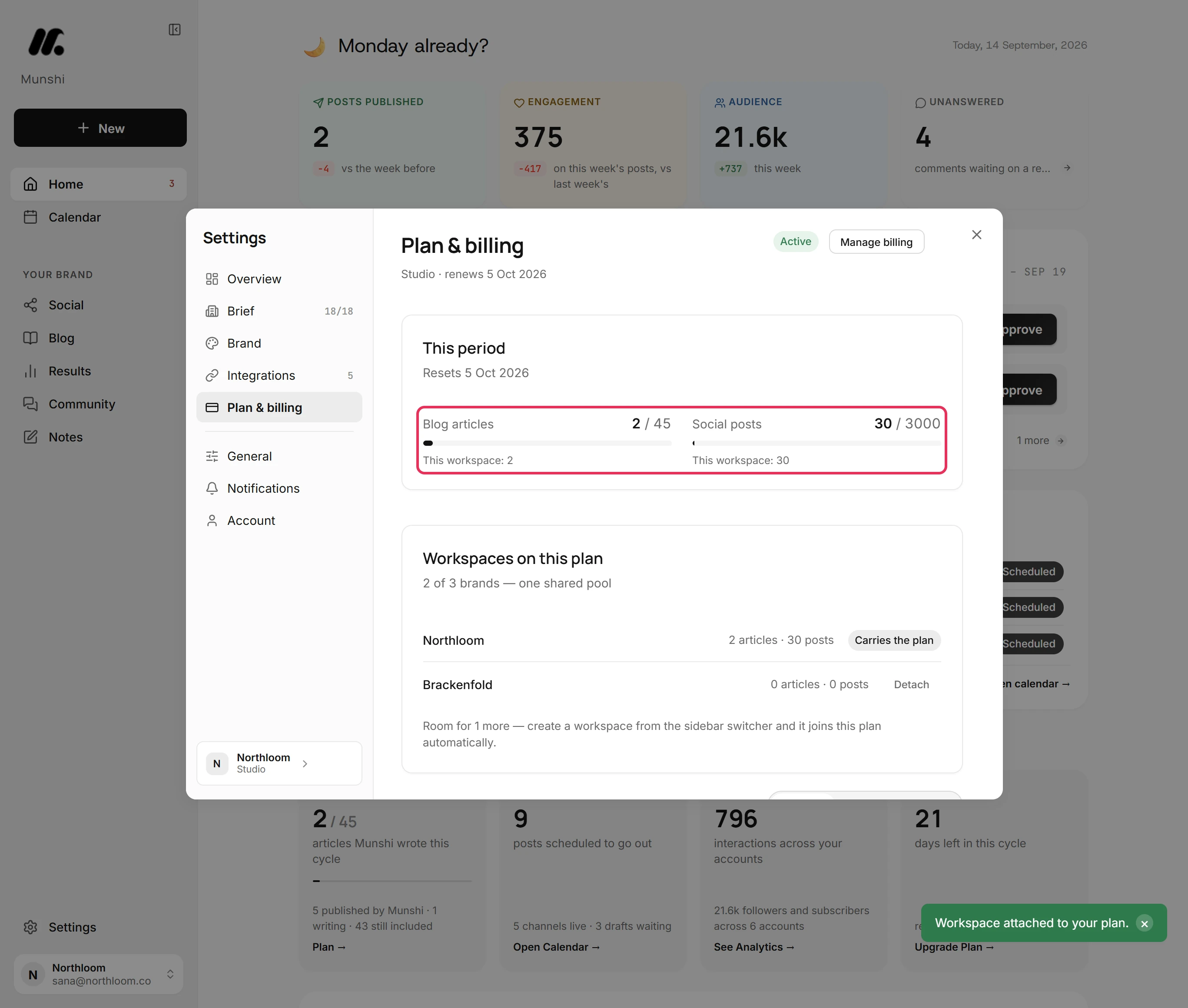
Step by step: Your monthly allowance: articles and posts
Connections you grant and revoke in one click
Everything Munshi publishes goes through accounts you connect yourself, under Settings, Integrations. That covers eight social networks, five blog platforms, and one Google connection for Analytics and Search Console. The strip at the top answers three questions at a glance: Publishing to, Networks, Measuring.
Most networks connect through their own sign-in window. Afterwards, Munshi keeps an access token, encrypted at rest, not your password.
Bluesky uses an app password you create, and WordPress an application password. Both are revocable keys rather than a login. You can also revoke Munshi's access from the network's own settings at any time.
Taking a network back is one button. Open its tile and click Disconnect. Munshi revokes the access it held, deletes the numbers it read from that account, and leaves your drafts and published posts alone.
Each workspace holds one account per network, so a second account on the same network needs its own brand.
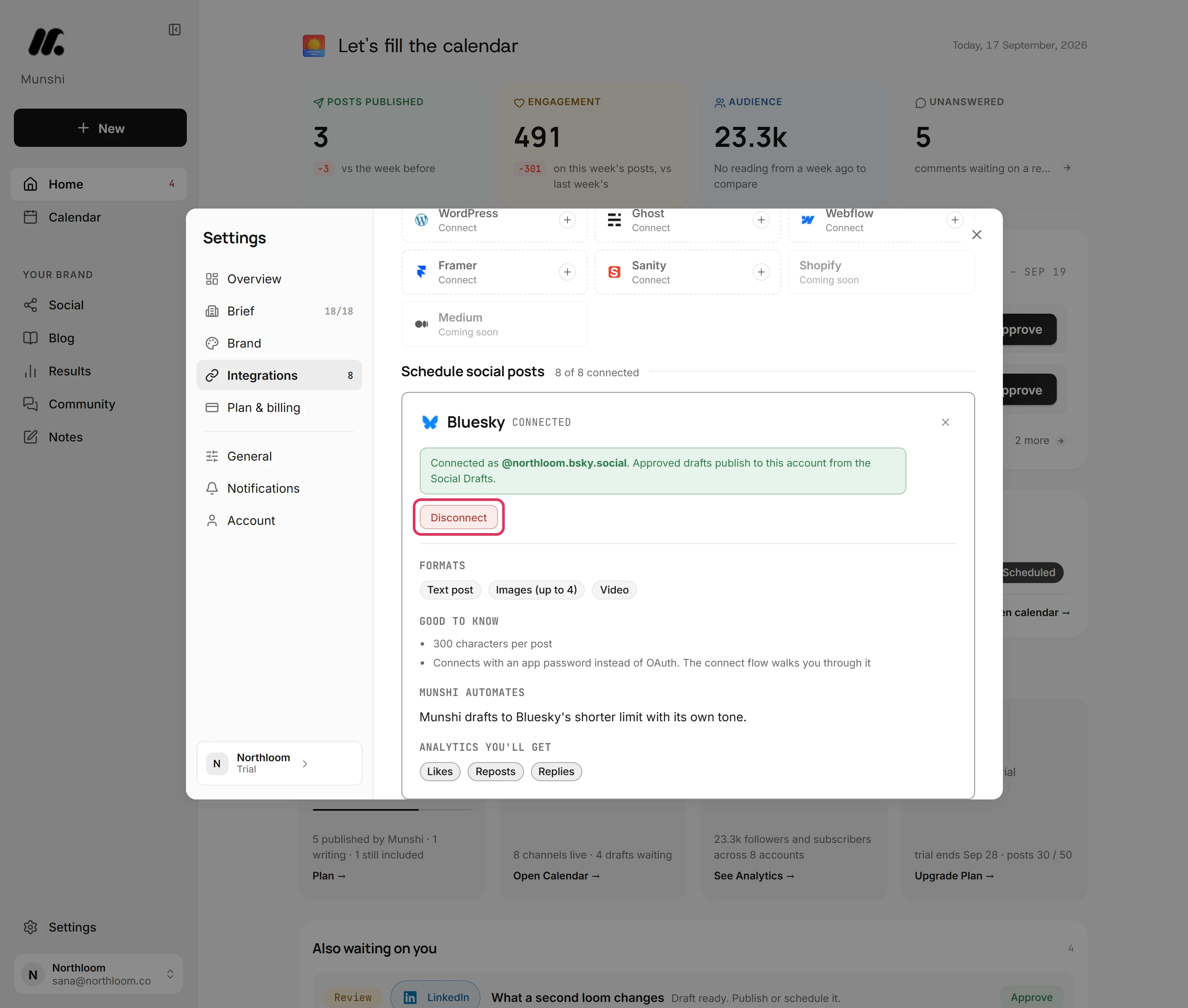
Step by step: How to disconnect a network, and what stays
Who can do what in a workspace
A workspace has an owner and, where a second seat has been set up, a member. Only the owner can connect and disconnect networks, rename the workspace, attach and detach brands, export, delete and handle billing. Everyone else sees Only the workspace owner can change this. where the control would be.
That is the whole permission model today: two seats to a workspace, with no custom roles, no per-section permissions and no approver-only seat. If your review process needs people with different powers, Munshi cannot do it yet. Splitting the work across workspaces does not solve it either, because each one still has an owner and at most one other seat.
Export your whole workspace in one file
Under Settings, Account, the section headed Your data has two rows. The first is Export this workspace. Click Download and Munshi builds one JSON file.
The file holds the brief and brand kit, articles and posts with their schedules, notes, the calendar, analytics history, plan and usage. Connected accounts are listed with their keys replaced by [redacted], and passwords are never in it.
Uploaded pictures and videos are listed by name, type, size and link rather than packed in, so keep your own originals. Exporting only reads the workspace, so nothing changes when you take a copy.
What Munshi stores and why is set out in the privacy policy. The data deletion page covers the ways out.
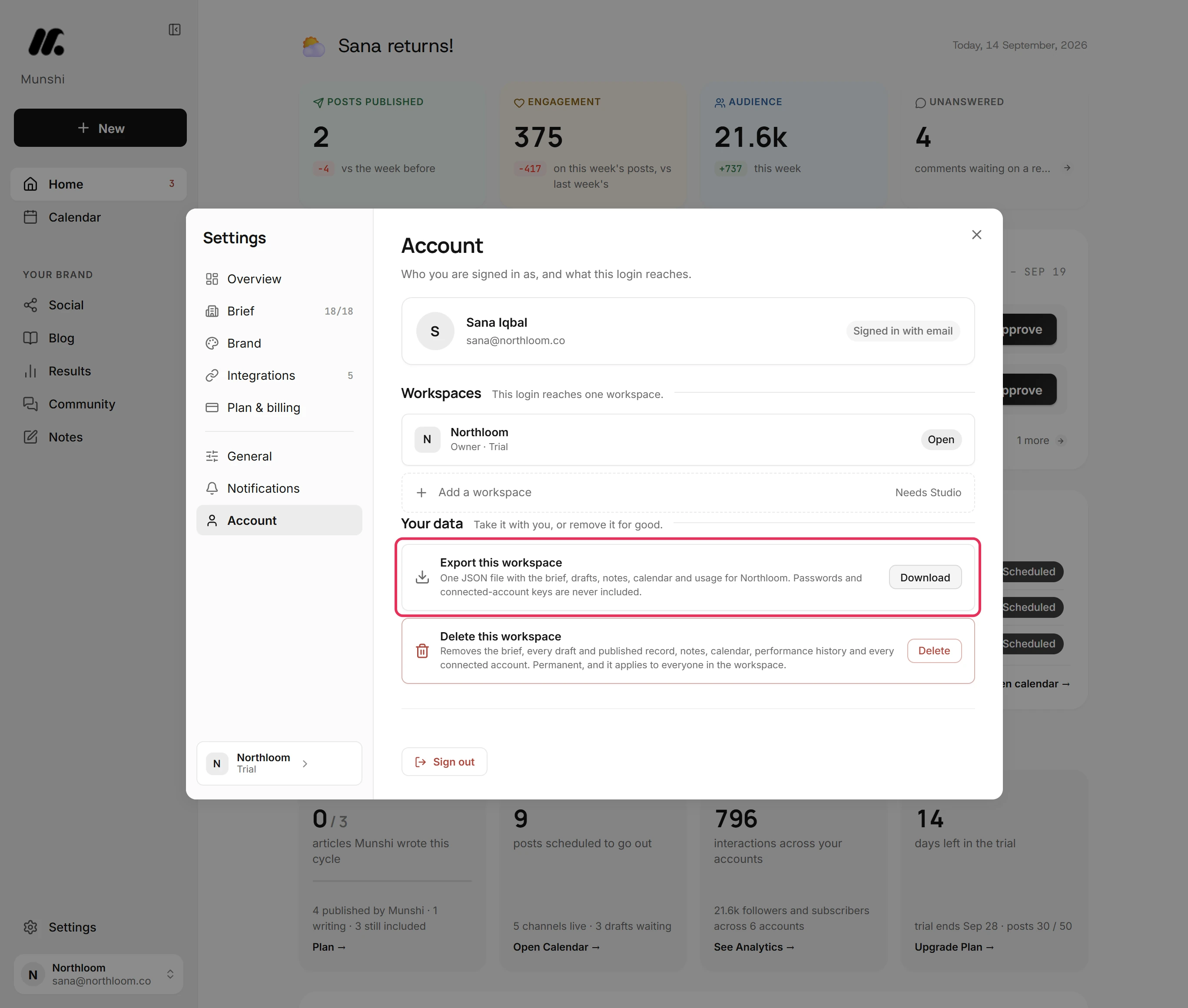
Step by step: How to export everything in a workspace
What happens when you delete a workspace
The second row is Delete this workspace, and its confirmation says plainly what goes. That is the brief and brand, every draft and published record, notes, the calendar and performance history. Every connected account and blog goes too.
The subscription ends with the workspace, and everyone in it loses access. Munshi cannot take down posts that already went out, so those stay live and you remove them at the network. Scheduled posts are cancelled where the network allows it.
Delete for good stays unavailable until you type the workspace name exactly. A workspace that other brands bill through will not delete until they are detached.
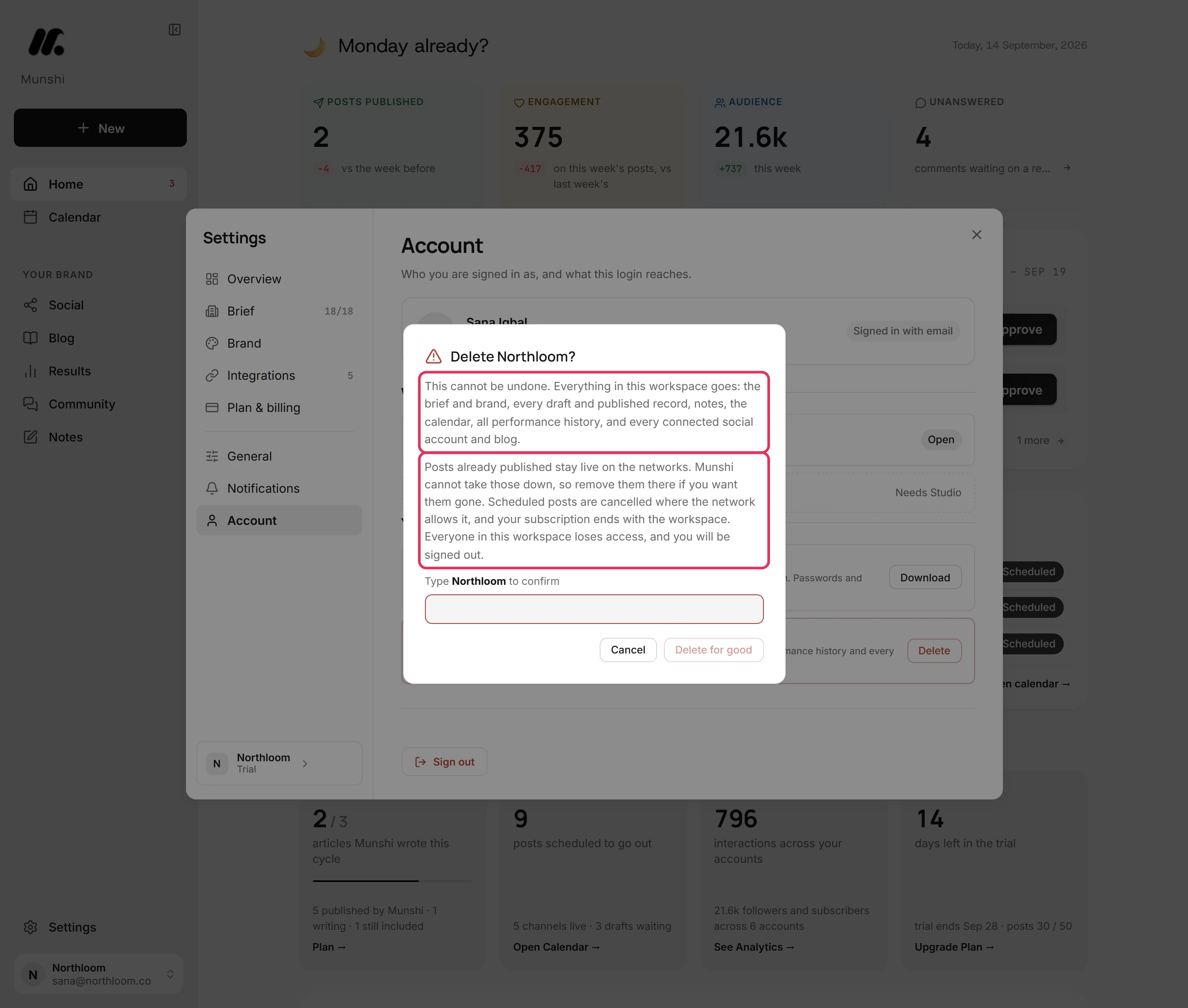
Step by step: How to delete a workspace for good
More than three brands? Tell us what you run
Above Studio there is no self-serve tier and no calculator to fill in. If you run more than three brands, or publish more than the pooled allowance covers, write to us. Tell us the brand count, where each brand publishes, and roughly how much a month.
We come back with a plan and a number, billed as one agreement. Support is answered by the people who build Munshi.
What each plan covers
Two plans you can buy, and one we shape with you in a conversation.
| Founding | Studio | Past three brands | |
|---|---|---|---|
| Brands | 1 | 3 | Set with the plan |
| Articles a month | 15 | 45, shared | Set with the plan |
| Posts a month | 1,000 | 3,000, shared | Set with the plan |
| Price | $15 a month | $29 a month | By conversation |
| Free trial | 14 days | 14 days | No |
| Daily generation cap | About $5 of model use, per workspace | About $5 of model use, per workspace | About $5 of model use, per workspace |
Yearly billing takes two months off both plans. See full pricing.
What it does not do
- No single sign-on. You sign in with a 6-digit code emailed to you, or with Google. There is no SAML and no directory sync.
- No roles beyond owner and member. There are no custom permissions and no approver-only seat.
- No audit log. There is no report of who changed or approved what.
- No public API. Munshi publishes through the accounts you connect, and there is nothing to build an integration against yet.
- No screen for adding teammates. A workspace is set up for one owner. A second seat is arranged with us rather than in the app.
- No uptime or response commitment in writing. Support is a direct line to the people who build Munshi, and that is what it is.
- One account per network per workspace. Two Instagram accounts mean two brands, and a plan with room for both.
Questions people ask
Can Munshi run more than three brands?
Not on a plan you can buy today. Founding covers one brand, Studio covers three on one subscription, and one login can reach up to five workspaces. Past three brands, the plan is set in a conversation. Tell us the brand count and how much each one publishes, and we price it as one agreement.
Does Munshi support single sign-on?
No. Sign-in is a 6-digit code sent to your email address, which expires in 10 minutes, or Continue with Google. There is no SAML, no directory sync and no password to manage.
Can we take our data out if we leave?
Yes. Export this workspace, in Settings under Account, downloads one JSON file. It holds the brief and brand kit, articles and posts with their schedules, notes, the calendar, analytics history, plan and usage. Uploaded pictures and videos are listed but not included, connected-account keys are redacted, and anything already published stays in your own CMS and accounts.
Does Munshi ever see our social passwords?
For most networks, no. You sign in at the network, and Munshi keeps an access token, encrypted at rest. Bluesky uses an app password you create, and WordPress an application password rather than your login. You can revoke access from the network's own settings at any time, and Disconnect in Munshi revokes it too.
How many people can use one workspace?
Two. A workspace holds its owner plus one more seat. There is no screen in the app for inviting that person, so ask us and we set it up. Everything that changes the account, from connecting a network to exporting and deleting, stays with the owner.
Is there an API or an audit log?
No, neither is available today. There is no public API to build against, and no report of who changed what inside a workspace. The export file is the closest record you can hold yourself.
What happens to our posts if we delete a workspace?
Posts that already went out stay live on the networks, because Munshi cannot take them down. Scheduled posts are cancelled where the network allows it, every connection is removed, and the subscription ends with the workspace. Nothing can be brought back afterwards.
The guides behind this page
Each one walks a single task through the real app, with a screenshot at every step.
- How to run several brands on one Studio plan 3 min · 8 steps
- How to add, switch and rename workspaces 3 min · 7 steps
- Your monthly allowance: articles and posts 2 min · 6 steps
- The daily fair-use cap on generation 1 min read
- Everything Munshi connects to today 2 min read
- One account per network per workspace 2 min read
- How to disconnect a network, and what stays 2 min · 6 steps
- How to export everything in a workspace 1 min · 5 steps
- How to delete a workspace for good 2 min · 6 steps
- How to change your plan, your card, or cancel 3 min · 7 steps