SaaS & tech startups
You ship product all week, and the writing never gets done. Munshi drafts SEO articles from your keyword map and keeps your posts going in a builder's voice.
Blog LinkedIn Bluesky
Munshi Social, the AI content marketing engine for small teams, is not built for one industry. If you can describe your company and your ideal customer, it can plan, write and publish for you.
14-day free trial, no credit card required.
Here are six kinds of business, the channels each one uses, and the work Munshi takes off their plate.
You ship product all week, and the writing never gets done. Munshi drafts SEO articles from your keyword map and keeps your posts going in a builder's voice.
Blog LinkedIn Bluesky
Product shots alone do not carry a feed. Munshi plans visual posts around your catalog. It writes articles for the keywords in your map that people search when ready to buy.
Instagram TikTok Pinterest Facebook Blog
Firms win on trust. Munshi drafts the articles clients search for before they call. You approve every word before it publishes.
Blog LinkedIn Facebook
You are on jobs all day. Munshi keeps the channels your customers check active on a fixed schedule, so you are not catching up after hours.
Facebook Instagram Blog
Your name is the brand, so showing up often is the product. Munshi drafts posts in your voice and turns your point of view into long articles.
Instagram Threads TikTok YouTube Blog
A second brand should not mean a second subscription. Studio runs three brands on one plan. Each brand is its own workspace with its own accounts and calendar.
Every supported channel 3 brands on Studio
Not on this list? Munshi does not depend on your industry, only on customers who read, search and scroll. If yours do, tell us what you sell and we will say honestly whether it fits.
The size of your business decides the plan, and your industry decides the channels. Four rows cover almost everyone. The numbers below are the ones the app itself counts against.
| You are | Brands | Plan | Price | Articles a month | Posts a month | Read more |
|---|---|---|---|---|---|---|
| Trying it out | 1 | Free trial | Free for 14 days, no card | 3 | 50 | Pricing |
| A solo founder running one business | 1 | Founding | $15 a month | 15 | 1,000 | For solo founders |
| An agency or a freelancer with clients | Up to 3 | Studio | $29 a month | 45, split between the brands | 3,000, split between the brands | For agencies |
| A larger team past three brands | As many as you run | Enterprise | priced by conversation | Matched to your calendar | Matched to your calendar | For enterprise |
A post counts once for every network it goes to, so one post sent to LinkedIn, Instagram and Facebook uses three of the allowance. An article counts once, the first time Munshi writes it, and rewriting it does not count again. Both counts go back to zero on your renewal date. On the trial, they reset at the start of each calendar month. Your monthly allowance explains what counts.
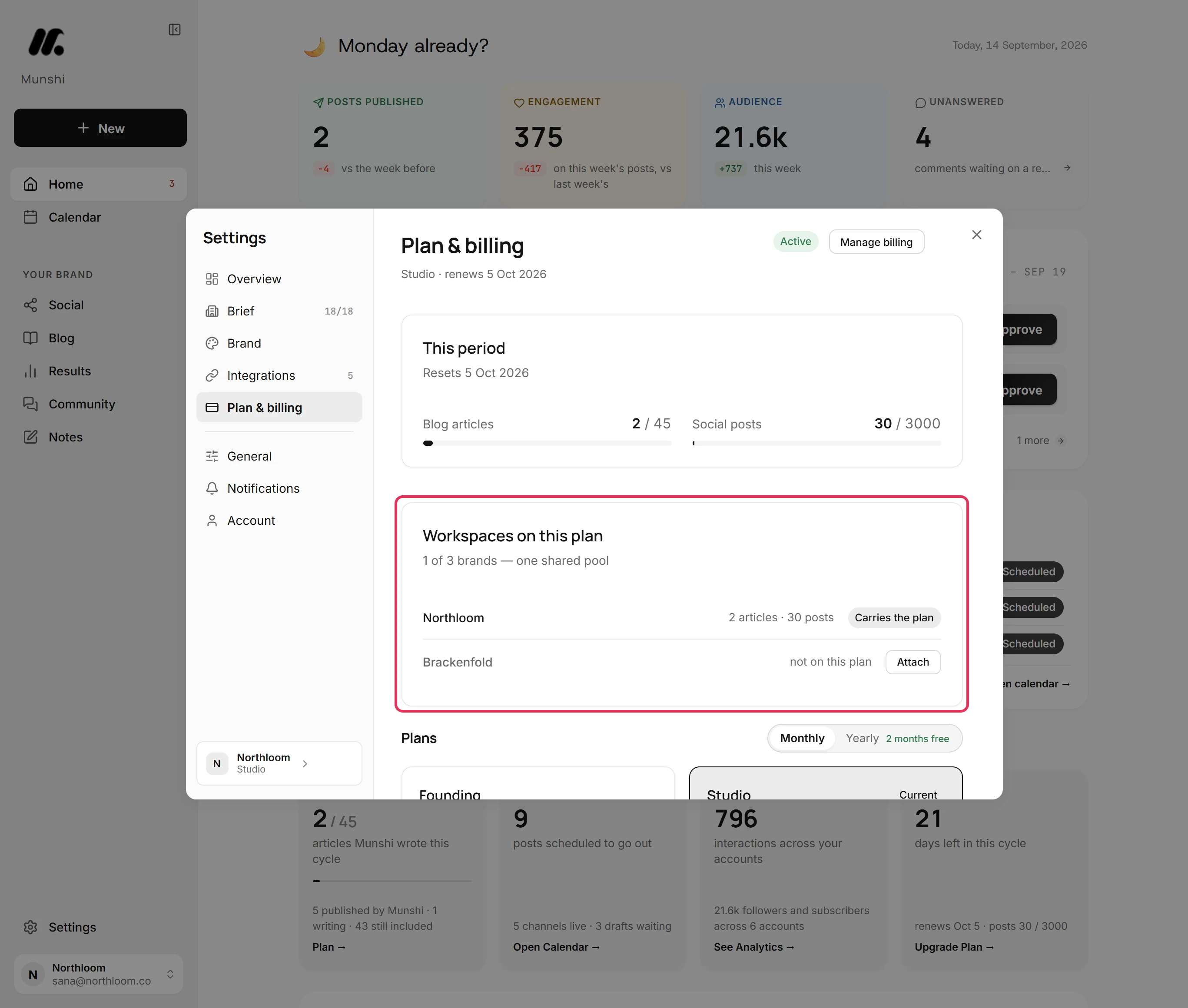
Step by step: How to run several brands on one Studio plan
Every plan has the same routine: one sitting a week, whether you run one business or three client brands. The plan only changes how many brands and how much volume you get.
You start on Home. One card counts what waits on your yes this week, and each row has one button: Approve, Review, Retry, Reconnect, Fix or Set up. Under it, Upcoming lists what still goes out this week, and Unanswered counts the comments waiting on a reply. Then you make four more stops: the Blog overview, the Scheduled tab on Social, the comments in Community, and Results.
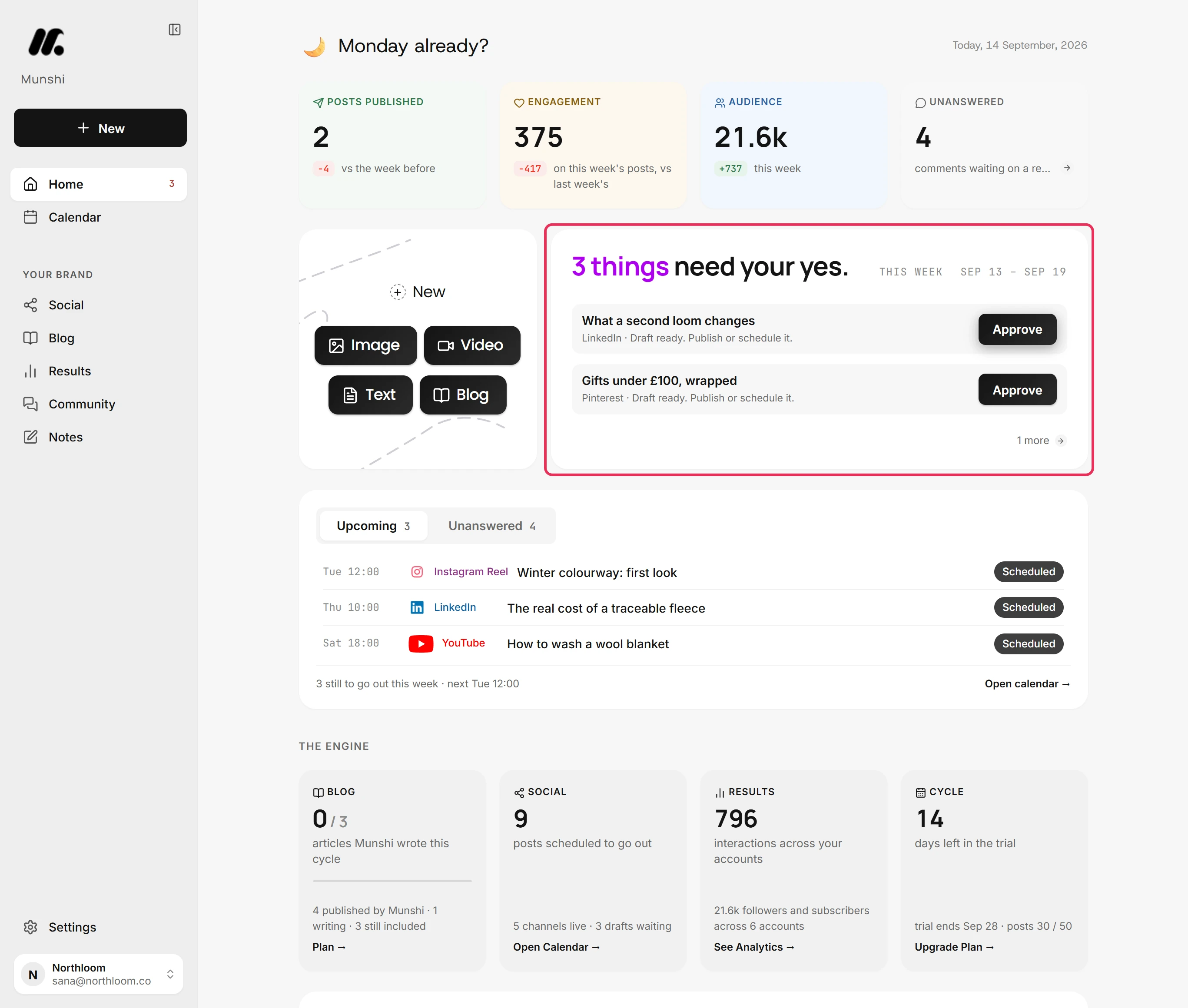
Step by step: Twenty minutes a week: the routine
Everything you approved and everything Munshi planned sits on one Calendar. The chips along the top filter the month by channel. The key underneath tells the entries apart: Planned or added by hand, Scheduled to go out, Already out and Reminder. Blog articles and social posts share the grid, so you see a thin week before it happens.
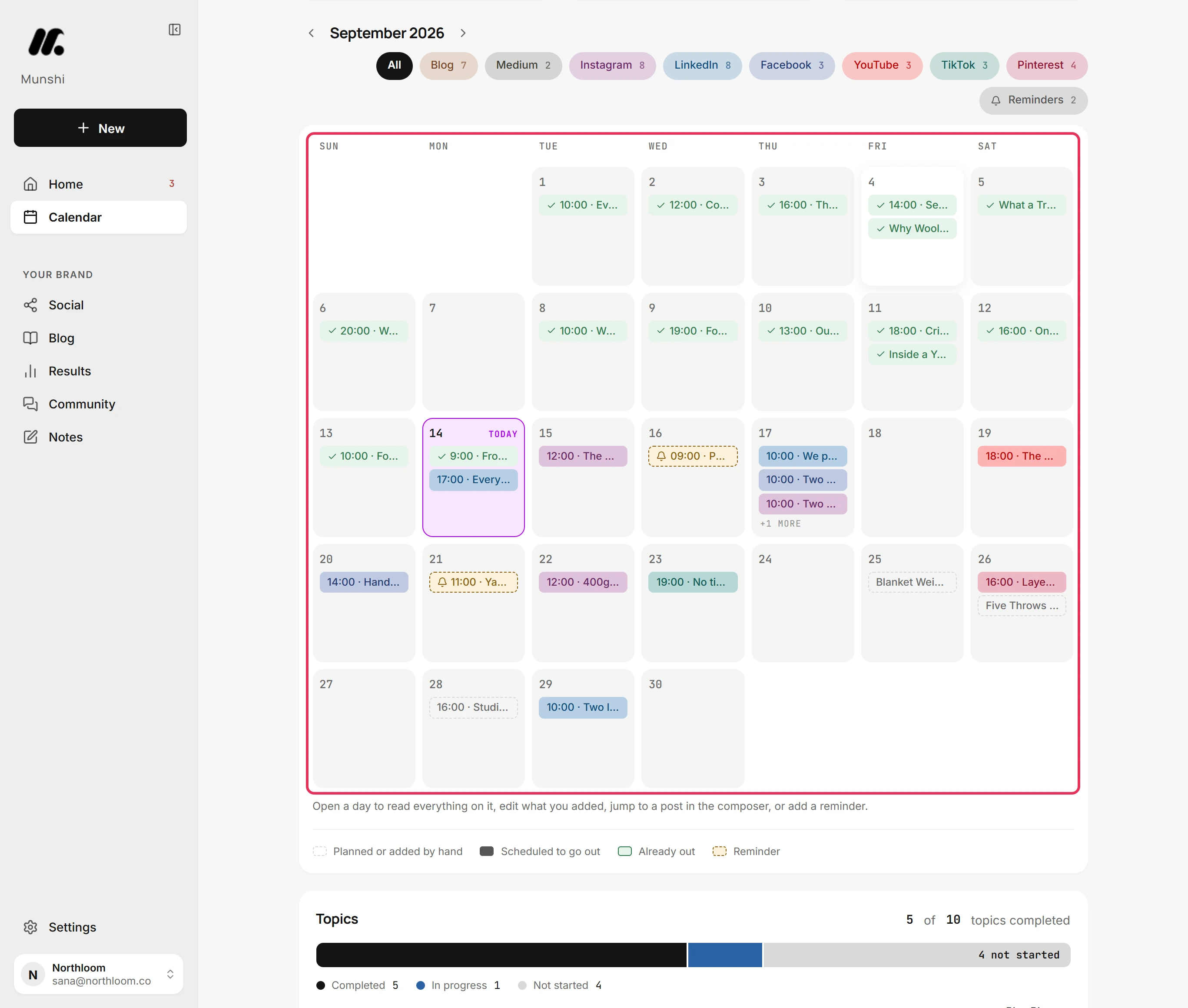
Step by step: How to read the calendar
A keyword tool, a writing tool, a scheduler and four analytics tabs only work if someone joins them up every week. That someone is the marketer you do not have. Munshi replaces that work, not just the tools.
Keyword research, the content plan, drafting, scheduling and publishing all happen in one place. You never copy work out of one tool and paste it into the next.
The week's work arrives as one batch. You approve, edit, regenerate or reject each item. Approved items then publish on a locked schedule without you touching them again.
Numbers from every connected channel land in one place. You see what worked without opening eight tabs on a Friday afternoon.
It depends on how many brands you run. One brand is Founding at $15 a month. Up to three is Studio at $29 a month, on one shared allowance. Past three it is Enterprise, priced by conversation, and every plan starts with the 14 day trial.
Yes, on Studio. It covers three brands, which share one pool of 45 articles and 3,000 posts a month. In Plan & billing, the Workspaces on this plan card lists each brand and what it used this period. Attach adds another workspace you own to the plan, and Detach takes it off again.
Blog articles go to WordPress, Ghost, Webflow, Framer, or Sanity, and social posts go to Instagram, TikTok, LinkedIn, Facebook, Pinterest, Threads, YouTube, and Bluesky, with X coming soon. Munshi writes each article into your CMS, formatted for that platform. Ghost, Webflow, and Framer receive it as a draft you publish from your own dashboard. WordPress receives a draft too, but a scheduled article goes live at its set time. Sanity articles go live on schedule. A workspace holds one account per network, so a second Instagram account needs a second workspace.
One sitting a week, on every plan. You clear what needs your yes on Home. Then you make four more stops: the Blog, the social week, Community and Results. The guide that walks them in order is called Twenty minutes a week.
Yes. The trial runs 14 days with every feature and no card, and includes 3 articles and 50 posts. Sign up with an email address or a Google account, and your first sign-in creates your workspace. First payments carry a 7 day money back guarantee.
Still not sure which row you are in? Compare the plans or tell us what you sell.