On this page13 sections
Three client brands on one subscription
Studio covers three brands on one subscription at $29 a month. It is billed to whichever workspace you set it up in. Without it, three clients usually means three logins, three bills and three tools quietly renewing.
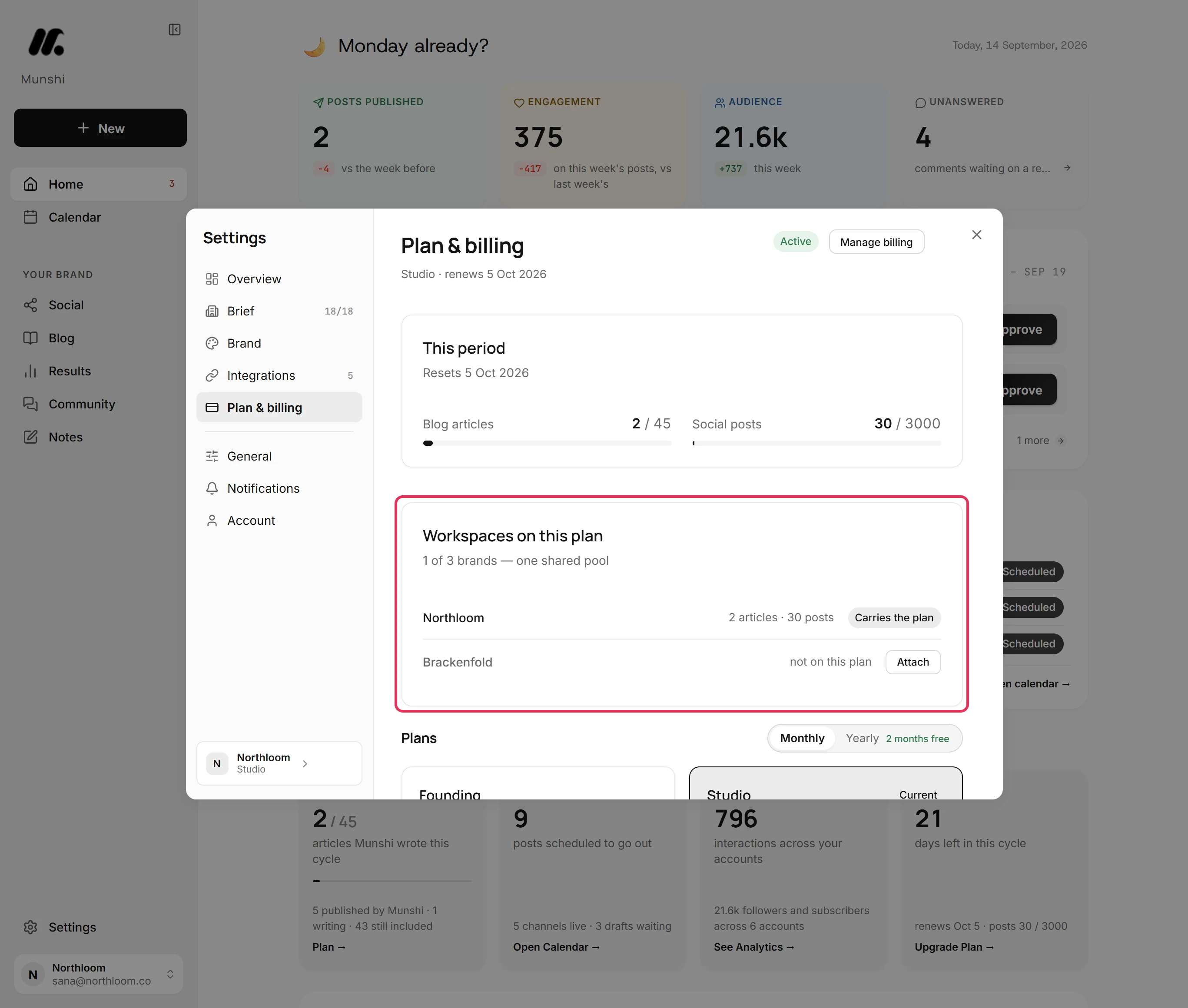
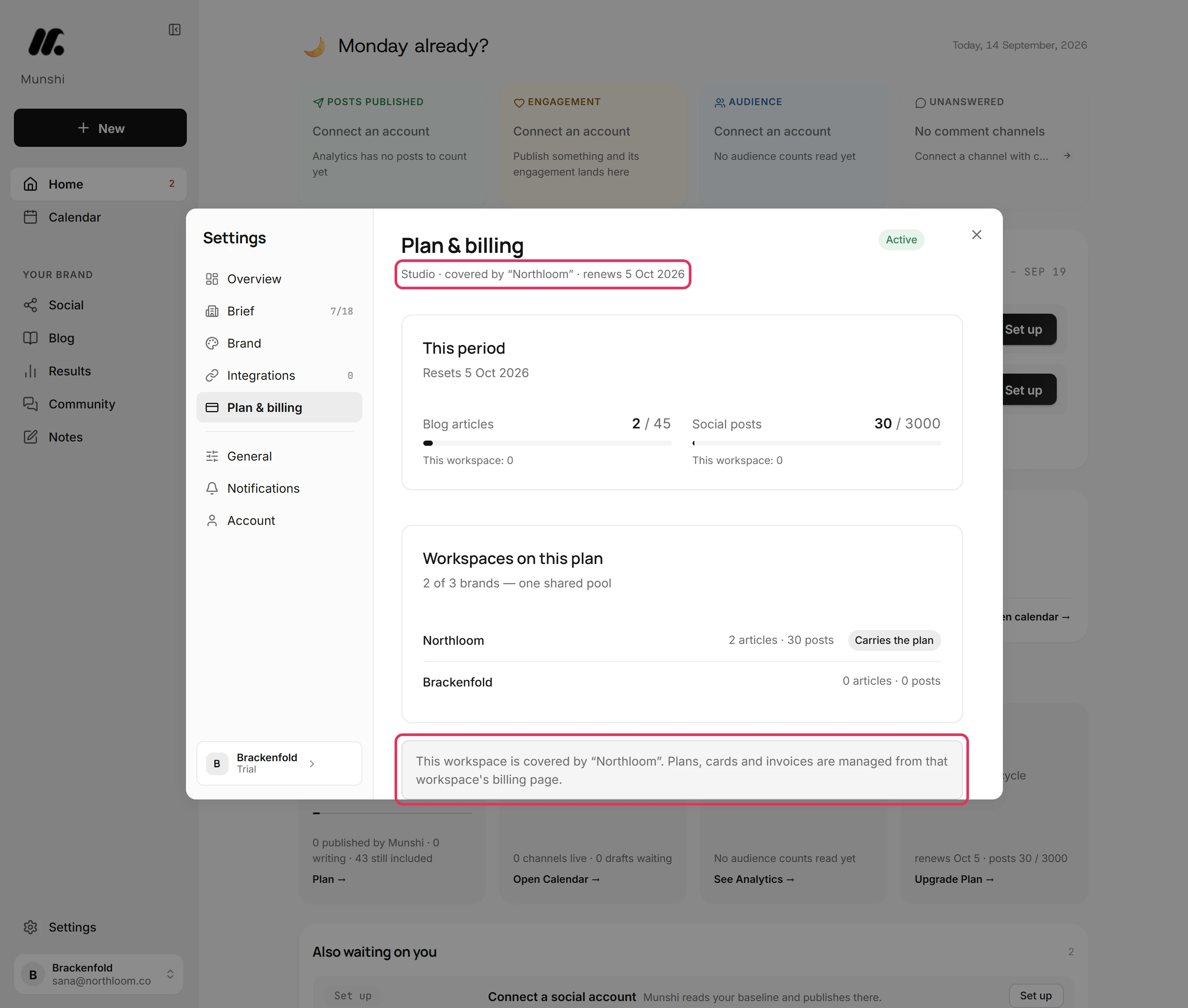
Open Settings, then Plan & billing, in the workspace that pays. Workspaces on this plan counts the brands on it, shown as 1 of 3 brands in the shot below. It lists each brand with the articles and posts it used this period, and marks the paying one Carries the plan.
Cards, invoices and plan changes live there and nowhere else, so one card and one invoice cover all three brands. The other brands see a plain line on their own billing page: Studio · covered by “Northloom”. There are no plan choices there to click by mistake.
Step by step: How to run several brands on one Studio plan
Each brand is its own workspace
Each brand is a separate workspace, not a tag or a folder inside one account. It has its own brief, brand kit, connected social accounts, blog connection, calendar, drafts and results. A post written for one client cannot land on another client's account, because that account is not connected there.
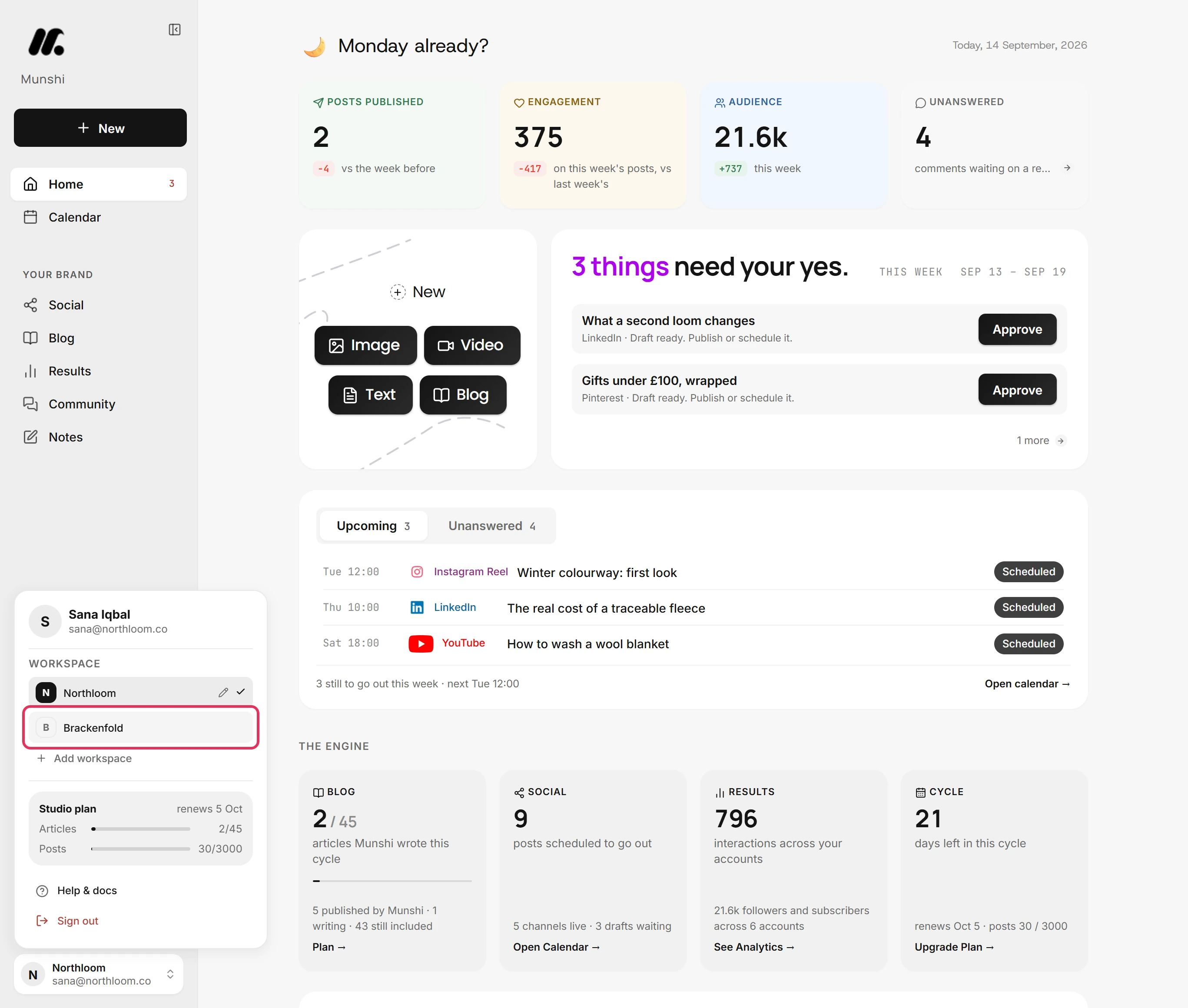
You move between brands from the chip at the bottom of the sidebar. Click it, pick the brand, and Munshi reloads in that workspace, with its home, its numbers and its week. The pencil beside the ticked workspace renames it.
Add workspace creates the next one. It joins your Studio plan by itself while the plan has room.
The switch is what keeps clients apart. Nothing on screen mixes two clients, so there is no filter to remember and nothing to get wrong at 6pm on a Friday.
Step by step: How to add, switch and rename workspaces
One shared pool of articles and posts
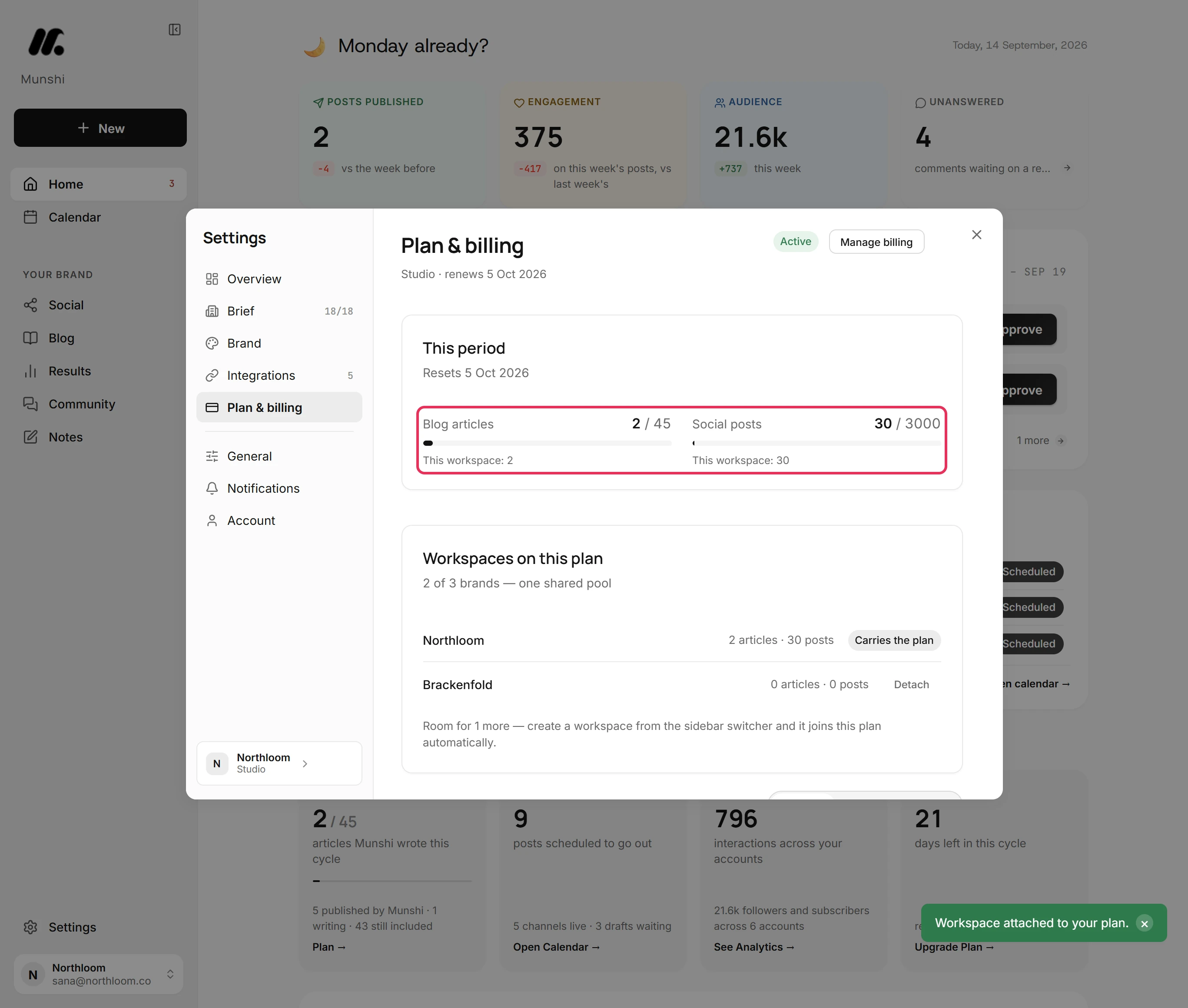
Studio's allowance is one pool: 45 blog articles and 3,000 social posts a month across all three brands, split however the work falls.
That suits client work, which is uneven. One brand launches a collection and wants eight articles this month, while another is quiet until spring. A quota per client would leave you buying volume you do not use.
Each meter under This period shows the whole pool. The line under it shows what the workspace you are in has taken from it.
An article counts once, the first time Munshi writes it. Rewriting or regenerating it does not count again, and deleting it does not give it back. A post counts once per network it goes to, so one post sent to LinkedIn, Instagram and Facebook uses three of the 3,000. A post you unschedule, or one that fails to go out, stops counting.
Step by step: Your monthly allowance: articles and posts
Every brand gets its own brief and voice
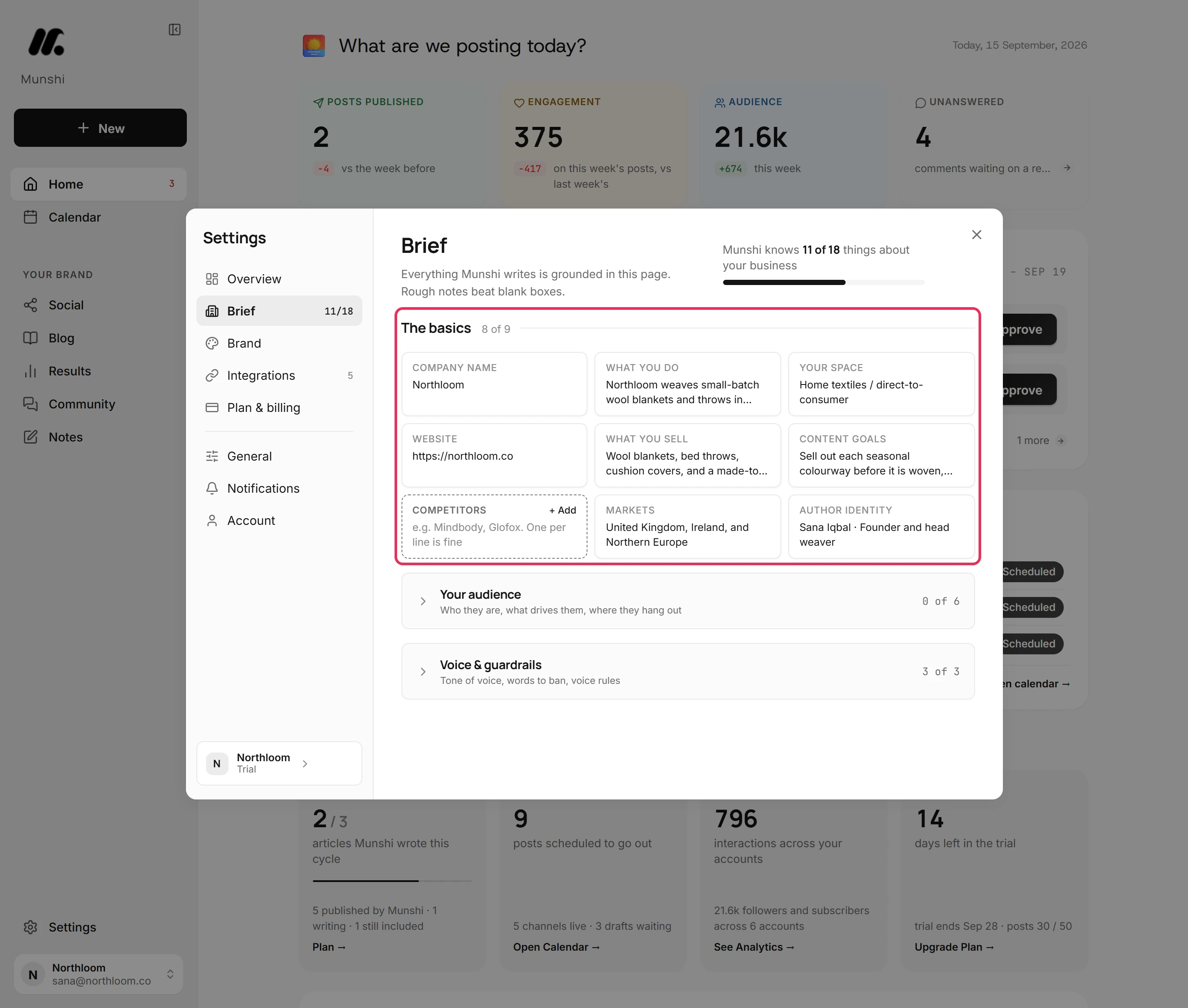
Agency content reads generic when the tool knows nothing about the client. So each workspace has its own Brief of 18 answers.
The basics come first: the company name, what they do, their space and their website. Then come what they sell, their content goals, competitors, markets and the author who signs their articles. Six answers about their audience follow, then Tone of voice, Words to ban and Voice rules.
Setup fills part of the Brief from the client's own website. Generate all (AI) researches the audience section from the rest of the Brief, filling only the fields you left empty. The words a client hates go in Words to ban once, and every piece written in that workspace is told to leave them out.
The Brief is per workspace, so your voice rules for a law firm never leak into the yarn shop.
Step by step: How to fill in your Brief
Article covers in each client's colours
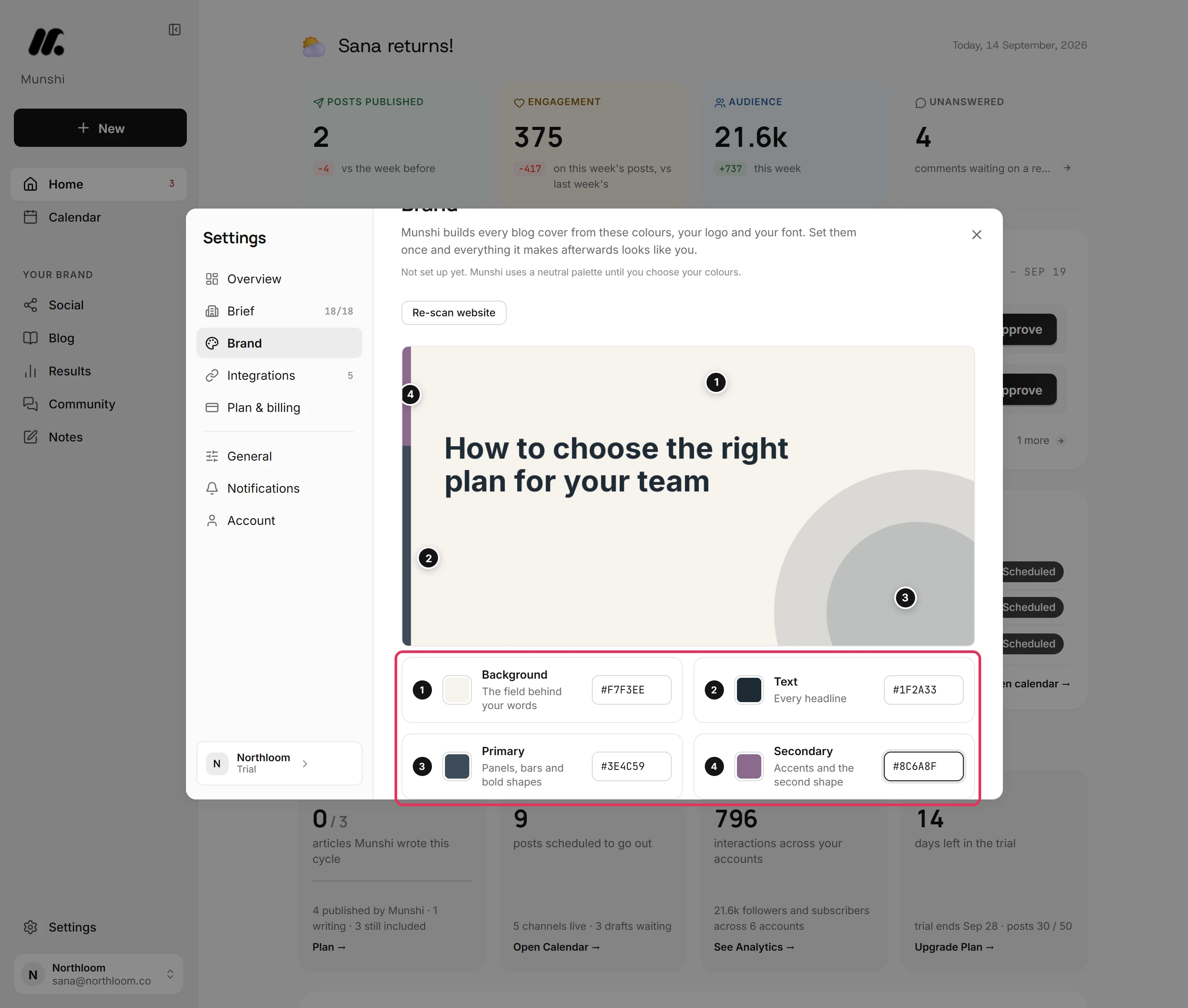
Brand in Settings holds four colours, a logo link and a typeface for the workspace you are in. The sample at the top is a real article cover drawn in those colours. It is numbered so you can see where each colour lands: 1 the background, 2 the text, 3 the primary, 4 the secondary.
Covers can use six fonts: Inter, Poppins, Manrope, DM Sans, Lora and Playfair Display.
Under Cover designs you tick the layouts Munshi may use. It works through the ticked ones in turn and names the next one up beside the heading. Set it once per brand, and every cover after that looks like that client, with no trip to a design tool.
Step by step: How to set up your brand kit for article covers
Export a client report as PDF or Excel
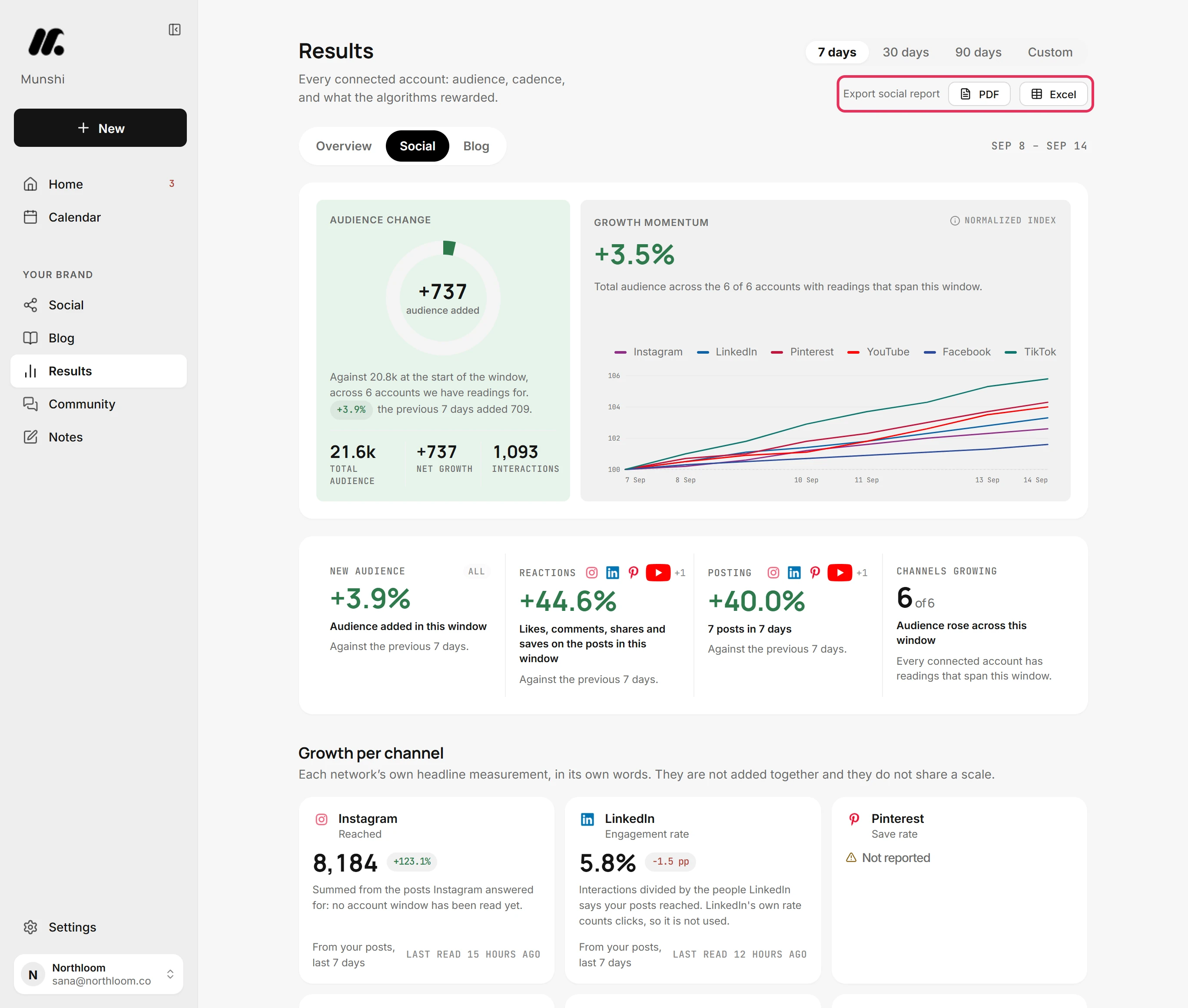
On Results, the Social tab has Export social report, with a PDF and an Excel button. Pick the window first: 7 days, 30 days, 90 days or Custom. The report builds in the background, the jobs dock tracks it, and a download link replaces the buttons when it is ready.
The PDF is the one you send. Its title is the brand's company name and the window. It holds the headline numbers (audience, interactions, posts published) and a Channels table.
That table covers audience, posts, interactions, impressions and each network's own headline figure. After it come a bar chart of interactions by channel and the top 40 posts by interactions.
The Excel workbook has Summary, Channels and Posts sheets, and lists up to 5,000 posts from the window. Open it when a client asks a question the PDF does not answer.
A built file is kept for an hour, and a workspace can build 20 reports an hour. A round of month-end reports is a few clicks per brand.
Step by step: How to export a social report as PDF or Excel
Attach and detach brands as clients come and go
The plan follows your client list. In Workspaces on this plan, a workspace you own that is not on the plan yet has an Attach button. Click it and the workspace joins straight away, drawing on the same pool from that moment. Detach takes it off again, and the plan has room for the next client.
Check one thing before you attach. If that workspace still pays for a plan of its own, cancel that subscription from its own billing page first, so nothing is billed twice.
A detached workspace goes back to its own plan. If its trial has already ended, it stays read-only until it has a plan again. That is a good state for a former client's workspace while they decide what to do with it.
Hand a client their data in one file
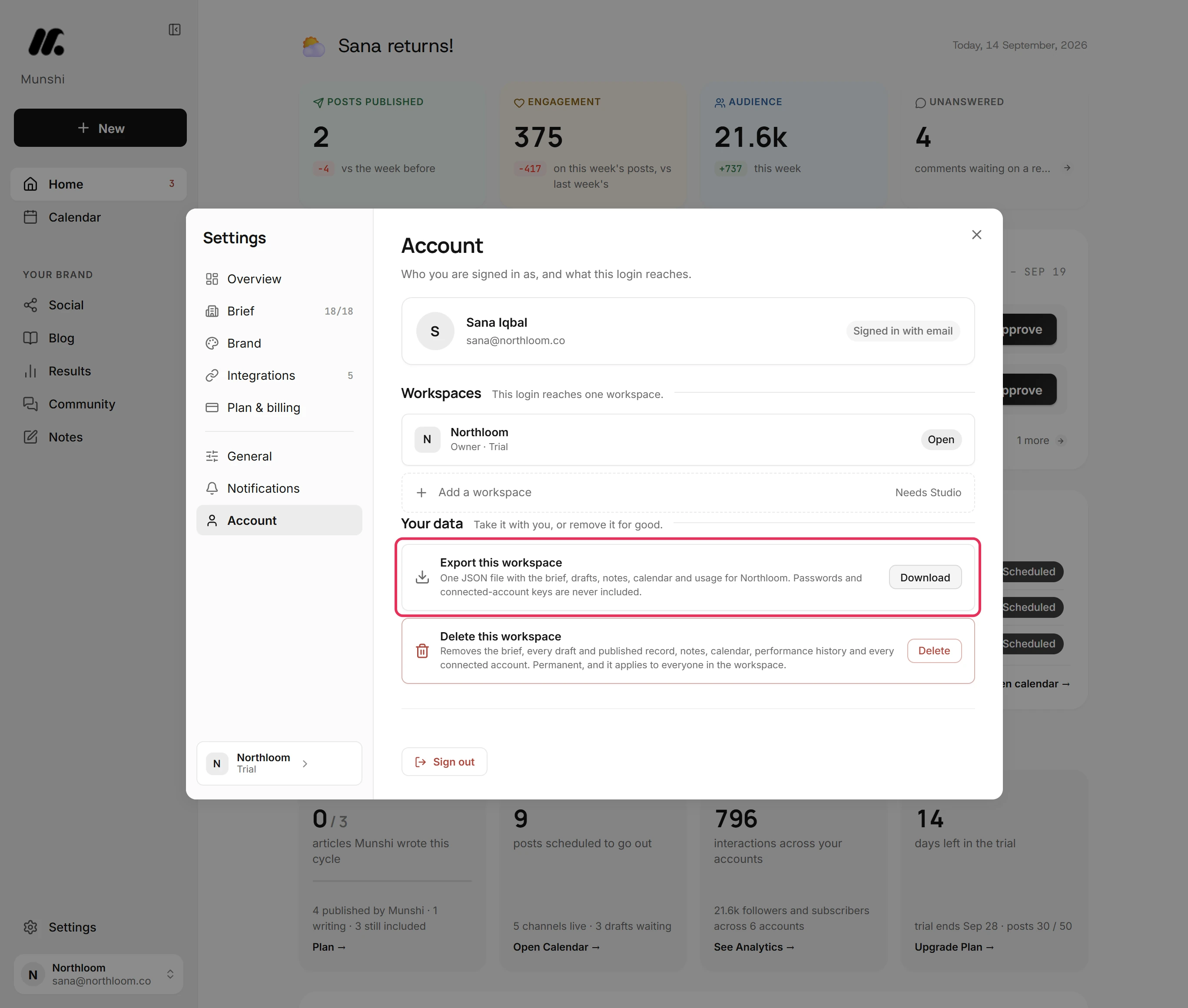
When an engagement ends, one file settles who has what. Settings, Account, Export this workspace makes one JSON file for the brand you are in.
It holds the brief and brand kit, and every article and post with its schedule. It also holds notes, the calendar, analytics history, plan and usage, and the jobs Munshi ran. Connected accounts are listed with their keys replaced by [redacted], and passwords are never in it.
Uploaded pictures and videos are listed by name, type, size and link, not embedded, so keep your own copies of the originals. Exporting only reads the workspace, so you can take the file on any Friday without changing anything.
Everything Munshi published went to the client's own accounts and their own CMS. It stays there whatever happens to the subscription.
Step by step: How to export everything in a workspace
What each plan covers
The plans are drawn at three brands, which is where a freelancer becomes an agency.
| Plan | Brands | Articles a month | Posts a month | Price |
|---|---|---|---|---|
| Free trial | 1 | 3 | 50 | Free for 14 days, no card |
| Founding | 1 | 15 | 1,000 | $15 a month |
| Studio | 3 | 45, one shared pool | 3,000, one shared pool | $29 a month |
| Enterprise | As many as you run | Matched to your calendar | Matched to your calendar | priced by conversation |
Yearly billing gives two months free, so Studio is $288 a year. Founding subscribers keep the price they joined at. See full pricing. If you run more than three brands, read the Enterprise page.
What each brand keeps, and what they share
| What | Per brand | Shared across the plan |
|---|---|---|
| Brief, audience and voice rules | Its own 18 answers | No |
| Brand kit: colours, logo, font | Its own | No |
| Connected social accounts | One per network | No |
| Blog or CMS connection | Its own, publishing to one chosen blog | No |
| Calendar, drafts and approvals | Its own | No |
| Results and exported reports | Its own | No |
| Articles and posts allowance | No | 45 and 3,000 a month |
| Subscription, card and invoices | No | One, in the workspace that carries the plan |
One login can reach up to five workspaces today, and Studio pays for three of them. One account per network per workspace explains what happens when two clients want the same Instagram.
What it does not do
- There is no client review link. You cannot send a client a page to approve a draft without a Munshi login. Approval happens in the app, by whoever is signed in to that workspace. The usual pattern is to walk the week with the client and approve on their behalf. If clients must sign off inside the tool, Planable, Loomly and SocialPilot are built for it.
- The reports are not white-label. Every page of the PDF carries the Munshi wordmark at the top and the line Munshi Social · <company> at the foot. It ends with a Report generated by Munshi Social sign-off, with links to Munshi's own channels. The client's company name is the title under that header, and you cannot swap any of it for your agency's logo. SocialPilot puts your logo on its reports from its Premium plan.
- There is no screen for adding teammates or setting roles. A workspace has an owner and can hold a second member seat, but nothing in Settings adds one. Owner-only actions such as renaming, exporting, attaching and detaching belong to the owner's login.
- It does not put three brands on one screen. Only Workspaces on this plan lists every brand at once, with what each used this period. Calendars, drafts and results are per workspace, so you switch between them.
- One account per network per workspace. A workspace holds one Instagram, one Facebook Page, one LinkedIn profile or Company Page, and one YouTube channel. Two accounts on the same network need two workspaces. An account another workspace already uses is refused on every network except Pinterest.
- Past three brands there is no fourth card to click. Enterprise is priced by conversation, not sold from the pricing page. One login can also reach only five workspaces at a time, whatever the plan pays for.
Questions people ask
Can I manage multiple brands' content in Munshi?
Yes. The Studio plan covers three brands on one subscription at $29 a month. Each brand is its own workspace with its own brief, brand kit, connected social accounts, blog connection, calendar and results. You switch between them from the chip at the bottom of the sidebar.
How much does Munshi cost for three client brands?
Studio is $29 a month, or $288 a year, which is two months free. That one subscription covers all three brands, not $29 per brand. Founding is $15 a month for one brand, and both start with a 14 day free trial and no card up front.
Do the three brands share one article allowance?
Yes. Studio's 45 blog articles and 3,000 social posts a month are one pool across all three workspaces, split however the work falls. Plan and billing shows the whole pool and what each brand used this period. Unused articles and posts do not carry over.
Can I connect two Instagram accounts?
Not in one workspace. A workspace holds one account per network, so two Instagram accounts need two workspaces. Connecting another account on the same network replaces the first. An account another workspace already uses is refused on every network except Pinterest, even when both workspaces are yours.
Can my client log in and approve their own posts?
No, there is no client-facing approval link today. Approval happens inside Munshi, by whoever is signed in to that workspace, and nothing publishes until someone approves it. Most agencies walk the week with the client and approve on their behalf.
Can I white-label the reports?
No. Every page of the exported social report carries the Munshi wordmark and a Munshi Social footer line. It ends with a Report generated by Munshi Social sign-off. The client's own company name is the title, but there is no way to replace the Munshi branding with your own logo.
What happens when a client leaves?
Detach their workspace from Plan and billing, and the plan has room for the next client. If they want their data, export the workspace first: one JSON file with the brief, drafts, calendar, notes, analytics history and usage. Everything already published went to their own accounts and their own CMS, so it stays there.
What if I run more than three brands?
Enterprise covers you, because Studio stops at three. It sets the number of brands and the article and post volume to match your publishing calendar, under one agreement and one invoice. It is priced by conversation rather than bought from the pricing page.
The guides that walk multi-brand work
Each one walks a single task through the real app, with a screenshot at every step.
- How to run several brands on one Studio plan 3 min · 8 steps
- How to add, switch and rename workspaces 3 min · 7 steps
- Your monthly allowance: articles and posts 2 min · 6 steps
- How to fill in your Brief 4 min · 9 steps
- How to set up your brand kit for article covers 3 min · 7 steps
- How to export a social report as PDF or Excel 2 min · 7 steps
- How to export everything in a workspace 1 min · 5 steps
- How to upgrade to Founding or Studio 3 min · 8 steps