Compare

Munshi vs Planable

Munshi Social, the AI content marketing engine for small teams, side by side with Planable. Planable is a collaboration tool for social media teams and agencies. Each post previews the way it will look on the network, and teammates and clients comment on it and approve it in place. It is priced per workspace, one for each brand or client, with unlimited users on every plan.

Pricing and features checked against planable.io/pricing, its pricing file for AI agents, its changelog and its help centre on 30 September 2026

14-day free trial · No card required · 7-day money-back

Pick Planable if other people must approve your posts before they go out: clients, a manager or a legal team. Its previews look like the real post, feedback sits on the post itself, and Required approval on Pro means nothing publishes without a sign-off. Pick Munshi if nobody is writing the posts or the blog in the first place, because Munshi writes both and Planable writes neither. Planable costs $39 a workspace a month on Basic or $59 on Pro, with analytics as a $14 add-on per workspace. Munshi is $15 a month flat for one brand, with the writing, blog publishing and results included. It has two seats, no client role and one account per network, so for an agency with a client approval chain, Planable is the better tool.

Weighing more than two tools? See the best Planable alternatives in 2026, ranked by how much of the content work each one does for you.

How it is sold
Per workspace, one per brand or client, with unlimited users on every plan.
Entry price
Basic, $39 a workspace a month, or $33 billed yearly. 4 social pages, 60 posts a month.
Approvals
Optional on Basic, Required on Pro, multi-level on Enterprise only.
Add-ons
Analytics $14 and social inbox $9, each per workspace a month. Social listening $99.
Free option
50 free posts in total, with no time limit and no card. It does not reset monthly.
Public rating
4.5 on Capterra (326 reviews)

What each one actually does

Munshi Planable
Starting price $15/mo founding price, locked for life (rises to $49 at launch) Basic $39/workspace/mo ($33 billed yearly). Pro $59/workspace/mo ($49 yearly). Analytics is a $14/workspace add-on
What that buys The whole engine: strategy, 15 SEO articles a month, 1,000 posts a month, publishing, analytics One workspace for one brand or client: 4 social pages, 60 posts a month and unlimited users on Basic
Writes your content? Yes: plans, writes, and grades articles and posts for you No. AI generates or rewrites a post when you ask, one post at a time in the composer
Blog articles to your site? Yes: WordPress, Ghost, Webflow, Framer, or Sanity. Articles arrive as drafts you publish from your CMS, except on Sanity, which goes live No. Universal content lets you draft and approve blog posts and newsletters, but it does not schedule or publish them
Keyword & content strategy Included: keyword research and a weekly plan you approve Not included. Campaigns and labels organize the plan you make yourself
Social networks 8 networks: Instagram, TikTok, LinkedIn, Facebook, Pinterest, Threads, YouTube, Bluesky 9: Facebook, Instagram, LinkedIn, X, YouTube, TikTok, Pinterest, Google Business Profile and Threads, with several pages per network allowed
Approval workflow One weekly approval batch. Nothing ships without your yes Its core strength: optional or required approval by plan, multi-level on Enterprise, with comments, annotations and client members
Analytics Every channel in one dashboard, captured daily A paid add-on per workspace, with client-ready reports and competitor benchmarks
Free trial 14 days, full engine, no card required 50 free posts in total, no time limit, no card. Once they are used, you upgrade

The rows above, as screens

You came to compare approval tools. In Munshi, approval is one list, one person and one sitting a week.

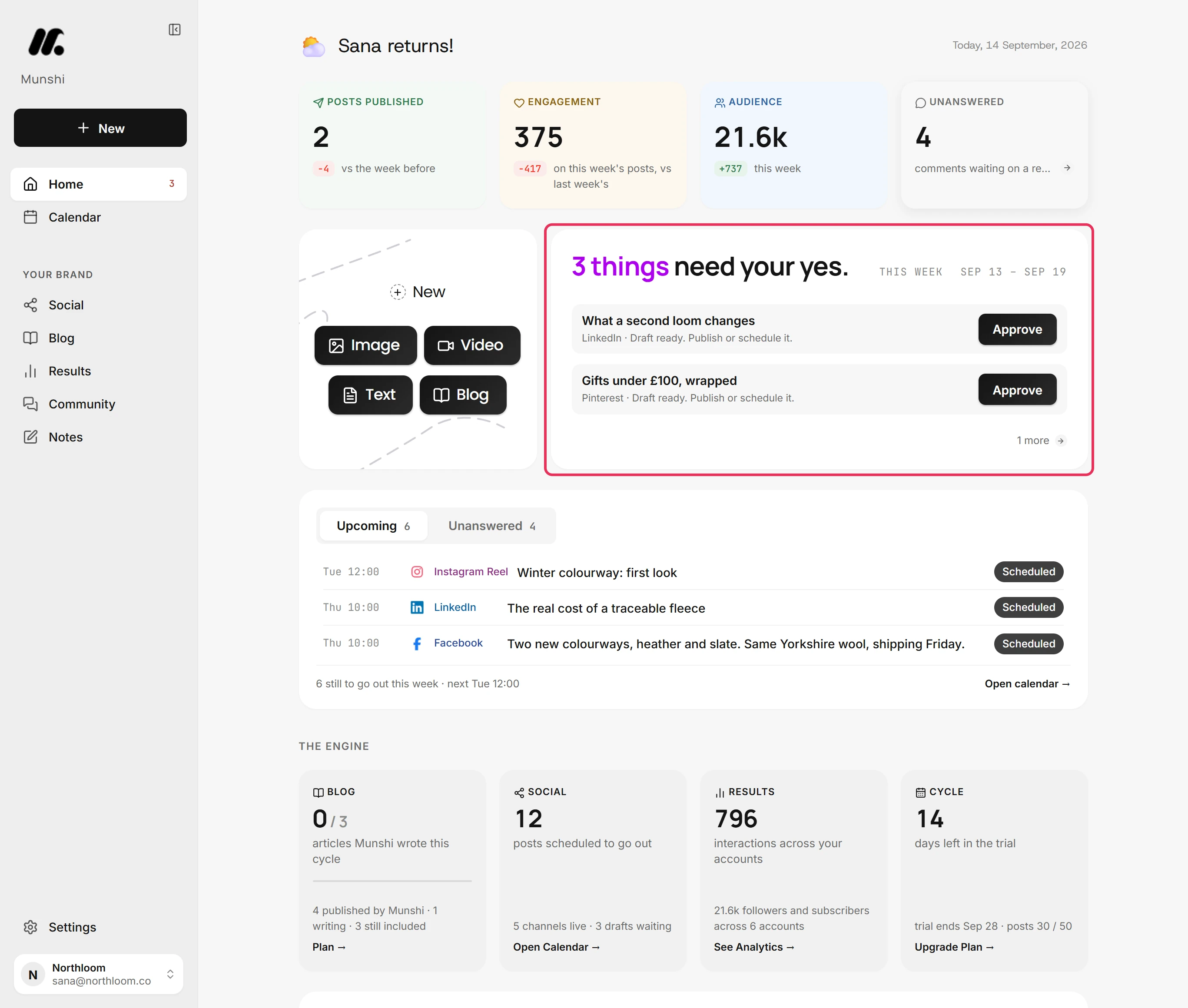
Munshi's Home card reading 3 things need your yes, listing two drafts with an Approve button beside each.
Everything Munshi wrote this week waits here for one person's yes. It is a single approver, not a chain, and nothing publishes without it.
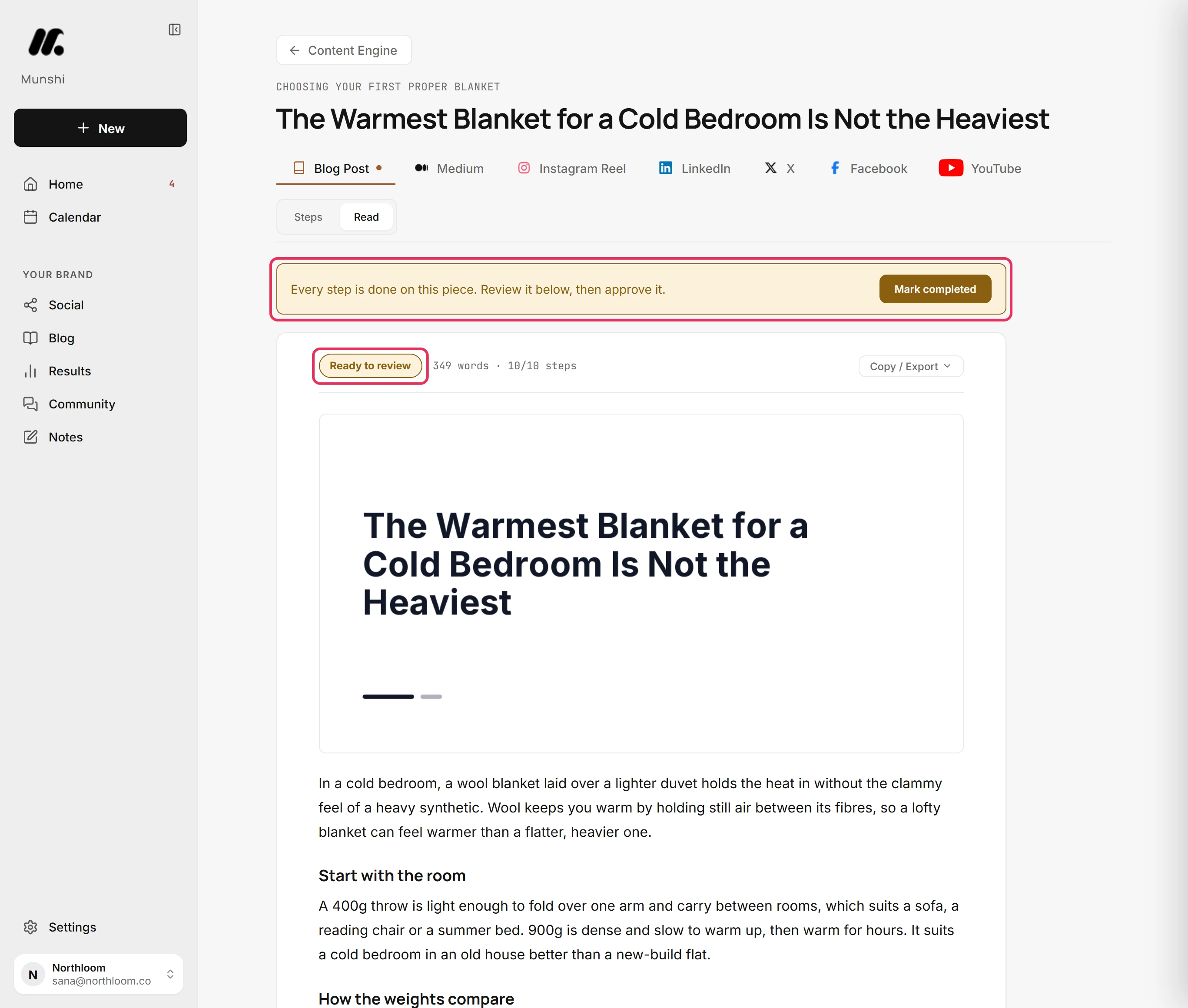
A Munshi article page marked Ready to review, with the review banner above the finished text.
Articles arrive written and wait for review. Planable can hold a blog draft for approval, but here the draft is already done and publishes to your CMS.
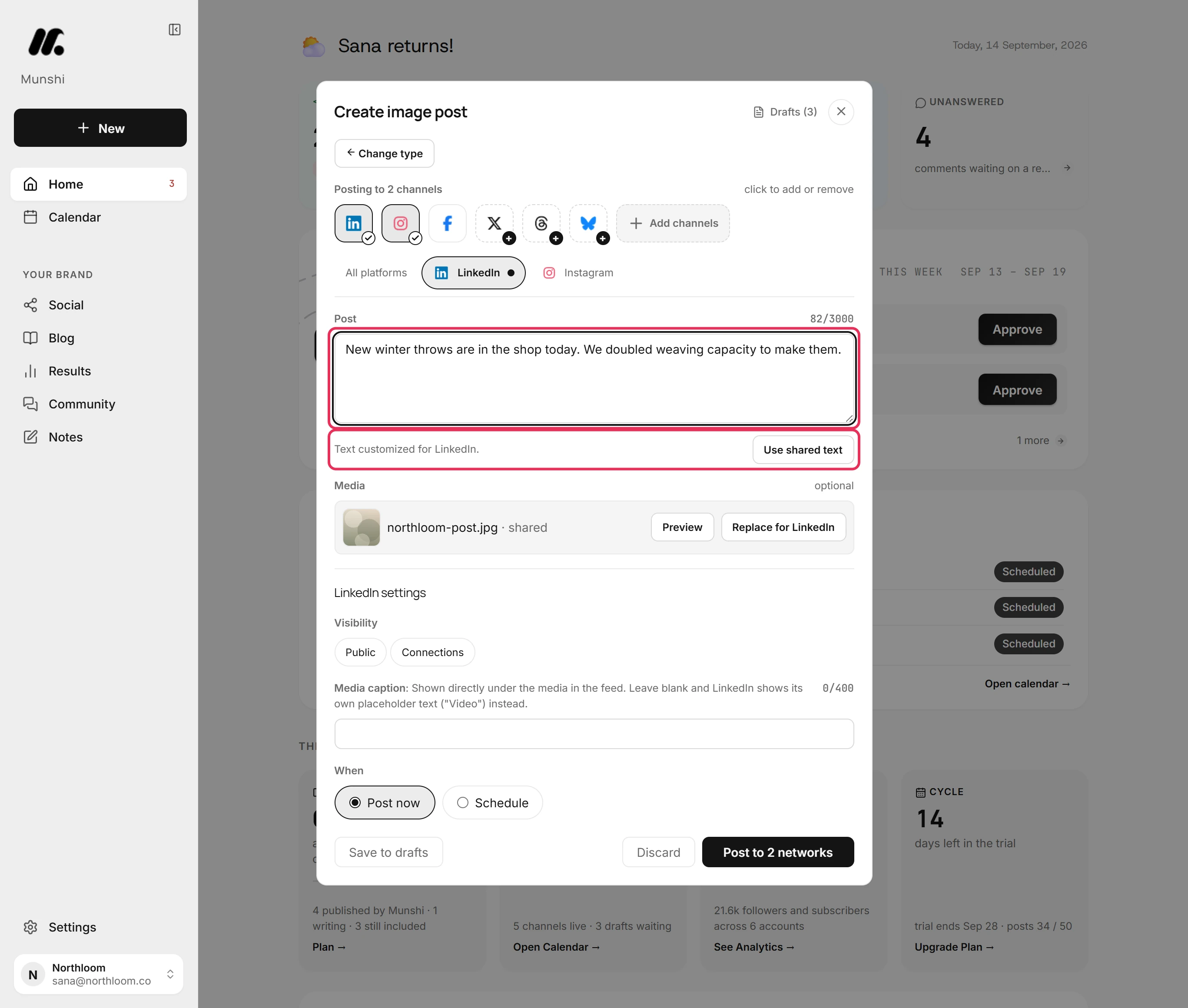
Munshi's composer on the LinkedIn tab with a longer caption and the line Text customized for LinkedIn beside a Use shared text button.
Each network gets its own tab and its own wording. It is a composer, not a native-looking preview, which is where Planable is stronger.
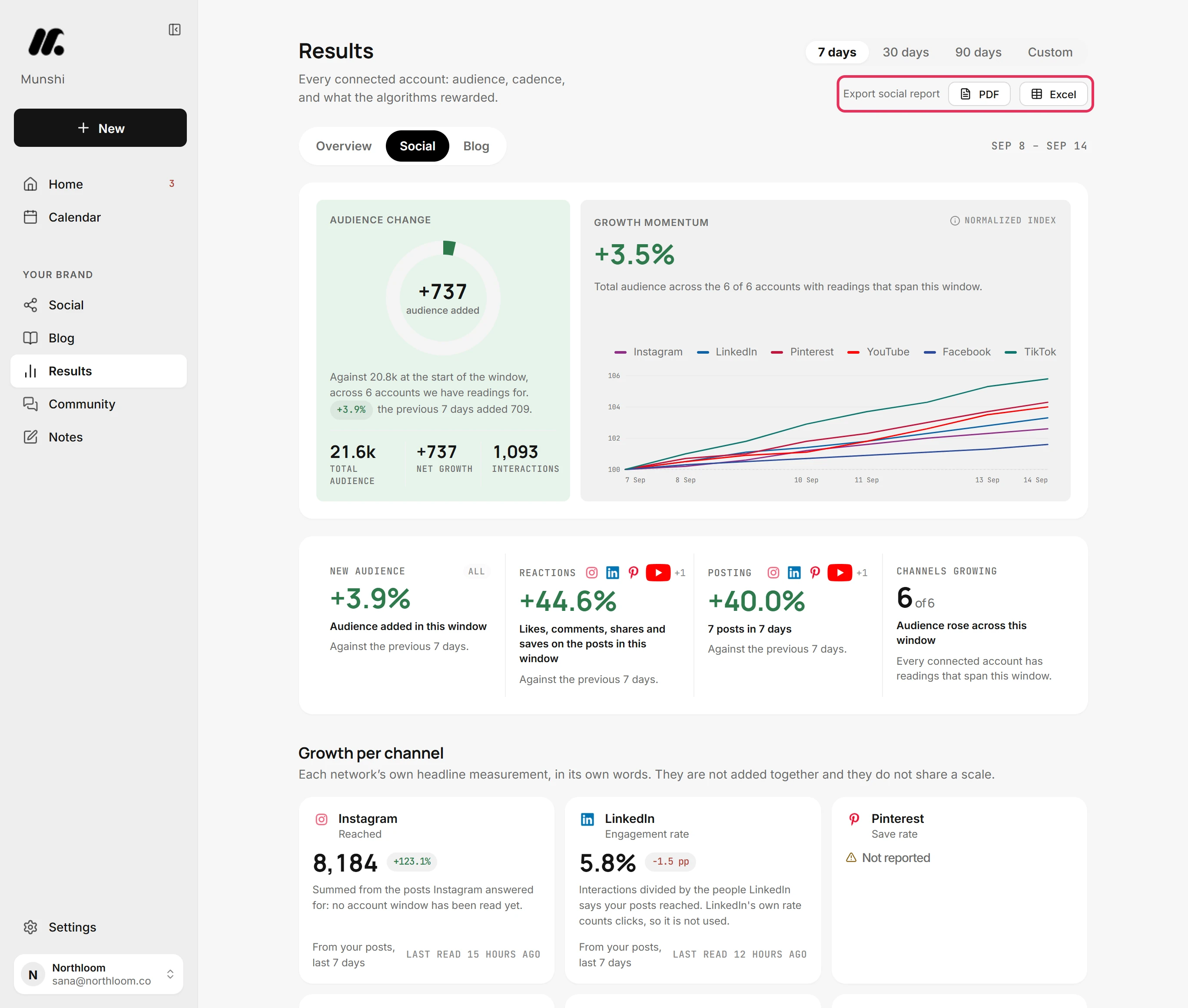
Munshi's Results on the Social tab, with Export social report and its PDF and Excel buttons at the top right.
Reports for a brand or a client come out as PDF or Excel, with no analytics add-on to switch on first.

What approval looks like in Munshi

One screen shows the week's drafts, and each one waits for a single yes before it goes out. It runs 59 seconds and was recorded in the real app. The written steps are in the guide, and the film is also on YouTube.

The differences that decide it

Every comparison on this site answers the rows above. These rows matter only when two tools are this close.

Munshi Planable
Who writes the content Munshi does. It drafts articles and posts from the keyword plan you approved, and they are waiting before you open the app. You do. The AI generates a post from a prompt, rewrites one, suggests hashtags or captions an image, but only when you ask inside the composer.
What the price is per One flat price per plan: $15/mo for one brand, or $29/mo for three brands on Studio. Per workspace. Planable recommends one workspace per brand or client, so five clients means five workspaces.
Users Two seats per workspace, and the only roles are owner and member. There is no third seat. Unlimited users on every plan, including clients, so inviting another person never raises the bill.
Approval workflow One weekly batch you clear in one sitting. Nothing unapproved publishes, but it is one batch, not a chain of approvers. None or Optional on Basic, Required on Pro, and multi-level chains (team, client, legal) on Enterprise. Posts can lock after approval and schedule themselves once approved.
Client access No client login and no client role. Clients see the work through the reports you send them. Clients join as Client members with approver rights. Team-only drafts and notes on Pro keep work in progress hidden until it is ready for them.
Blog articles and newsletters Written for you and published into WordPress, Ghost, Webflow, Framer, or Sanity. Most platforms take them as drafts you publish from your own dashboard. Universal content holds blog posts, newsletters and ads for review and approval. Planable's help centre says it cannot schedule them, so you publish elsewhere and mark them as published by hand.
Keyword and content strategy Included: keyword research and a weekly plan you approve before anything is written. Not offered. Campaigns, labels and a shared calendar organize the ideas your team brings.
Post volume 1,000 posts and 15 articles a month on Founding, written for you. 60 posts a workspace a month on Basic, 150 on Pro and unlimited on Enterprise. Your team writes them.
Accounts per network One account per network per workspace. Four Facebook Pages for one brand do not fit. Several pages from the same network can sit in one workspace, up to 4 on Basic, 10 on Pro and 50 on Enterprise.
Social networks 8, with no per-channel fee: Instagram, TikTok, LinkedIn, Facebook, Pinterest, Threads, YouTube, Bluesky. X is coming soon. 9, including X and Google Business Profile, which Munshi cannot connect. It does not list Bluesky. Basic allows one published post to X every 24 hours.
Analytics Search Console, Google Analytics and every connected network on one Results page, included in the plan, with PDF and Excel reports. A $14 add-on per workspace a month with a 30-day trial on paid plans. It covers Facebook, Instagram, LinkedIn, YouTube, TikTok and Google Business Profile, with X added in September 2026, plus competitor benchmarks and shareable reports.
Inbox and listening Comments on six networks and replies on four. No direct messages and no social listening. Social inbox add-on at $9 a workspace a month, with comments and Facebook and Instagram direct messages. Social listening is a $99 add-on per workspace.
Previews, grid and mobile Per-network tabs in the composer, but no Instagram grid preview and no mobile app. The web app works at phone width. Previews built to look like each network, a grid view from Pro, and iOS and Android apps.
API and AI assistants No public API yet. An MCP connector on every plan, so an AI assistant can work in Planable, and a public API from Pro.
Track record Munshi launched in 2026. The team is small and the history is short, and we would rather you knew that. An established product with 326 verified reviews on Capterra and a changelog that ships most weeks.

Every plan, both sides

These are published list prices, not what a sales call gets you. We re-check them whenever either vendor changes a price, and the date is at the top of this page.

Planable plans in full

Plan Billed monthly Billed yearly Social pages Posts Users Approval types
Free trial$0$0450 in total, no resetUnlimitedNone, Optional
Basic$39/workspace/mo$33/workspace/mo4 per workspace60/workspace/moUnlimitedNone, Optional
Pro$59/workspace/mo$49/workspace/mo10 per workspace150/workspace/moUnlimitedNone, Optional, Required
EnterpriseCustomCustom50 per workspaceUnlimitedUnlimitedAdds multi-level

Yearly billing is two months free, charged up front. Add-ons are priced per workspace: Analytics $14 a month and Social inbox $9 a month, each with a 30-day trial on a paid plan, and Social listening $99 a month or $990 a year. Pro adds a grid view, team-only drafts, bulk approval and the public API. Enterprise adds SSO, a list view and a dedicated account manager, and Planable offers volume discounts past five workspaces. Prices exclude tax.

Munshi plans in full

Plan Billed monthly Billed yearly Networks Posts Users Approval
Founding$15/mo$144/yr8, one account each1,000/mo, written for you2 seatsOne weekly batch
Studio$29/mo$288/yr8 per brand, one account each3,000/mo across 3 brands2 seats per workspaceOne weekly batch
EnterpriseCustomCustom8 per brandSet with the plan2 seats per workspaceOne weekly batch

Founding pricing is locked for life on the plan and billing cycle you join. Later price rises apply only to new members. Articles (15 a month on Founding, 45 across three brands on Studio), blog publishing and analytics are in every plan, with no add-ons.

Three situations, with the arithmetic

These are list prices, multiplied out. Do the same sum for your own team before you believe either of us.

One brand on six networks, with numbers

A small business that wants posts on six networks and a monthly look at the results.

Planable $73/mo Pro at $59, because Basic stops at four pages, plus the $14 Analytics add-on. On yearly billing, Pro alone is $49 a month. The team still writes every post.
Munshi $15/mo Founding. Eight networks, the writing, blog articles and the Results page are all in the base plan.

The two prices buy different things. Planable's $73 buys unlimited users, required approvals and previews that look like the real post. Munshi's price buys the posts themselves, written and waiting for your yes.

An agency with five clients who each approve their posts

Five brands, a client approver on each, and a report every month.

Planable $365/mo Pro for Required approval: 5 × $59 = $295, plus Analytics at 5 × $14 = $70. On yearly billing the plans alone are 5 × $49 = $245 a month. Unlimited users, clients included.
Munshi $58/mo, but no client approval Two Studio plans cover six brands, with a PDF or Excel report per brand. There is no client login, no client role, and two seats per workspace.

Here Planable is simply the better tool. If clients have to approve posts inside the tool before they publish, Munshi cannot do that, and no price difference makes up for it.

An in-house team of five with a required sign-off

One brand, a writer, a designer, two marketers and a manager who approves everything.

Planable $59/mo One Pro workspace, billed monthly ($49 yearly). All five people get a login, and Required approval blocks anything unsigned.
Munshi $15/mo, but only two seats Munshi caps a workspace at two seats, and the only roles are owner and member.

Planable wins this one outright. Unlimited users on a single workspace is the right shape for a team that reviews each other's work.

Pick Planable if…

  • Clients, a manager or a legal team must approve posts before they go out
  • You want comments, annotations and suggested edits on a preview that looks like the real post
  • More than two people need their own logins, and you would rather not pay per seat
  • You run several pages on one network for one brand, such as regional Facebook Pages
  • You publish to X or Google Business Profile, which Munshi cannot connect yet
  • You want an Instagram grid view, a mobile app, a public API or social listening

Pick Munshi if…

  • Nobody has time to write the posts, and an approval tool cannot fill an empty calendar
  • You want articles published to your own blog, not only drafted and approved
  • You run one brand, and $59 a workspace plus $14 for analytics is more than you want to spend
  • You want a keyword plan behind the calendar, not only campaigns and labels
  • You want blog traffic, Search Console and every network's numbers on one page, without an add-on
  • One or two people approve everything in one weekly sitting

Where each one falls down

A comparison written by one of the two tools is worth reading only if it is willing to lose a row. Here are both lists.

What reviewers flag about Planable

  • Analytics is not in the base plans. Recent reviewers object to paying extra for it on a tool they already find pricey.
  • Several reviewers say the price is a stretch for small teams, and one non-profit asked for it to be 20 to 30 percent cheaper.
  • Instagram Stories are a sore point: reviewers describe the app glitching while posting them, and Stories still going through the phone app.
  • The monthly post cap per workspace frustrates some users, as do gaps such as no custom thumbnail for YouTube Shorts and no PDF posts to LinkedIn.
  • One owner says image upload quality makes it hard to plan for clients who need high-quality visuals, and another reports the app freezing at publish time.

Public reviews on Capterra and GetApp from 2024 to 2026, read 30 September 2026

What we will tell you about Munshi

  • Two seats per workspace, and the only roles are owner and member. There is no client login and no approval chain.
  • One account per network per workspace. Several Facebook Pages for one brand do not fit, and Studio gives three brands, each with its own set.
  • X is coming soon and cannot be connected yet, and there is no Google Business Profile. Planable publishes to both.
  • No Instagram grid preview, no mobile app, no public API yet and no social listening. The inbox handles comments on six networks and replies on four, with no direct messages.
  • A small team launched Munshi in 2026. The track record is short, and you should price that in.

Written by the people who build Munshi, September 2026

Munshi and Planable, answered

How much does Planable cost?

Basic is $39 a workspace a month, or $33 billed yearly, for 4 social pages and 60 posts a month. Pro is $59 a workspace a month, or $49 yearly, for 10 pages, 150 posts and Required approval. Enterprise is quoted. Analytics costs $14 and the social inbox $9 per workspace a month on top. Prices checked on planable.io/pricing on 30 September 2026.

Does Planable have a free plan?

Not a monthly one. The first 50 posts are free, with no time limit and no card, but the 50 do not reset. Once they are used, you pick a paid plan. X publishing is off during the free period, and the Analytics and inbox add-ons can only be tried on a paid plan.

Is Planable priced per user?

No. It is priced per workspace, and every plan includes unlimited users, clients included. Planable recommends one workspace per brand or client, so the bill grows with the number of clients, not the size of the team.

Does Planable include analytics?

Not in the base plans. Analytics is an add-on at $14 a workspace a month, with a 30-day trial once you are on a paid plan. It covers Facebook, Instagram, LinkedIn, YouTube, TikTok and Google Business Profile, and added X in September 2026, with competitor benchmarks and client-ready reports. Munshi's Results page is part of every plan.

Can Planable publish blog posts to WordPress?

No. Its universal content pages let a team write, review and approve blog posts, newsletters and ads in the same calendar as social. Planable's help centre says scheduling is not supported for this content, so you publish it yourself and mark it as published. Munshi writes articles and publishes them into WordPress, Ghost, Webflow, Framer or Sanity.

Does Planable write posts with AI?

It helps when you ask. In the composer, the AI can generate a post from a prompt, rewrite one, suggest hashtags, caption an image or video, and propose an idea based on at least five earlier posts. A person still decides what goes out and writes or accepts each post. Munshi writes the week's posts and articles without being asked, then waits for your approval.

Is Planable good for agencies?

Yes, it is built for them. Each client gets a workspace with its own pages, calendar and approval flow, clients join free as approvers, and team-only drafts keep work in progress out of their sight. For an agency whose clients approve every post, Planable is a better fit than Munshi.

Which approval workflows does Planable offer?

Four types. None and Optional are on every plan. Required, where at least one approver must sign off before a post can be scheduled, starts on Pro. Multi-level approval, with named steps such as team, client and legal in order, is on Enterprise only.

Can I run several accounts on one network?

In Planable, yes: a workspace can hold several pages from the same network, up to 4 on Basic and 10 on Pro. In Munshi, no: a workspace holds one account per network, so four Facebook Pages for one brand do not fit.

Does Munshi have client approval like Planable?

No. Munshi has one weekly approval batch, two seats and no client role. Nothing unapproved publishes, but there is no way to route a post to a client, a manager and then legal. If that chain is why you use Planable, stay on Planable.

Can I move from Planable to Munshi?

Yes, and the move is small. Posts Planable published live on your networks, so they stay where they are. Planable keeps its record of published posts for 13 months on Basic and Pro, so export anything you want to keep first. Then connect your networks and your blog to Munshi and approve a first strategy. The 14-day trial includes 3 real articles and 50 posts, with no card.

More on what Munshi does: the blog engine · cross-posting · analytics · pricing

Where every figure on this page comes from

Each Planable price, plan limit and feature above was read on Planable's own pages, or on the review site named, on the date shown. If Planable has changed something since, its page is right and this one is out of date.