On this page14 sections
It plans your blog topics before it writes
Munshi plans your blog before it writes a word. Most AI writers start with an empty box, and next week you need another topic. The hard part is knowing what to write, in what order, for which search.
Your blog strategy is one map. It runs from your brief, to your focus areas, to the articles planned under each one. Focus areas are the themes you want to be found for.
Type in a focus area, or let Munshi suggest some from your brief. Generate keywords finds the searches people type for that theme. Generate articles lays out the pieces to write, from first questions to deeper ones.
Every article Munshi writes later is tied to a keyword on this map. That keeps each draft on subject, and it sounds like your business, not like everyone's.
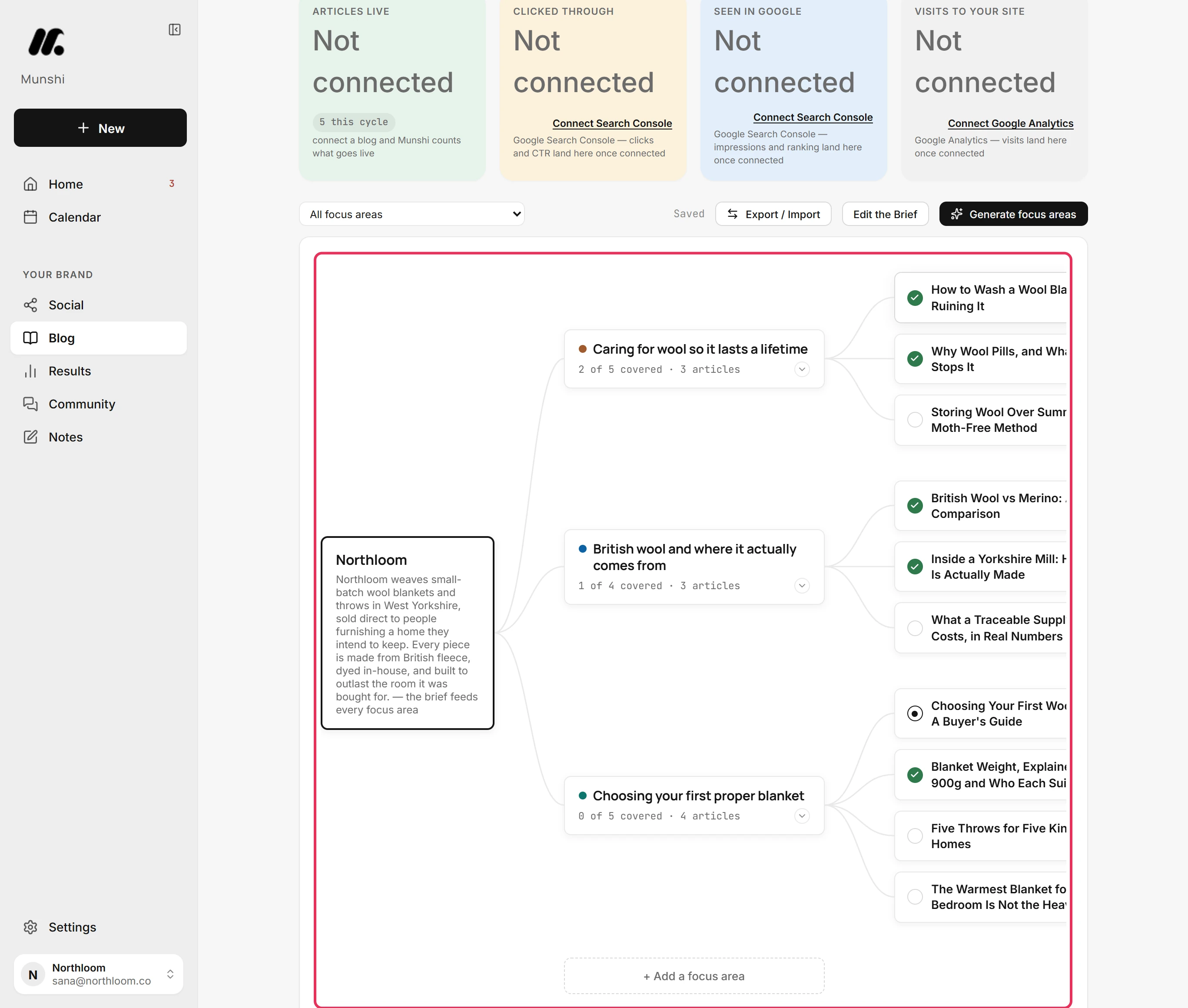
Step by step: How to build your blog strategy
Does anyone search for this keyword?
Munshi checks each keyword with Google before you write about it. A keyword nobody types is an article nobody finds.
Inside a focus area, click Check demand. Munshi asks Google's autocomplete about each keyword and ticks the ones Google completes. A keyword without a tick is one people rarely type, so it is worth swapping.
One check covers the first 30 keywords of a focus area. It costs nothing from your plan and uses no AI model.
With Google Search Console connected, the Strategy tab also lists the searches that already bring people to your site. Each one shows its clicks over the last 28 days, and Munshi offers to write more about it.
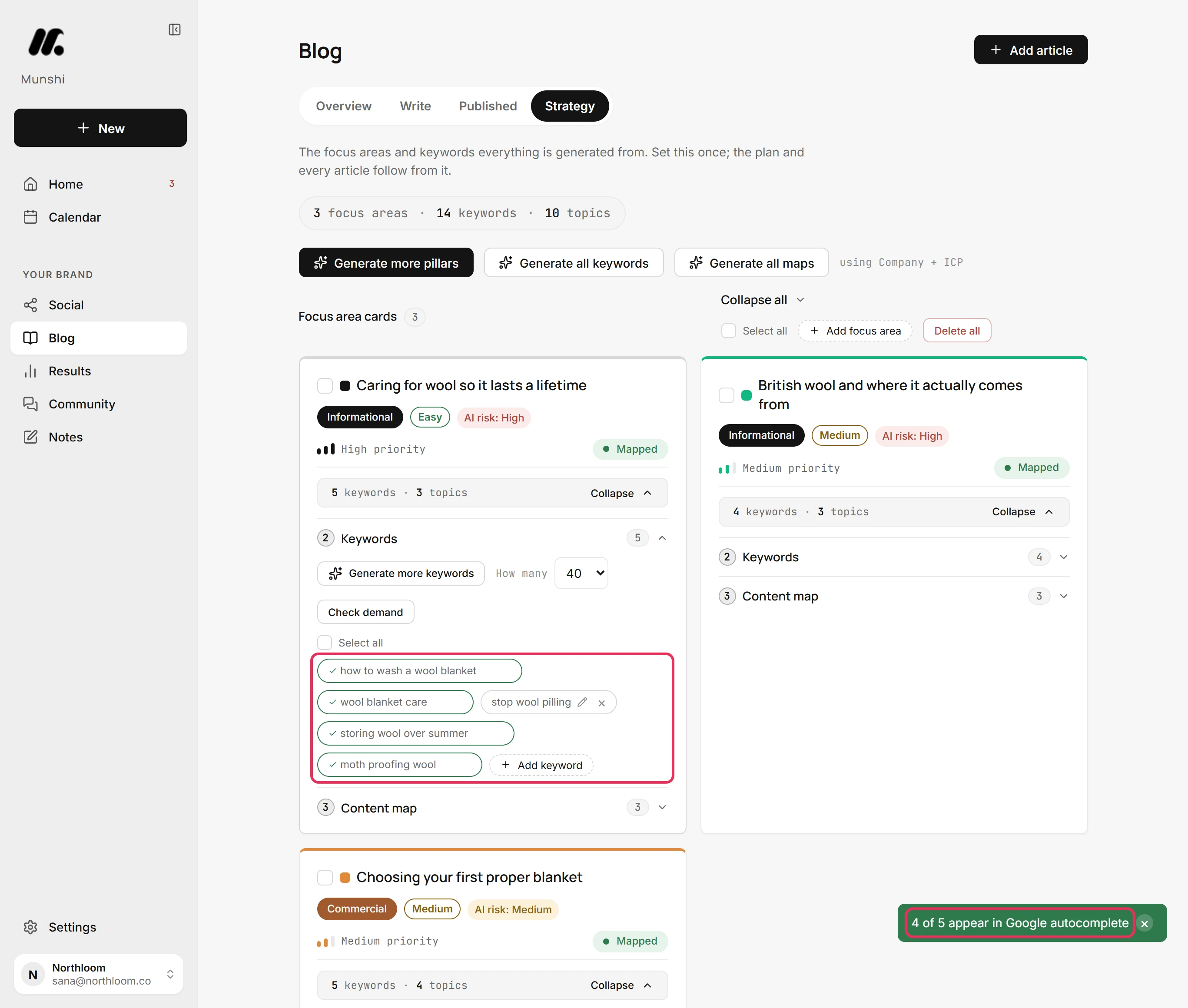
Step by step: How to check demand for your keywords
How it writes: ten steps you can check
The Munshi writer splits each article into the ten steps an editor would follow, and shows you each one. A single “generate article” button gives you 1,500 words and no way to see where they went wrong.
The first four steps are Topic & Angle Lock, SERP & Source Research, Outline & Heading Architecture and Section-by-Section Drafting. Then come SEO Optimization Pass, GEO Citability Pass and Meta, Title Tag & Schema. The last three are Internal Linking, Featured Image and Publish checklist & handoff.
Each step builds on the ones before it. If the angle is wrong, you fix it at step one, not in the finished piece.
Regenerate gives any step a new version, and Restore previous brings the old one back. Edit lets you change the text by hand. Have research notes already? Paste them into the research step, click Approve as done, and the draft is built on your notes.
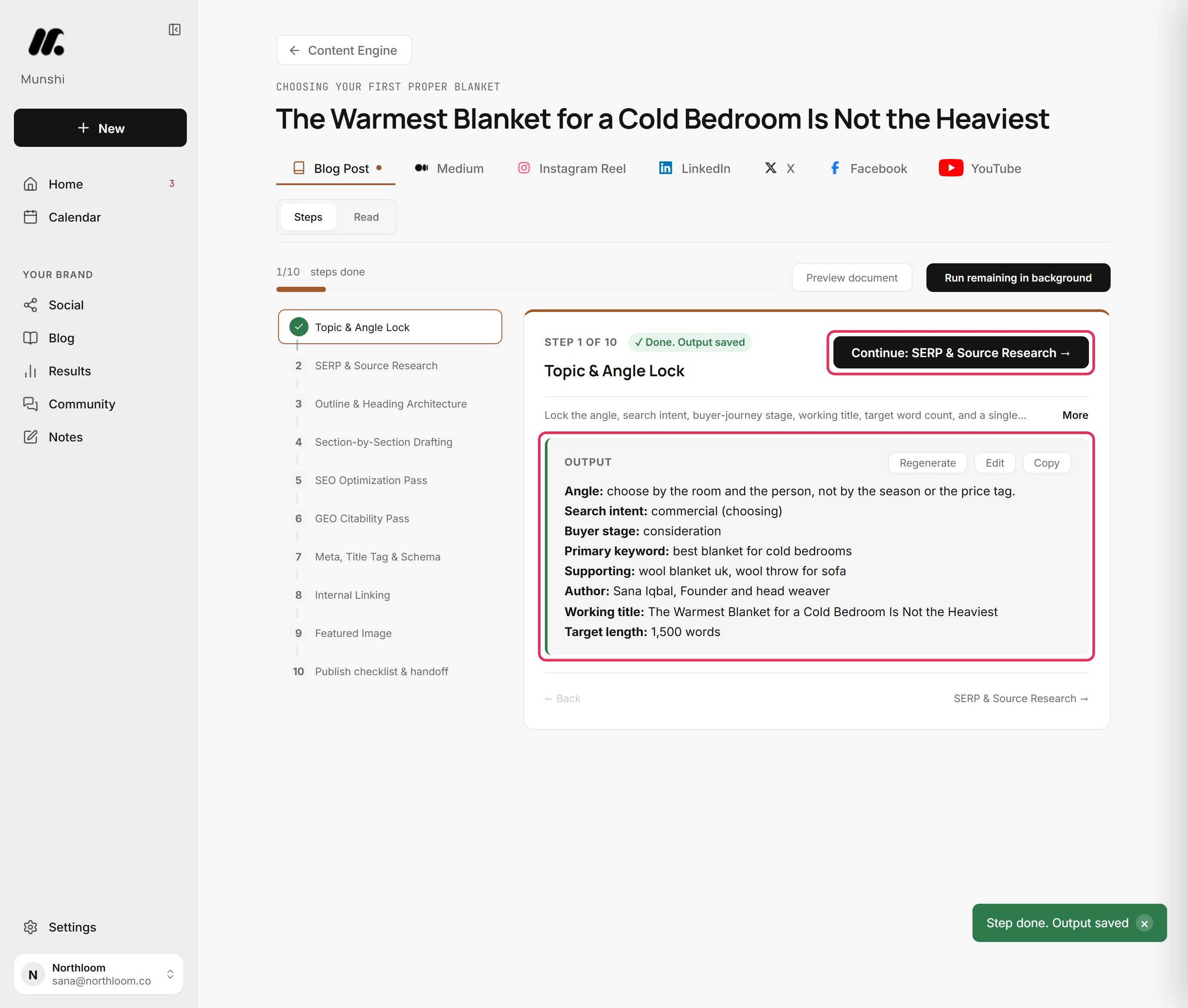
Step by step: How to write an article with the ten-step writer
Let it finish the article in the background
Munshi can write the remaining steps while you do something else. Click Run remaining in background and it writes every step that is still empty. Steps you filled in are left alone.
It ticks each step off as it lands, until the bar reads 10/10 steps done. You can leave the page. The jobs panel at the top right follows the run anywhere in the app, and its Open button brings you back to the article.
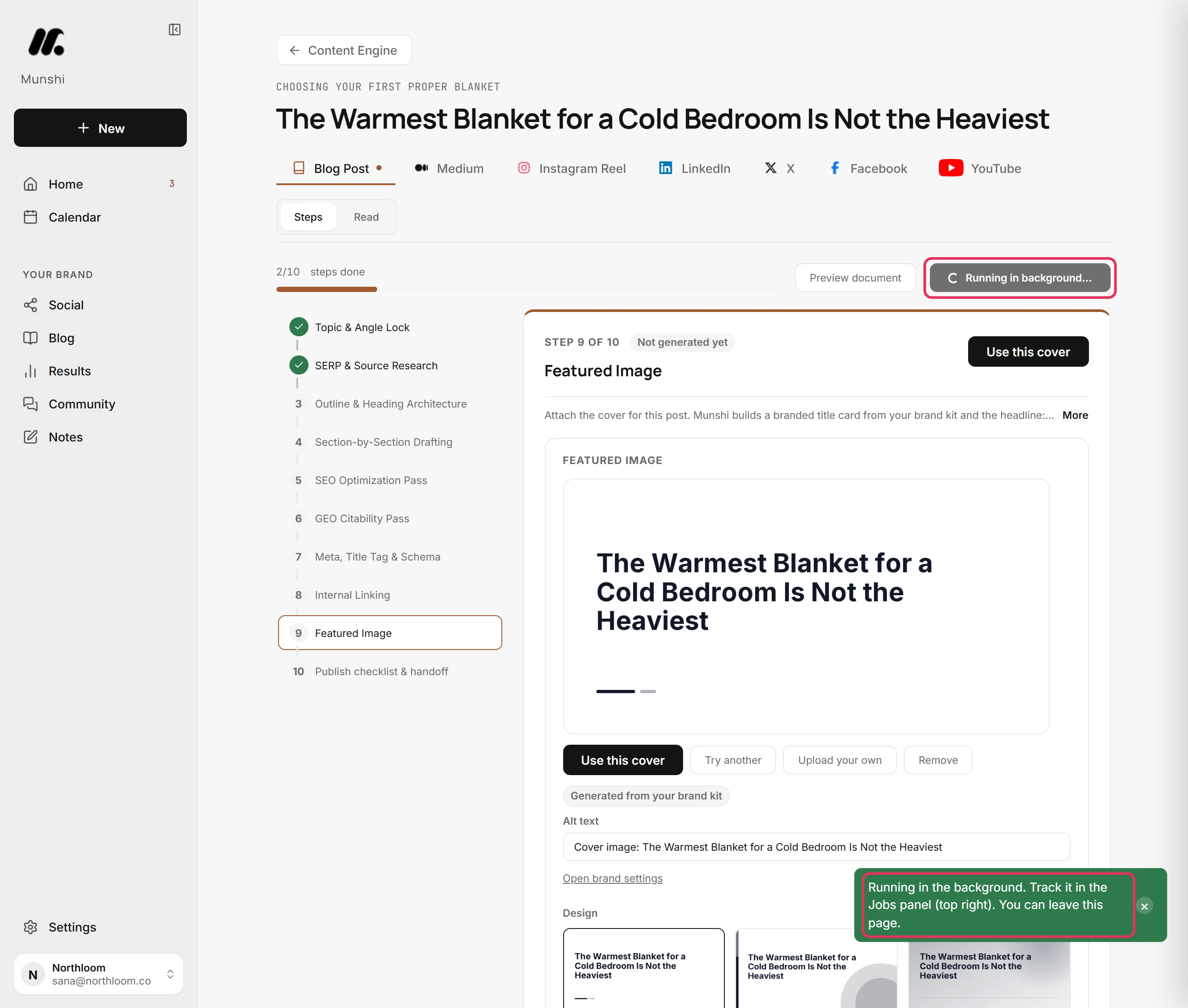
Two scores: one for Google, one for AI answers
Munshi scores every draft twice, each out of 100: once for Google and once for AI assistants. People still search on Google, and they also ask ChatGPT, Perplexity and Google's AI Overviews. An article can do well in one and be invisible in the other.
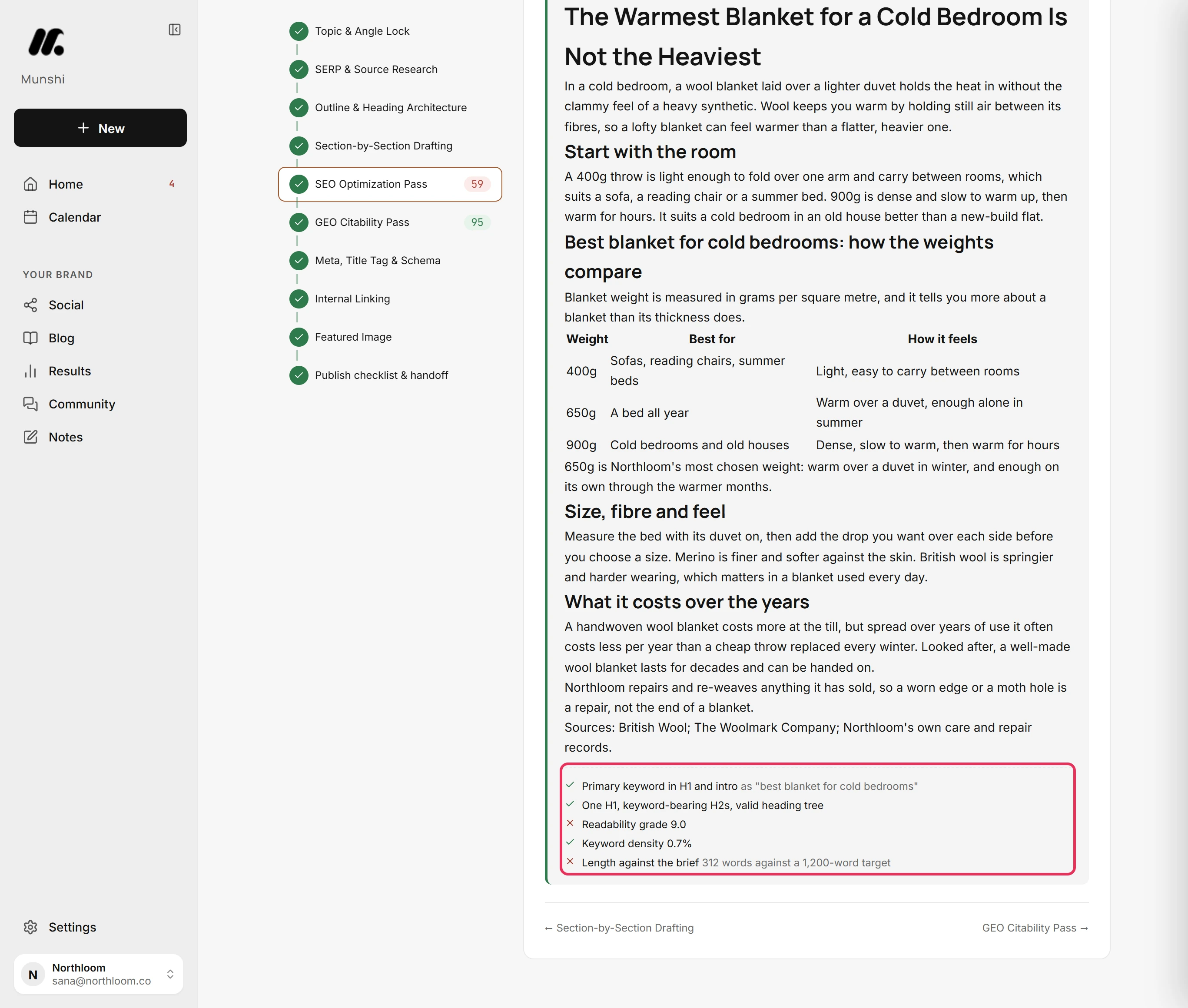
The SEO Optimization Pass looks at keyword placement and density, heading structure, length, readability and image alt text.
The GEO Citability Pass looks at what makes an assistant quote a page. It checks for a direct answer under each heading, figures a reader can check, named sources, hedge words and up-to-date data.
Each score shows its reasons. Open a scored step and every check is listed with a tick or a cross. Some carry a note, such as the draft's word count against its target. You see why it scored 82, and what to change to raise it.
Cover images made from your brand kit
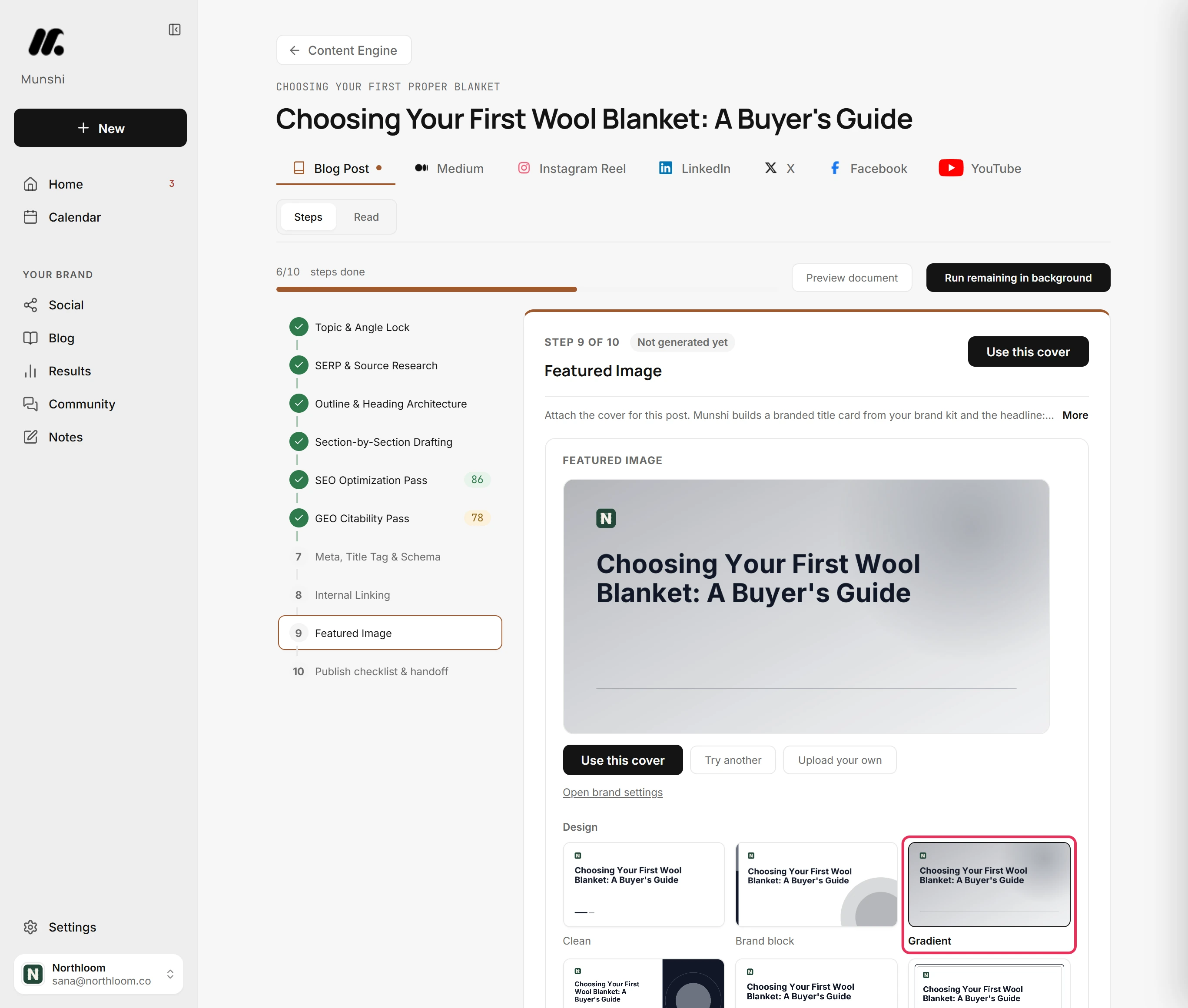
The Featured Image step makes a cover from your brand kit: your colours, your type and the article's title. You do not need to open a design tool.
Take it as it is with Use this cover. Or pick a different design, change the words, and set colour, size and position. To use a photo instead, click Upload your own.
The cover travels with the article. WordPress gets it as the featured image, Ghost as the feature image and Sanity as the main image. Webflow gets it in the collection's Image fields. Framer does not take it, so you add it there when you publish.
Step by step: How to choose a cover for an article
Nothing goes out until you approve it
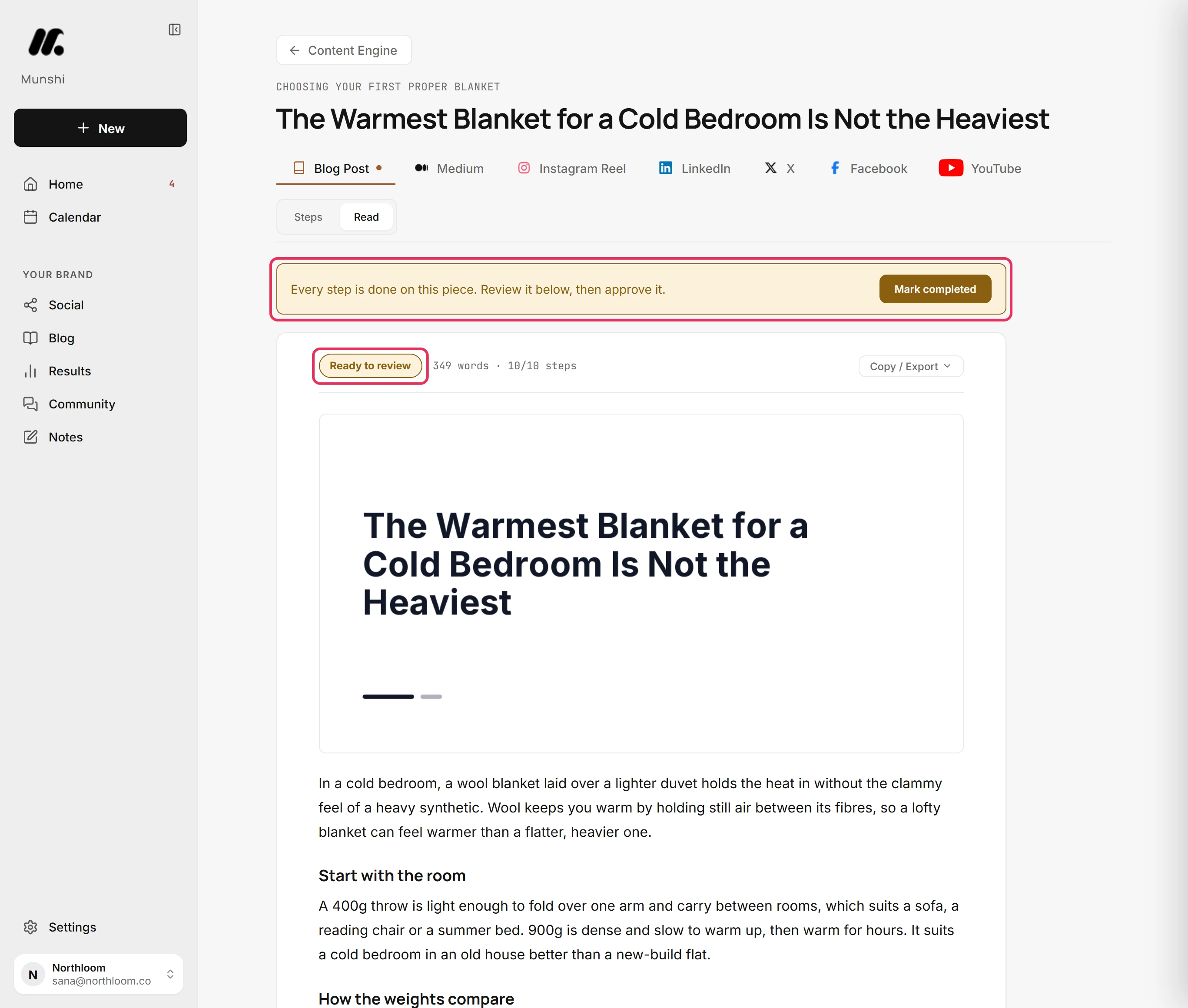
Every article waits for your approval before it can publish. A finished article shows up on Home under Also waiting on you, tagged Review.
Open it and it reads like the published page, with the cover at the top. The word count and the steps behind it are one click away. Change anything you like, then click Mark completed.
Approving does not publish. It moves the article to the Published tab, where you decide when and where it goes. If you change your mind, Un-approve puts it back in the pipeline.
This is the part we will not automate away. Your name is on the blog, so you get the last read.
Step by step: How to review, edit and approve an article
Publish to your CMS, now or on a schedule
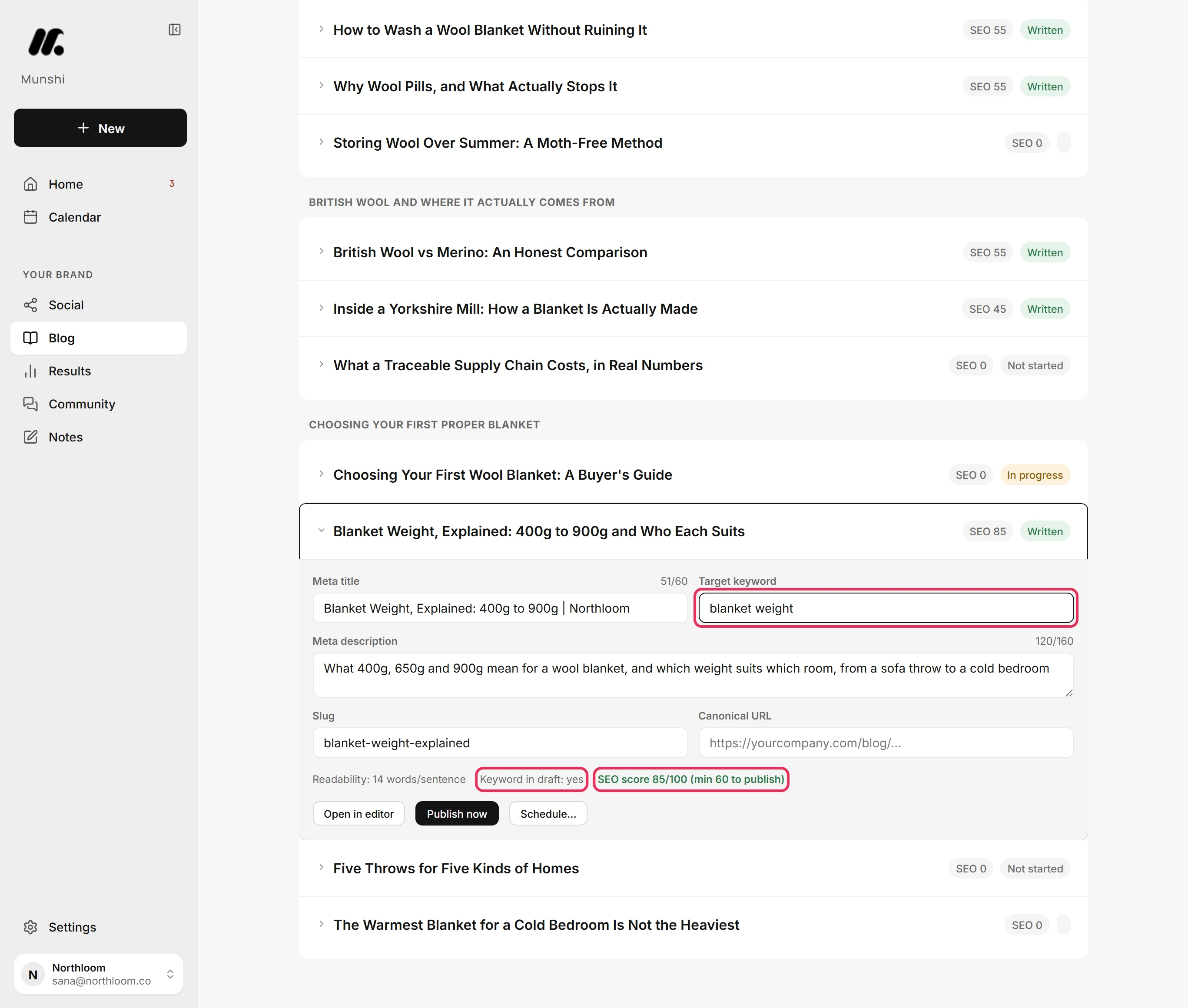
Munshi sends approved articles straight into your CMS, the tool your blog runs on. First, the article's SEO fields must reach 60 out of 100.
Those fields are meta title, meta description, target keyword, slug and canonical URL. Munshi fills the title, description and slug from the writer's own meta step. It shows the score as you type and keeps Publish now greyed out until it passes. This floor means nothing reaches your site with an empty description.
Then click Publish now or Schedule. Munshi writes the article into your CMS in that platform's own format. In WordPress the body arrives as blocks, so it edits normally, and its images are copied into your media library. There is no copy and paste step where the formatting breaks.
Step by step: How to set the SEO fields and publish, now or on a schedule
Has Google indexed your article?
Munshi asks Google for you. On the Published tab, every live article has a Check indexing button that asks Google about that one address.
The answer is Indexed, or Google's own reason if it is not, such as Discovered - currently not indexed.
With Search Console connected, each article shows its clicks and impressions from the last 28 days. The searches that are working feed back into the strategy map for the next round.
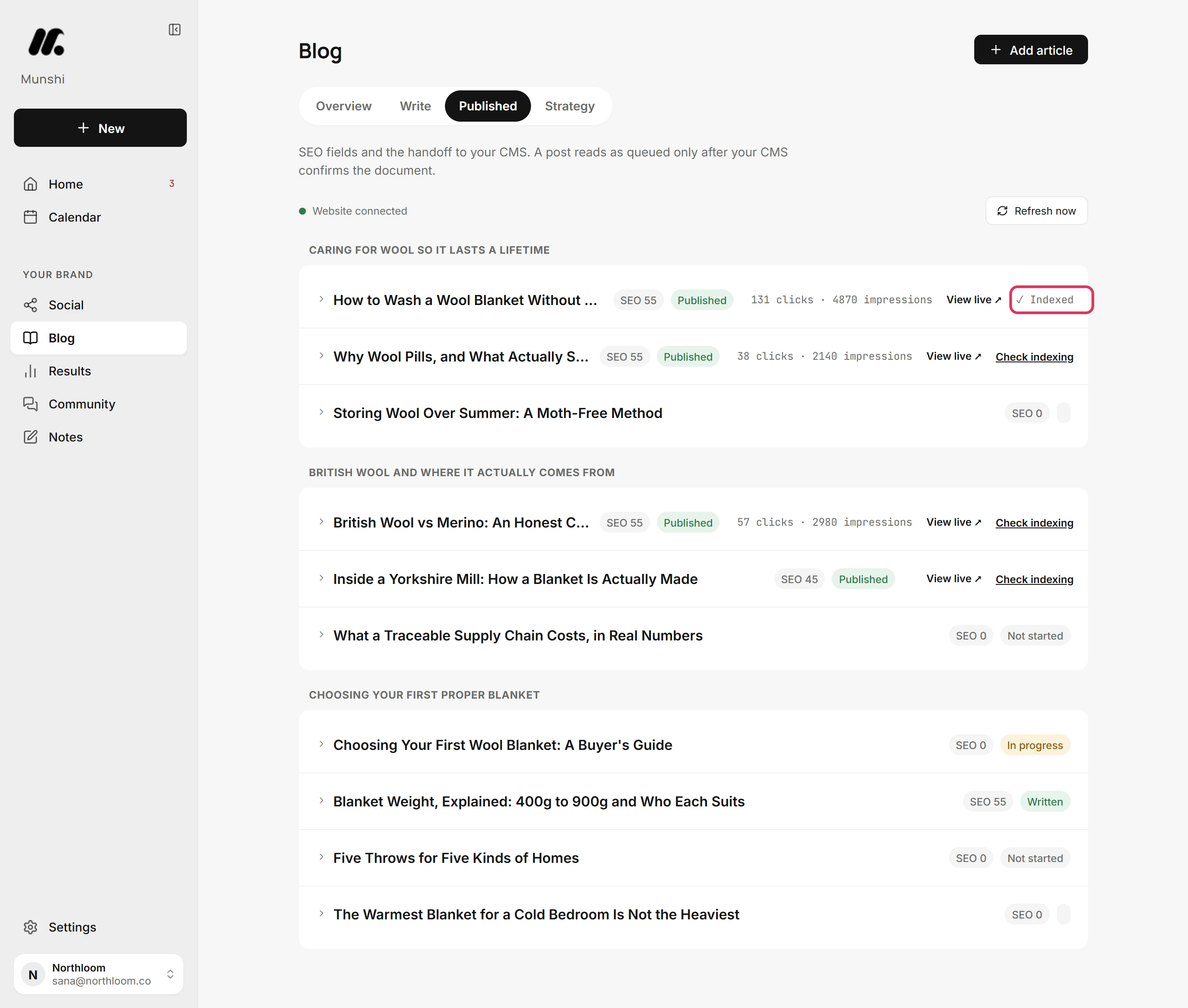
Step by step: How to check whether Google has indexed an article
How an article lands in each CMS
Each platform treats an incoming article differently. We would rather tell you here than have you find out on publish day.
| Platform | Publish now | Schedule | Cover image |
|---|---|---|---|
| WordPress | Saved as a draft you publish from WordPress | WordPress puts it live at the slot on its own | Featured image, uploaded to your media library |
| Ghost | Saved as a draft | Sent at the slot, still a draft until you publish it | Feature image, uploaded to Ghost |
| Webflow | Saved as a draft CMS item | Sent at the slot, still a draft until you publish it | Written into the collection's Image fields |
| Framer | Saved as a draft | Sent at the slot, still a draft until you publish it | Add it in Framer |
| Sanity | Goes live as a post document | Staged as a draft, published by Munshi at the slot | Main image, uploaded to your assets |
The full detail is in Draft or live: how an article lands in each CMS. Using a different platform? You can copy or export an approved article for any other platform.
How many articles you get
| Plan | Articles | Brands | Price |
|---|---|---|---|
| Free trial | 3 | 1 | Free for 14 days, no card |
| Founding | 15 a month | 1 | $15 a month |
| Studio | 45 a month, split however you like | 3 | $29 a month |
An article counts once, the first time Munshi writes it. Rewriting it does not count again. Deleting it does not give it back, and unused articles do not carry over. Each workspace also has a daily fair-use cap on generation, which resets at 00:00 UTC. See full pricing.
What it does not do
- It does not publish without you. There is no autopilot mode that posts to your site unread. Every article waits for your approval.
- It does not replace knowing your business. The drafts are as specific as your brief. A thin brief gets a generic article from any tool, this one included.
- It does not promise rankings. The scores check that the article is built the way search engines and AI assistants reward. Ranking also depends on your domain, your competition and time.
- It publishes to one blog at a time. A workspace sends its articles to the one blog you choose in Integrations, on the five platforms above. Other platforms work by copy or export. If your site runs on HubSpot, Drupal or Wix, StoryChief reaches it, and CoSchedule publishes articles you write to WordPress and HubSpot.
Questions people ask
What is an AI blog writer?
An AI blog writer is software that drafts blog articles with a language model. Munshi goes further: it plans topics from your keywords and writes each article in ten checked steps. It scores the draft for Google and for AI assistants. Then it sends the approved article to your CMS.
Will Google penalise AI-written articles?
Not for being written by AI. Google says it rewards helpful content however it is made, and acts against content made mainly to game rankings. What matters is whether the article answers the search better than the pages around it. Munshi grounds each article in a real keyword and your brief, and you approve it before it publishes.
What is a GEO score?
GEO means generative engine optimization: making a page easy for AI assistants to quote. Those include ChatGPT, Perplexity and Google AI Overviews. Munshi's GEO Citability Pass scores a draft out of 100. It checks for a direct answer under each heading, figures that can be checked, named sources and current data.
Can I edit what Munshi writes?
Yes, at every level. You can edit any of the ten steps by hand, regenerate a step, or restore the previous version. You can paste in your own research or outline and approve it as done, and edit the finished article before approving it. None of that uses another article from your allowance.
Which blog platforms does it publish to?
WordPress, Ghost, Webflow, Framer and Sanity. Ghost, Webflow and Framer get a draft you publish from their own dashboard. WordPress gets a draft when you publish now, and puts scheduled articles live on its own. Sanity goes live now or at the scheduled slot, and for anything else you can copy or export the article.
How long are the articles?
You choose. The target length is set for each article in its first step, and the guide example moves one from 1,500 words to 1,200. The SEO pass then checks the draft's word count against that target.
How many articles can I write a month?
Three during the 14-day free trial, and 15 a month on Founding at $15. Studio at $29 gives 45 a month, shared across three brands. An article counts once, when Munshi first writes it, and regenerating or editing is free.
How is this different from asking ChatGPT for a blog post?
ChatGPT writes the text you ask for and stops there. You still choose the keyword, check demand, structure the piece, write the meta fields and make a cover. Then you format it for your CMS, publish it, and check that it was indexed. Munshi does all of that around the writing, remembers your brand between articles, and turns the published piece into social posts.
Every part of the blog, step by step
Each one walks a single task through the real app, with a screenshot at every step.
- How to fill in your Brief 4 min · 9 steps
- How to build your blog strategy: focus areas, keywords and topics 3 min · 8 steps
- How to check demand for your keywords 1 min · 6 steps
- How to add a topic of your own to the plan 2 min · 8 steps
- How to write an article with the ten-step writer 5 min · 10 steps
- How to choose a cover for an article 2 min · 8 steps
- How to review, edit and approve an article 3 min · 7 steps
- How to set the SEO fields and publish, now or on a schedule 3 min · 10 steps
- Draft or live: how an article lands in each CMS 3 min read
- How to check whether Google has indexed an article 1 min · 5 steps
- How to read the Blog overview: this cycle, by focus area 3 min · 6 steps
- Blog results: queries, pages, clicks and position 3 min · 7 steps