Compare

Munshi vs CoSchedule

Munshi Social, the AI content marketing engine for small teams, side by side with CoSchedule. CoSchedule is a marketing calendar with social publishing built in. Blog posts, social messages, emails and events sit on one drag-and-drop calendar, and WordPress posts publish from it. It sells three plans today, Starter, Professional and Suite, with AI assistants for posts and campaigns on each one.

Pricing and features checked against coschedule.com/pricing, its product pages and its help centre on 30 September 2026

14-day free trial · No card required · 7-day money-back

Pick CoSchedule if your team writes and wants one calendar for the blog, social, email and events. That drag-and-drop calendar is the best part of the product, and Professional adds client calendars and a free approver role at $49 a month billed yearly. Pick Munshi if nobody has time to write, because Munshi does the writing for you. Both tools put blog articles on WordPress and posts on social networks. The difference is what arrives on the calendar. CoSchedule's AI drafts a post, a campaign or a first draft when you ask, and a person still finishes the article in WordPress. In Munshi, a keyword plan, 15 articles and 1,000 posts a month are the product, for $15 a month flat.

Weighing more than two tools? See the best CoSchedule alternatives in 2026, ranked by how much of the content work each one does for you.

What they sell
Starter, Professional and Suite calendar plans. Headline Studio and Hire Mia are separate products.
Public rating
4.4 on Capterra, from 106 reviews
Entry price
$29/mo billed yearly, $39 monthly: 1 user, 3 social profiles
Blog publishing
WordPress and HubSpot on every paid plan. You write the post.
X (Twitter)
$16 a profile a month, on top of any plan
Free trial
14 days on Starter and Professional, plus a free calendar with 1 profile

What each one actually does

Munshi CoSchedule
Starting price $15/mo founding price, locked for life (rises to $49 at launch) Starter $29/mo billed yearly or $39 monthly. Professional $49 or $59, and Suite is quoted from $69/mo
What that buys The whole engine: strategy, 15 SEO articles a month, 1,000 posts a month, publishing, analytics 1 user, 3 social profiles ($5/mo each after that), unlimited scheduling, WordPress and HubSpot blog scheduling
Writes your content? Yes: plans, writes, and grades articles and posts for you AI assistants draft posts, whole social campaigns and first-draft copy when you ask. A person decides what to write and finishes it
Blog articles to your site? Yes: WordPress, Ghost, Webflow, Framer, or Sanity. Articles arrive as drafts you publish from your CMS, except on Sanity, which goes live Yes, on every paid plan: WordPress, on as many sites as you like, and HubSpot. You write the post, and CoSchedule publishes it on its date
Keyword & content strategy Included: keyword research and a weekly plan you approve None built in. Headline Studio Premium, a separate product, suggests keywords for headlines
Social networks 8 networks: Instagram, TikTok, LinkedIn, Facebook, Pinterest, Threads, YouTube, Bluesky 10 networks, including Google Business Profile and Mastodon. X is extra, at $16 a profile a month
Approval workflow One weekly approval batch. Nothing ships without your yes Social approvals on Professional and Suite, with a free Approver role. Project approval workflows on Suite
Analytics Every channel in one dashboard, captured daily Social reports on every paid plan, AI insights from Professional. No website or search analytics
Free trial 14 days, full engine, no card required 14 days on Starter and Professional, plus a free calendar: 1 profile and 15 scheduled posts

The rows above, as screens

A comparison table is a set of claims, so here are four screens from the app itself. They show who writes the content, how one idea reaches each network, where the week sits, and what comes back afterwards.

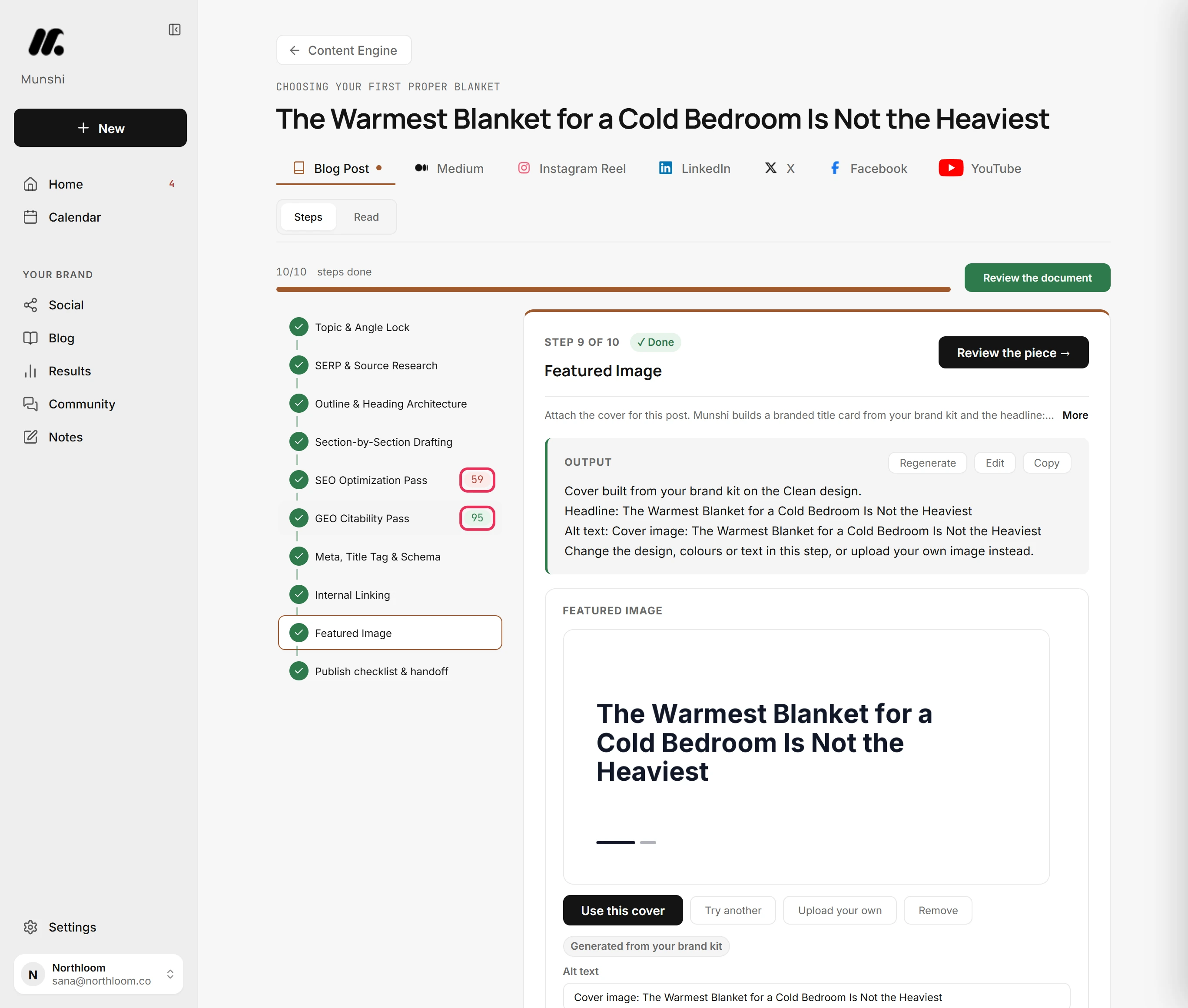
The Munshi article writer with ten steps ticked, SEO Optimization Pass 59, GEO Citability Pass 95, and the Featured Image step open.
Who writes it: ten steps you can read one at a time, two of them scores out of 100.
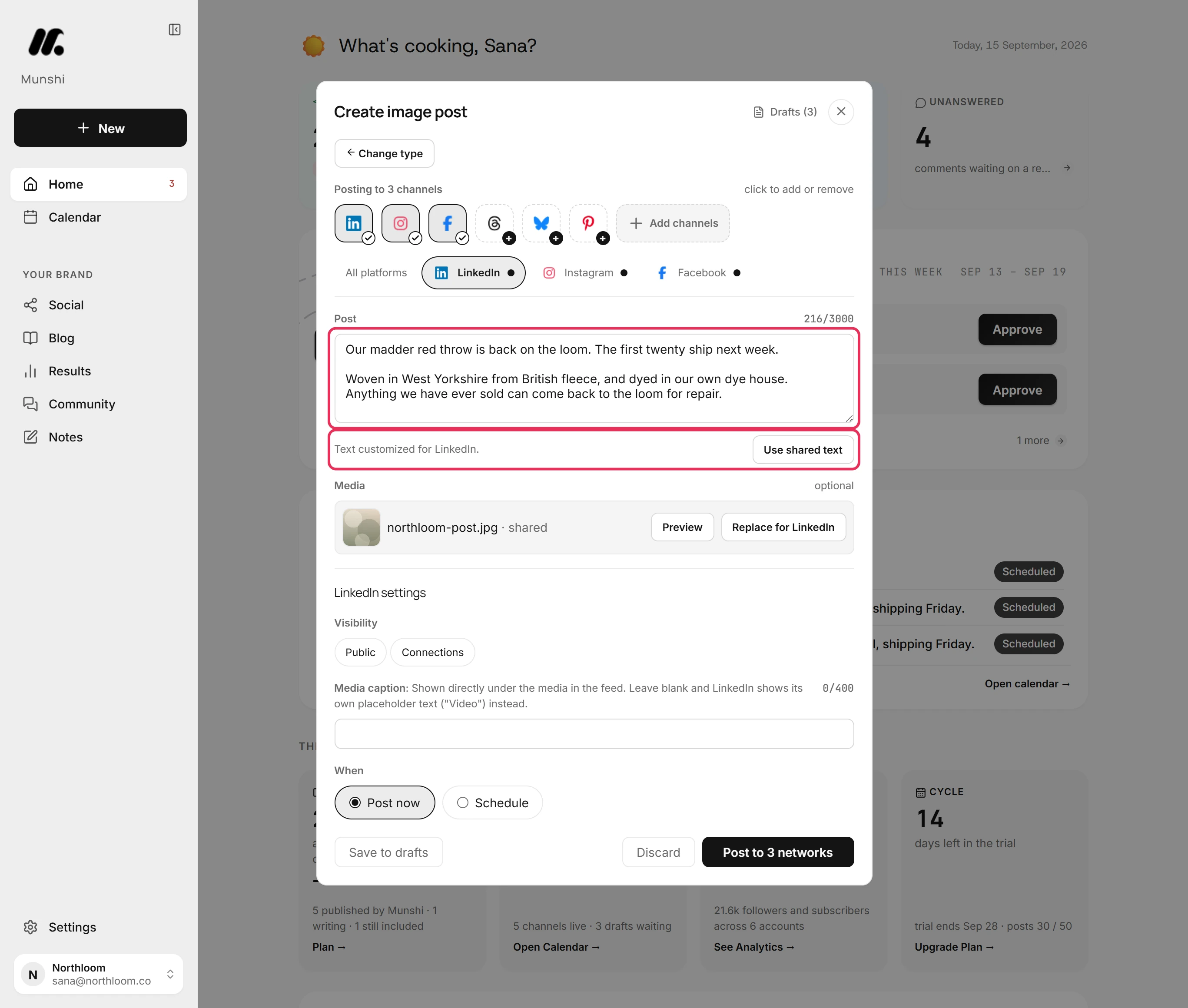
The Munshi composer posting to LinkedIn, Instagram and Facebook, with the LinkedIn tab open, its own caption, and a Use shared text button.
One post gets a tab for each network you picked. Reword the LinkedIn tab and Munshi marks it customized. One button puts the shared text back.
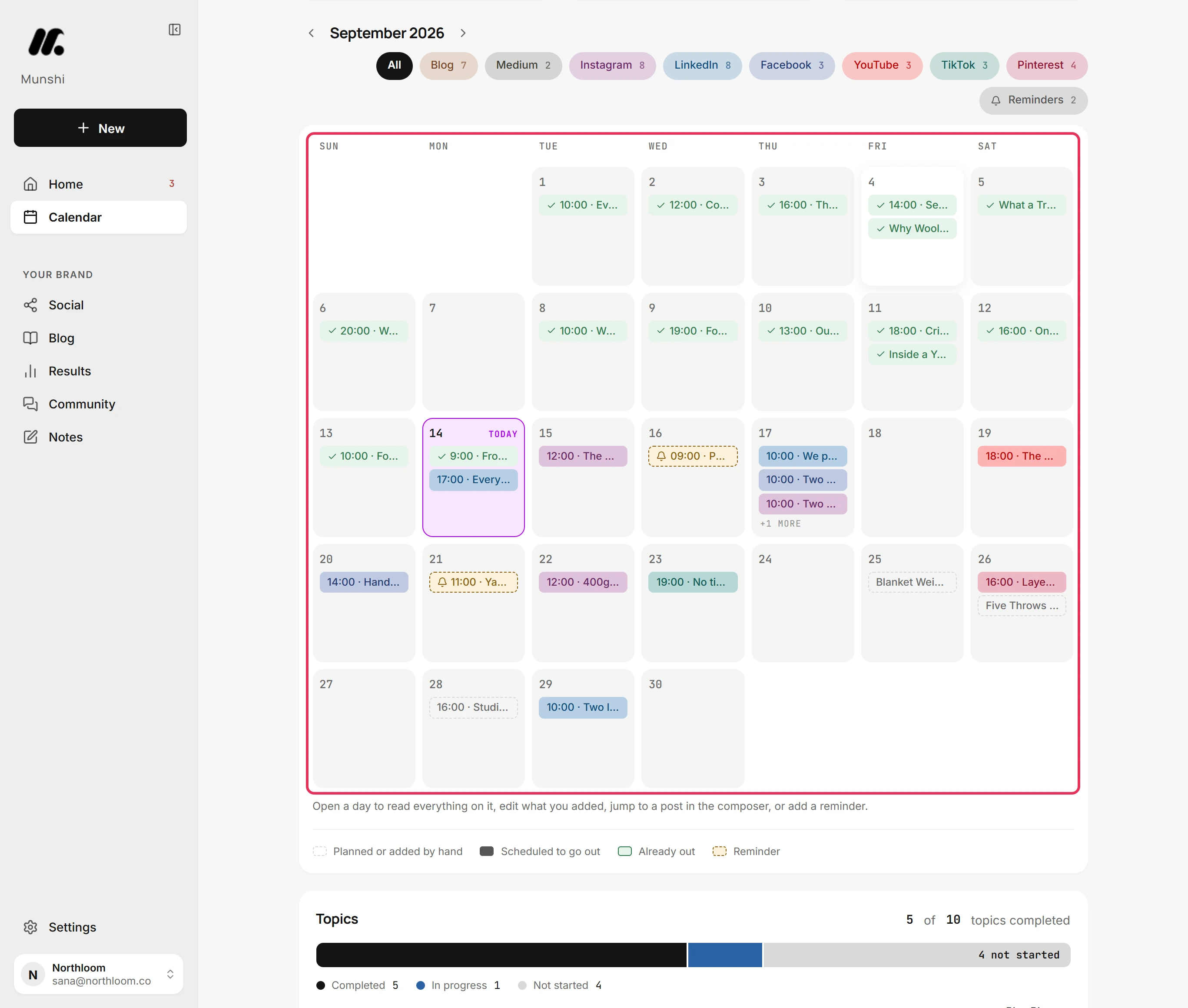
The Munshi calendar for September 2026, with posts and articles on most days, a filter for each channel and a colour key.
Where the week lives: the blog and every connected channel on one month, colour-coded by state.
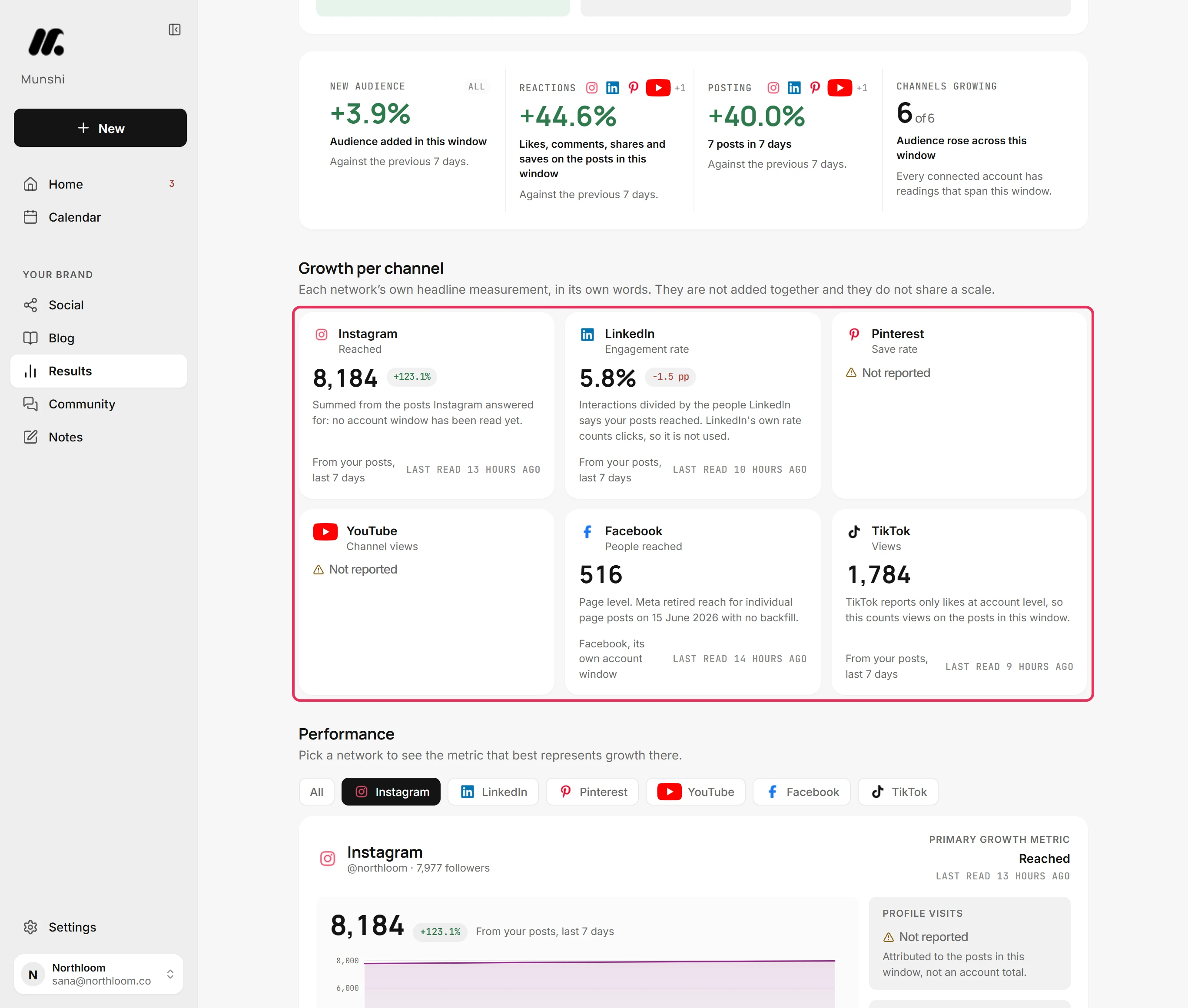
Munshi Results, growth per channel: Instagram reached 8,184, LinkedIn engagement rate 5.8%, Facebook 516 people reached, TikTok 1,784 views, Pinterest and YouTube Not reported.
What comes back: one card per network, in the measure that network reports. Each card shows when it was read, and says Not reported where the network gives nothing.

Scheduling an article into WordPress, the job CoSchedule users know

The article is already written and scored, so the only work left is checking the SEO fields and picking a date. It runs 70 seconds and was recorded in the real app. The written steps are in the guide, and the film is also on YouTube.

The differences that decide it

Every comparison on this site answers the rows above. These rows matter only when two tools are this close.

Munshi CoSchedule
Who writes the content Munshi does. It drafts articles and posts from the keyword map you approved, using your company profile for positioning. They are ready before you open the app. You do, with help. The AI Social Assistant, AI Campaign Assistant and AI Project Assistant draft when you prompt them, and a person owns the finished piece.
How the AI is metered By finished output: 15 articles and 1,000 posts a month, with no credit balance to watch. It is not metered. The three AI assistants are unlimited on every paid plan, and you can choose OpenAI or Anthropic models to run them.
Cheapest route to a published blog article $15/mo, and the article is written for you. $29/mo on Starter billed yearly, or $39 monthly. The calendar schedules the WordPress post, and you write it.
Keyword and content strategy Included: keyword research, focus areas and a weekly plan you approve. Not built in. The AI Campaign Assistant plans the timing of one campaign you describe. Keyword suggestions live in Headline Studio Premium, which is sold separately.
How the blog post gets to your site Munshi writes each article into your CMS, formatted for that platform. Ghost, Webflow, and Framer receive it as a draft you publish from your own dashboard. WordPress receives a draft too, but a scheduled article goes live at its set time. Sanity articles go live on schedule. A WordPress plugin syncs each post's title, date and status with the calendar, and the post publishes at the time you set. The body is edited in WordPress, or converted from a CoSchedule text editor or Google Doc.
Blog destinations 5: WordPress, Ghost, Webflow, Framer, Sanity WordPress (self-hosted, or WordPress.com on its Business plan or higher) and HubSpot blog posts and pages.
Social networks 8, with no per-channel fee: Instagram, TikTok, LinkedIn, Facebook, Pinterest, Threads, YouTube, Bluesky. X is coming soon. Facebook, Instagram, LinkedIn, Pinterest, TikTok, Threads, YouTube, Bluesky, Mastodon and Google Business Profile. X costs $16 a profile a month extra.
Accounts per network One account per network per workspace. Studio gives three brands, each with its own set. As many as you pay for: 3 profiles on Starter and 5 on Professional, then $5/mo each. Suite has no profile limit.
Seats and roles Two per workspace, owner and member. There is no third seat. 1 user on Starter, 2 on Professional with a third at $29/mo, and unlimited on Suite with custom permissions.
Approval workflow One weekly batch you clear in one sitting. Nothing unapproved publishes, but there is no separate approver login for a client. Social message approvals on Professional and Suite. An Approver role takes no seat and costs nothing, which suits client sign-off.
Analytics Search Console, Google Analytics and every connected network on one Results page. It refreshes through the day and flags a broken connection. Social reports on every paid plan. Professional adds AI insights, custom dashboards and white-label reports. The Google Analytics link only adds UTM tags, so blog traffic is read in Google Analytics itself.
Social inbox Comments on six networks and replies on four. No direct messages. Comments, mentions and direct messages. Facebook and Instagram only on Starter, all networks from Professional.
Evergreen recycling Not offered. Past posts you import go to Results to be measured, not back into a queue. ReQueue fills gaps in the schedule with your best past messages, from 5 groups on Starter to 10 on Professional.
Billing and refunds $15 a month, or $144 a year. Cancel any time through the Paddle billing portal, with 7-day money back on a first payment. Monthly or yearly on Starter and Professional. Monthly fees are never refunded, and yearly plans are refundable within 14 days of renewal. Suite has a 12-month minimum.
Track record Munshi launched in 2026. The team is small and the history is short, and we would rather you knew that. Public reviews on Capterra go back to 2016, and the product has a mobile app, a Chrome extension and an enterprise tier with SSO.

Every plan, both sides

These are published list prices, not what a sales call gets you. We re-check them whenever either vendor changes a price, and the date is at the top of this page.

CoSchedule plans in full

Plan Billed yearly Billed monthly Users Social profiles X profiles Blog to WordPress
Free Calendar$0$011, with 15 scheduled posts at a timeNot availableNot listed on the pricing page
Starter$29/mo$39/mo1, no more can be added3, then $5/mo each$16/profile/moYes
Professional$49/mo$59/mo2, plus a third at $29/mo5, then $5/mo each$16/profile/moYes
SuiteFrom $69/mo, quotedNot offeredUnlimitedUnlimitedAdd-onYes

Suite is sold on a 12-month minimum term. Other add-ons: the Actionable Marketing Institute course library is $50/mo on Starter and Professional and $100/mo on Suite, and brand voice training is an add-on on Suite only. Headline Studio Premium and Hire Mia are separate subscriptions. Nonprofits get 30% off paid plans. The pricing page describes the free calendar as up to 15 posts per profile, and the help centre as 1 profile and 15 posts at a time.

Munshi plans in full

Plan Billed yearly Billed monthly Users Social networks X Blog articles
Founding$144/yr$15/mo28, one account eachComing soon15/mo, written for you
Studio$288/yr$29/mo2 per workspace8 per brand, 3 brandsComing soon45/mo across 3 brands
EnterpriseCustomCustom2 per workspace8 per brandComing soonSet with the plan

Founding pricing is locked for life on the plan and billing cycle you join. Later price rises apply only to new members. Founding includes 1,000 posts a month and Studio 3,000 shared across its three brands, with no per-channel fee. Articles publish to WordPress, Ghost, Webflow, Framer, or Sanity.

Three situations, with the arithmetic

These are list prices, multiplied out. Do the same sum for your own team before you believe either of us.

A solo owner with a WordPress blog and eight networks

One person and one brand, posting to the same eight networks Munshi supports, with an article going out most weeks.

CoSchedule $54/mo Starter billed yearly: $29 for 3 profiles plus 5 more at $5 each. Billed monthly it is $64. Blog posts schedule to WordPress, and you write them.
Munshi $15/mo Founding. The keyword plan, 15 articles, the posts, WordPress publishing and analytics are all in the base plan.

CoSchedule's price buys a calendar and unlimited AI prompts, and Munshi's buys finished work. If you also post to X, CoSchedule can do it for $16 a month more, and Munshi cannot connect X yet.

A three-person marketing team

A manager, a writer, and someone who approves before anything ships.

CoSchedule $78/mo Professional billed yearly: $49 for two users plus a third at $29 ($88 billed monthly). It includes 5 profiles, user roles and social approvals.
Munshi $15/mo, but only two seats Munshi caps a workspace at two seats, and the only roles are owner and member.

Here CoSchedule is simply the better tool. Professional gives three people their own logins, and Suite removes the limit and adds custom permissions and approval workflows. Munshi cannot give a third person a login at any price.

An agency with four clients

Four brands with Instagram, Facebook and LinkedIn each, and every client signs off before posts go out.

CoSchedule $84/mo Professional billed yearly: $49 for 5 profiles plus 7 more at $5 each ($94 billed monthly). You get client calendars, white-label reports and Approver logins that take no seat.
Munshi $58/mo Two Studio plans cover six brands, each with its own networks, writing and results. There is no approver login for the client, so the sign-off is yours.

Munshi costs less and writes the content, but client sign-off is the reason agencies buy CoSchedule Professional. If each client must approve posts in the tool, CoSchedule fits and Munshi does not.

Pick CoSchedule if…

  • Your team writes, and you want one drag-and-drop calendar for the blog, social, email and events
  • You run an agency and need client calendars, white-label reports and a free Approver role for client sign-off
  • You post to X, Google Business Profile or Mastodon, or run several accounts on one network
  • You answer direct messages from a social inbox, and you want a mobile app
  • Evergreen recycling matters: ReQueue fills gaps in the schedule with your best past posts
  • Three or more people need their own logins, roles and approval workflows

Pick Munshi if…

  • Nobody on the team writes, and a calendar full of empty slots does not help you
  • You want a keyword plan behind the blog, not only a date on a calendar
  • You want 8 networks at $15 a month flat, not $5 for every profile past three
  • You want blog search numbers and social numbers on one page
  • Your blog runs on Ghost, Webflow, Framer or Sanity, which CoSchedule does not publish to
  • You would rather clear one weekly batch than run a project workflow

Where each one falls down

A comparison written by one of the two tools is worth reading only if it is willing to lose a row. Here are both lists.

What reviewers flag about CoSchedule

  • Many reviewers call it pricey for a small business or a small blog, and some say the tools they wanted sat on a higher plan.
  • The learning curve is long. Reviewers describe the interface as overwhelming, dated or clunky when linking projects and tasks.
  • Social connections drop. Older reviews mention repeated LinkedIn sign-outs, and a 2026 review says Meta updates break the connection.
  • The WordPress link needs setup care. One reviewer calls it finicky, and WordPress.com sites need a Business plan or higher to use the plugin.
  • A handful of Trustpilot reviewers from 2024 to 2026 report slow support and trouble stopping charges after cancelling.

Public reviews on Capterra (2016 to 2025) and Trustpilot (2022 to 2026), read 30 September 2026

What we will tell you about Munshi

  • Two seats per workspace, and the only roles are owner and member. There is no free approver login for a client, as CoSchedule Professional has.
  • One account per network per workspace. X cannot be connected yet, and Google Business Profile and Mastodon are not offered.
  • Five blog destinations (WordPress, Ghost, Webflow, Framer, or Sanity). HubSpot is not one of them.
  • No direct messages, no evergreen recycling, no mobile app, no link-in-bio page, no Instagram grid preview and no free plan. CoSchedule has every one of these.
  • A small team launched Munshi in 2026. The track record is short, and you should price that in.

Written by the people who build Munshi, September 2026

Munshi and CoSchedule, answered

How much does CoSchedule cost?

Starter is $29 a month billed yearly, or $39 monthly, for one user and three social profiles. Professional is $49 a month billed yearly, or $59 monthly, for two users and five profiles. Extra profiles are $5 a month each, and X profiles are $16 a month each on both plans. Suite is quoted, from $69 a month, on a 12-month minimum term. Prices checked on coschedule.com/pricing on 30 September 2026.

Does CoSchedule have a free plan?

Yes, a free calendar. CoSchedule's help centre says it connects one social profile and holds no more than 15 scheduled or drafted posts at a time, with no X. It leaves out social analytics, bulk scheduling, ReQueue and the AI marketing assistant, so it is a way to try the calendar rather than run your content.

Does CoSchedule publish blog posts to WordPress?

Yes, on every paid plan, and on as many self-hosted WordPress sites as you like. A plugin syncs each post's title, date and status with the calendar, and the post goes live at the time you set. The body is written in WordPress, or converted from a CoSchedule text editor or Google Doc. It also schedules HubSpot blog posts and pages. WordPress.com sites need WordPress's Business plan or higher.

Does CoSchedule's AI write blog posts?

It writes first drafts when you ask. The AI Project Assistant drafts copy inside a project, the AI Social Assistant writes social messages, and the AI Campaign Assistant builds a whole social campaign from a description or a link. All three are unlimited on paid plans. What it does not do is decide what to write: there is no keyword plan, and a person takes the draft into WordPress to finish it. Munshi plans the keywords, writes the articles and grades them before you see them.

Does CoSchedule do keyword research or SEO?

Not inside the calendar. Keyword suggestions, an SEO score for headlines and competitor analysis are in Headline Studio Premium, which is a separate product with its own subscription, and it works on headlines rather than a content plan. Munshi's keyword research, focus areas and weekly plan are part of the base plan.

Why does X cost extra on CoSchedule?

CoSchedule says X is the only network charging it significant fees for API access, so X profiles are sold separately at $16 a profile a month and do not count toward your included profiles. Munshi cannot connect X at all yet. It is coming soon, so if X matters today, CoSchedule is the one that posts there.

Does CoSchedule bill monthly, and does it refund?

Starter and Professional bill monthly or yearly. CoSchedule's policy is no refunds on monthly plans, and yearly self-serve plans are fully refundable within 14 days of renewal. Suite has a 12-month minimum. Munshi bills monthly at $15 or yearly at $144, with 7-day money back on a first payment.

How long is the CoSchedule free trial?

Fourteen days on Starter or Professional, and the free calendar stays free after that. Munshi's trial runs 14 days with 3 real articles and 50 posts, and no card.

Is CoSchedule good for agencies?

Yes, it is one of its strengths. Professional, at $49 a month billed yearly, includes client calendars, white-label reports and social approvals, and an Approver login takes no seat. The catch is people: Professional allows three users, so a bigger team moves to Suite, which is quoted on a 12-month term. For client sign-off, CoSchedule is the stronger tool.

What are Headline Studio and Hire Mia?

Both are CoSchedule products sold apart from the calendar. Headline Studio scores and suggests headlines, and its Premium tier adds keyword suggestions. Hire Mia is an AI writing assistant with brand profiles that can plug into the calendar's AI tools. CoSchedule's pricing page lists both as requiring an additional plan.

Can I move from CoSchedule to Munshi?

Yes. There is no importer, but your WordPress posts live on your site, and CoSchedule's help centre says disconnecting WordPress does not delete them. Disconnecting does remove the WordPress projects, their social messages and sharing analytics from CoSchedule, so export what you need first. Then connect WordPress and your networks to Munshi and approve a first strategy, which takes about an afternoon.

Does Munshi write the articles, or just help me write them?

It writes them. Each article targets a keyword from the strategy you approved. It is graded for classic search and for AI answer engines before you see it. Then it lands in a weekly batch for you to approve or send back, and nothing publishes without your yes.

More on what Munshi does: the blog engine · cross-posting · analytics · pricing

Where every figure on this page comes from

Each CoSchedule price, plan limit and feature above was read on CoSchedule's own pages, or on the review site named, on the date shown. If CoSchedule has changed something since, its page is right and this one is out of date.