On this page16 sections
What Munshi Social does
Munshi Social, the AI content marketing engine for small teams, is one web app for the whole content cycle of a small business. It reads your website and plans what to publish. Then it writes the blog articles and the social posts.
It sends articles to your blog platform and posts to your social accounts on a schedule. It brings in comments from the networks that report them, and it shows what everything earned. A person approves the work before anything goes out.
It is built by Dojo Labs LLC. There are two monthly plans, at $15 and $29, and a 14 day free trial that needs no card.
The sidebar shows how the product is laid out. Home shows what needs your yes this week, and Calendar shows everything booked. Social holds drafts and scheduled posts, and Blog holds the strategy and the articles.
Results holds the numbers. Community holds comments waiting for a reply. Notes holds what you jot down between sittings.
Munshi is built around one sitting a week. You clear what needs your yes, check the blog, fill the social week, answer comments and read the results. The rest of the week runs on the schedule you approved.
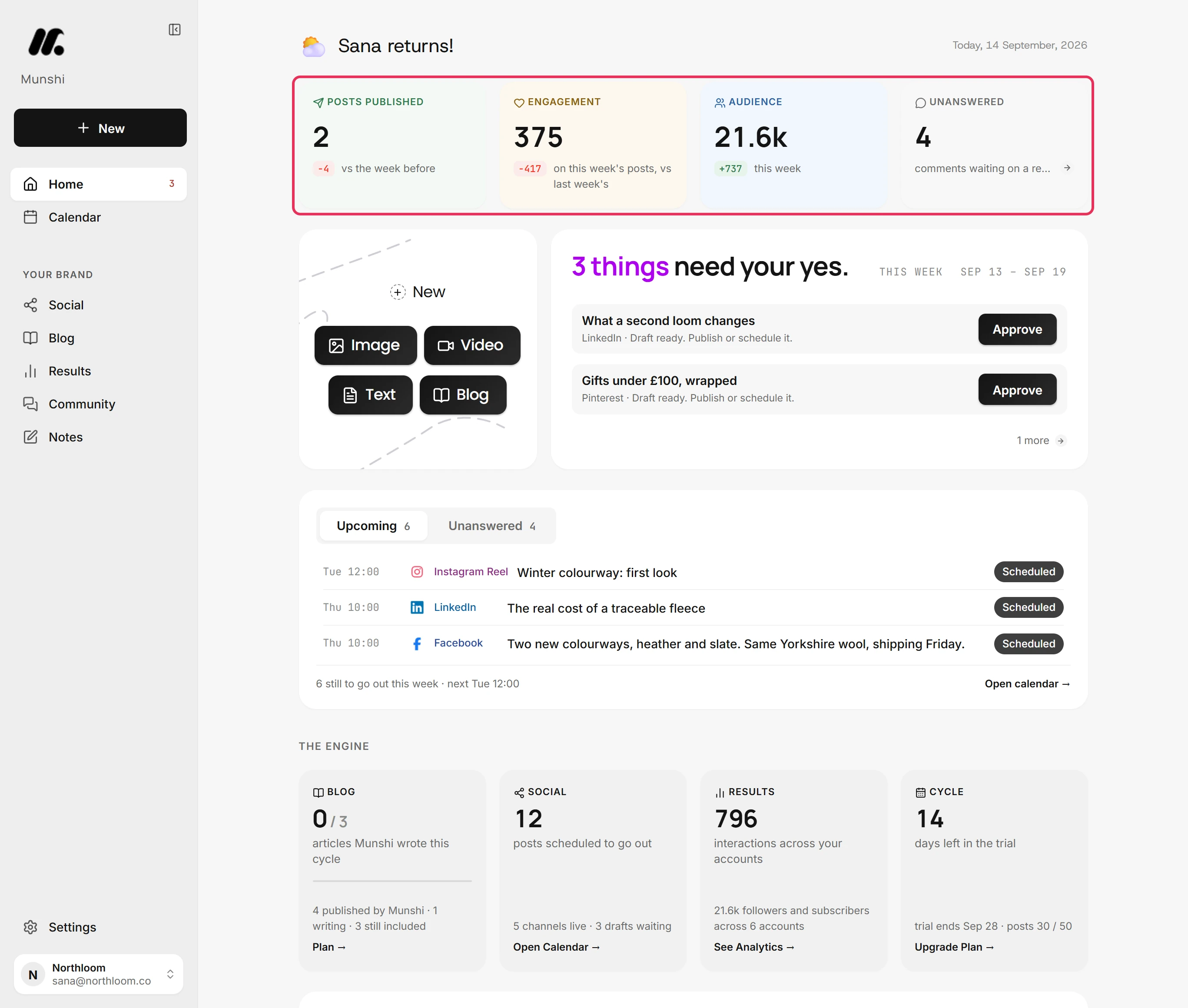
Step by step: Twenty minutes a week: the routine
Who is Munshi Social for?
Munshi is for a business where nobody owns the marketing. That could be a solo founder, a team of a few people, or a freelancer or small agency running content for a handful of clients.
Usually the plan lives in someone's head and the writing happens in bursts. In most weeks, it does not get done at all.
Studio is the plan for more than one brand. It holds up to three workspaces on one subscription, each with its own connected accounts, calendar and strategy. All three share one pool of 45 articles and 3,000 posts a month.
Past three brands, an Enterprise agreement sets the numbers to match your publishing calendar.
Munshi is not for everyone. If your team already writes all the content and only needs it queued, a scheduler is cheaper and simpler.
If you want content to go out without a person reading it first, Munshi is the wrong tool. Approval is not a setting you can turn off. A workspace also holds one account per network, so two Instagram accounts need two workspaces.
Step by step: How to run several brands on one Studio plan
How does Munshi plan what to publish?
Munshi plans from your website. Type your domain and click Scan my site. Munshi reads your homepage for your company name, what you sell and your brand, and reads your blog at the same time.
It comes back with Does this look right? already filled in. You pick a tone under How it should sound. Your brand colours and font appear under Your brand, and article covers are drawn from them.
You can edit everything it guessed. A business with no website can fill in the same fields by hand.
Next, Munshi tells you what it found. That might be a blog that has gone quiet, or articles with no meta description for AI search to quote. Then it offers a first move: Plan my blog coverage or Post to social now.
The plan covers three months. It branches from your company into focus areas, with a number of articles under each.
This map keeps every later article on topic. Each article Munshi writes is tied to a focus area and a keyword. You can edit the strategy at any time on the Strategy tab of the Blog.
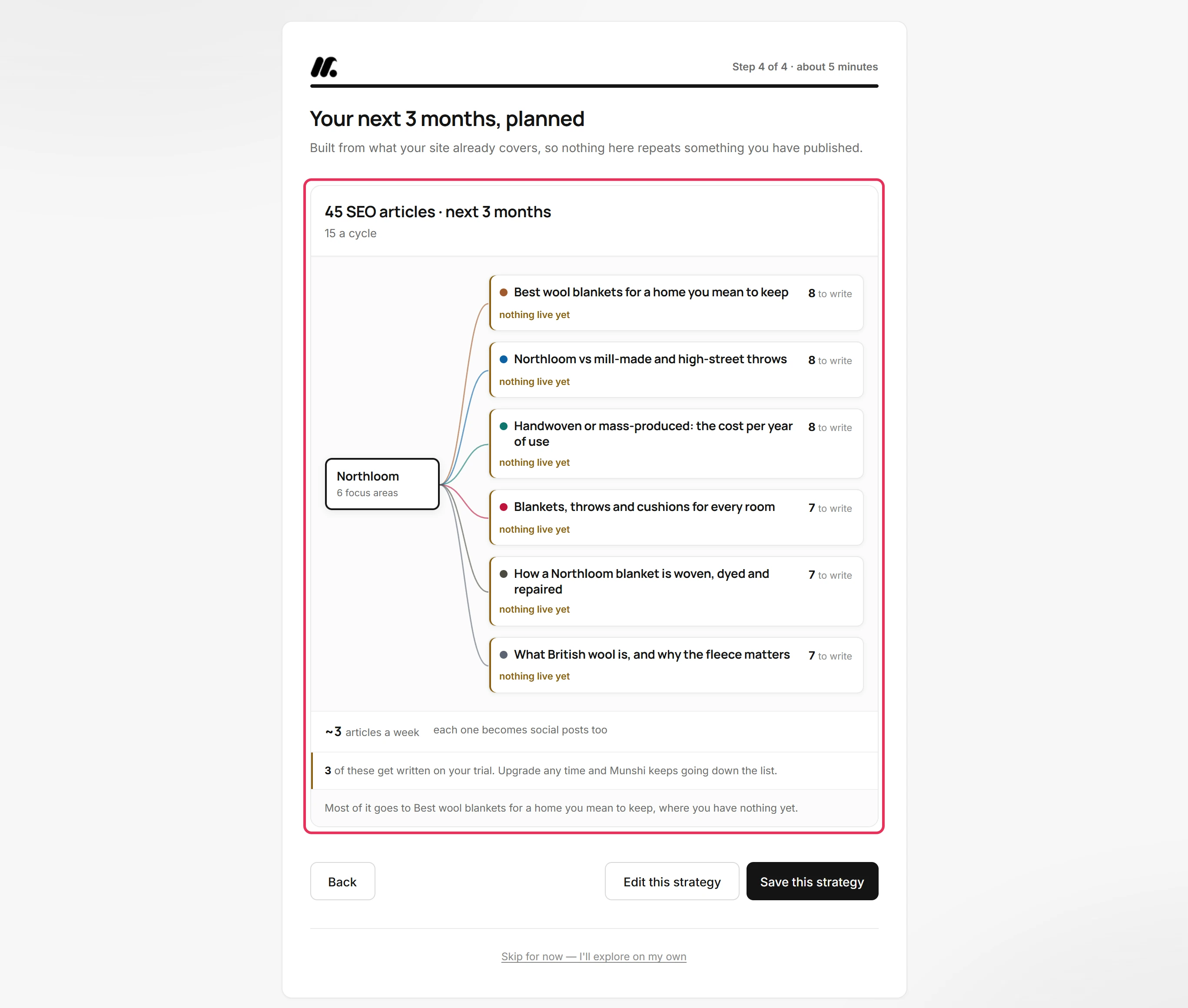
Step by step: How to set up your workspace from your website
How does Munshi write a blog article?
Munshi writes each article in ten steps, and you can read each step on its own. The first five are Topic & Angle Lock, SERP & Source Research, Outline & Heading Architecture, Section-by-Section Drafting and SEO Optimization Pass.
The last five are GEO Citability Pass, Meta, Title Tag & Schema, Internal Linking, Featured Image and Publish checklist & handoff.
You can regenerate any step, edit it by hand, or fill it with your own notes and approve it as done. Run remaining in background writes the rest while you do something else.
Two of the steps give a score out of 100. The SEO pass grades keyword placement, headings, length, readability and alt text. The GEO pass grades what makes an AI assistant quote a page.
That means a direct answer under each heading, figures a reader can check, named sources and current data. Open a scored step to see every check with a tick or a cross, so each score comes with its reasons.
When the bar reads 10/10 steps done, the article is finished but not yet published. It waits under Review until you read it and mark it completed. Social posts made from it start from the article's own short answer.
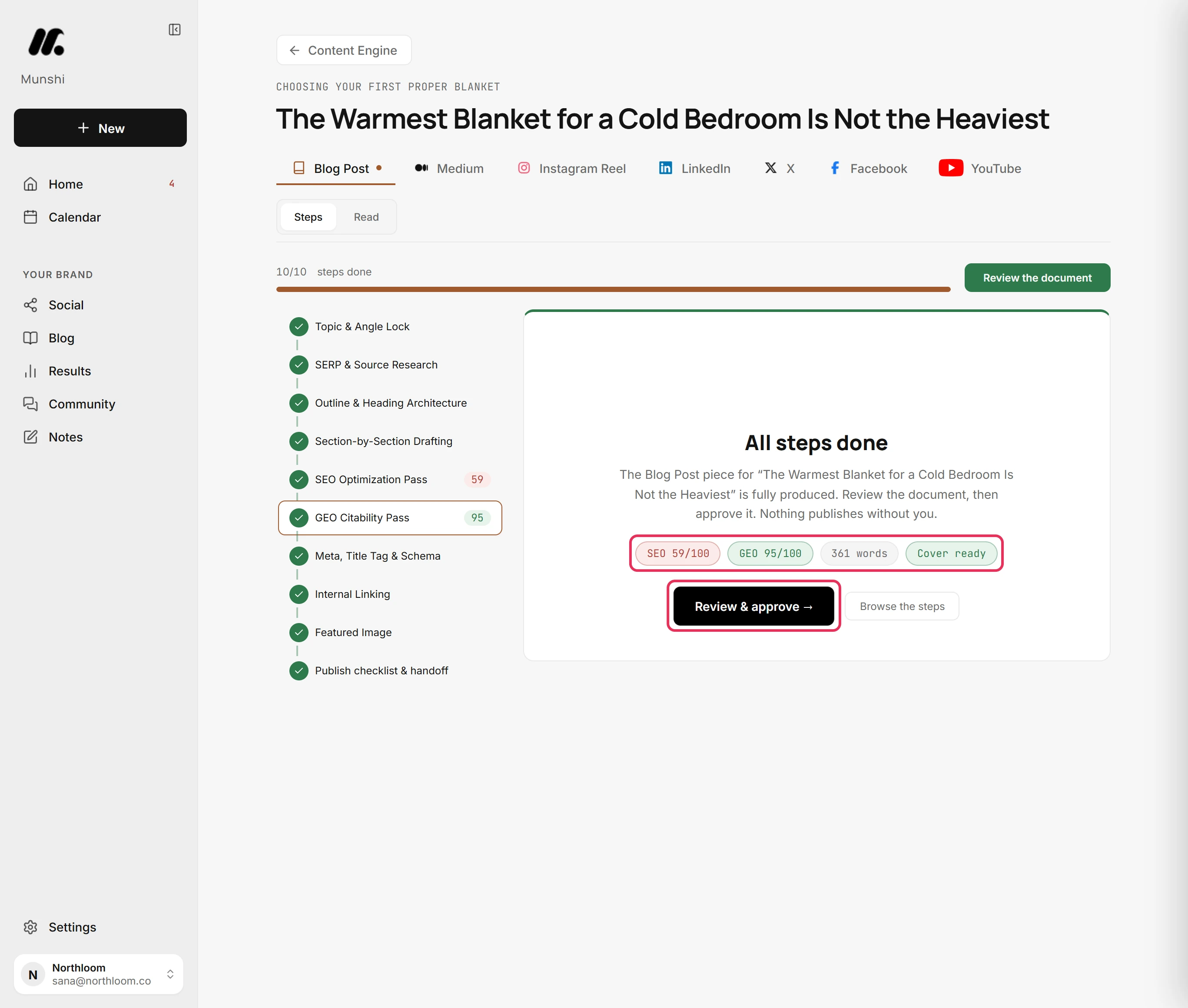
Step by step: How to write an article with the ten-step writer
How does Munshi publish articles and posts?
Approved articles go to the blog platform you chose in Integrations. Before an article can go, its SEO fields must reach 60 out of 100.
Those fields are meta title, meta description, target keyword, slug and canonical URL. The writer has already filled the first three. Then you choose Publish now or Schedule.
Munshi writes each article into your CMS, formatted for that platform. Ghost, Webflow, and Framer receive it as a draft you publish from your own dashboard. WordPress receives a draft too, but a scheduled article goes live at its set time. Sanity articles go live on schedule.
Social posts work the same way. The composer takes one idea and gives each network its own tab. Optimize per platform rewrites the caption for each one.
You can turn an article you have written into a draft post for each channel in a couple of clicks. Each channel gets a tick once it has a post, so nothing is offered twice.
Everything lands on the calendar. It has Month, Week and Day views, and a pill for each channel to show or hide it.
A key under the grid tells apart Planned or added by hand, Scheduled to go out, Already out and Reminder. Open a day to unschedule a post, reopen it in the composer, or add something to that day.
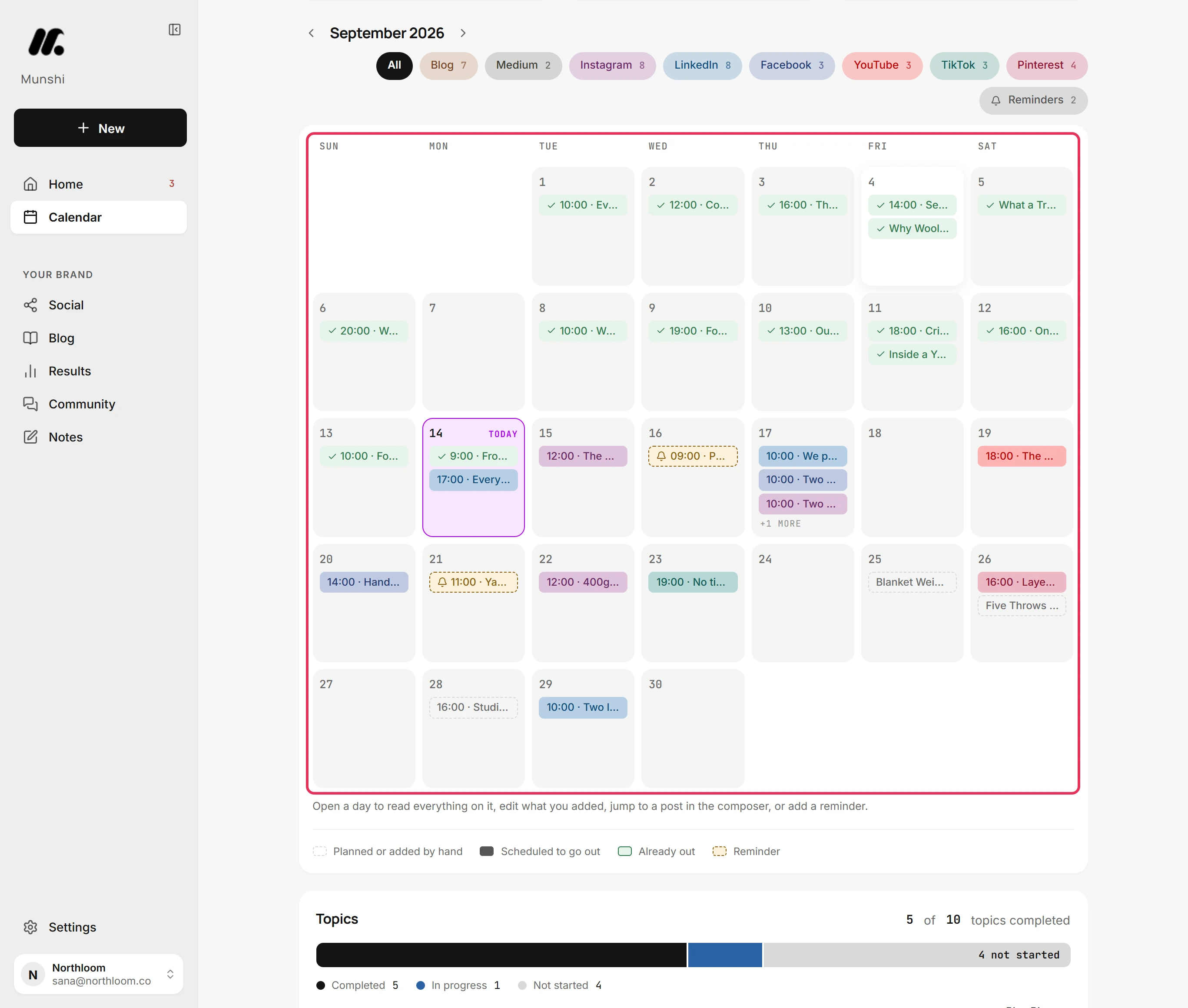
Step by step: How to read the calendar: day, week, month
How does Munshi measure results?
Results shows what each channel earned. It opens on Overview over 7 days, 30 days, 90 days or a custom window that can start up to 365 days back.
The Social card counts what went out, what it reached and what people did with it. The Blogs card counts the articles live on your blog and what Google did with your pages. Found through AI assistants lists visits sent by assistants such as ChatGPT and Perplexity, with the page each one landed on.
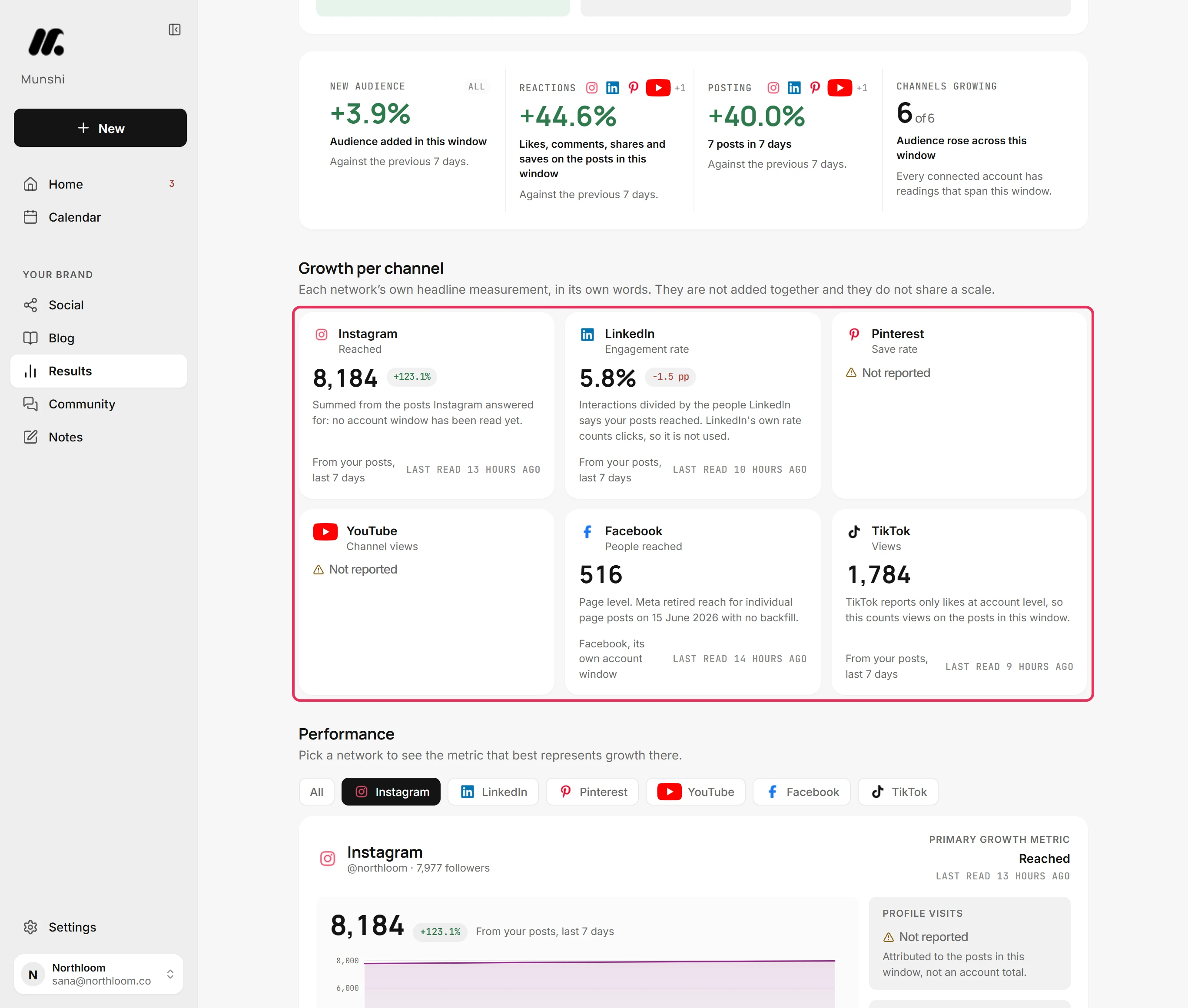
Growth per channel shows each network's own headline number, in that network's own words. It says plainly that these figures are not added together and do not share a scale.
A number the network did not send reads Not reported. That means missing, not zero. An honest gap is better than an invented total.
The last line of the overview names the post with the most interactions in the window. More like this sits beside it, so the results feed the next round of writing.
Step by step: Results overview: what landed on your site
What does Munshi Social connect to?
Munshi connects to eight social networks, five blog platforms and Google.
Social accounts connect under Schedule social posts on the Integrations page. Instagram connects as a Business or Creator account, Facebook as a Page, and LinkedIn as yourself or a Company Page. YouTube connects as a channel, and TikTok, Pinterest and Threads connect too. Bluesky uses an app password instead of a sign-in window.
X is coming soon. It has a card on that page, but no X account can be connected yet, so posts cannot go to X. Each network holds one account per workspace, and connecting a second account replaces the first.
Blogs connect under Publish your blog: WordPress, Ghost, Webflow, Framer, or Sanity. Articles go to one of them at a time. When more than one is connected, you choose where they land.
Shopify and Medium are listed but cannot be connected. For Medium, publish on your own blog and then use Medium's Import a story.
One Google connection covers Analytics & Search Console, where the traffic and search figures come from. If only one of the two is set up, the row reads Half connected. Microsoft Clarity and Bing Webmaster are named on that page, but neither can be connected today.
Step by step: Everything Munshi connects to today
How much does Munshi Social cost?
You can buy two plans without talking to anyone. Founding is $15 a month, or $144 a year. It covers one brand with 15 articles and 1,000 posts a month.
Studio is $29 a month, or $288 a year. It covers three brands that share 45 articles and 3,000 posts a month. Yearly billing is two months free on both plans.
Founding prices are locked for life for members who stay on the plan and billing cycle they joined. The price ladder only goes up for people who join later.
The trial lasts 14 days with every feature switched on. It includes 3 articles and 50 posts and needs no card. When it ends, writing and publishing stop, but your drafts, schedules and tracked numbers stay readable.
First payments carry a 7 day money-back guarantee. You cancel in the Paddle billing portal behind Manage billing, with no email and no retention call.
An article counts once, the first time Munshi writes it, so regenerating and editing it are free. A post counts once per network, so one post sent to three networks uses three. Unused allowance does not carry over.
Step by step: Your monthly allowance: articles and posts
Who makes Munshi Social?
Munshi is built by Dojo Labs LLC, a Wyoming limited liability company, at 30 N Gould St STE 52615, Sheridan, WY 82801, United States. It is a small bootstrapped product team with one product, not a venture-funded platform. The same name appears on the site, in the policy pages and on the API registrations behind the network connections.
Mubashir Rahim is Founder of Munshi and Founder and CEO of Dojo Labs LLC. He is an engineer who built multi-agent pipelines, retrieval systems and automation before this.
He also runs Dojo Labs' own marketing, which is where the product came from. The tools did the tasks, and nobody did the job.
The blog on this site is written and published through Munshi itself, with a person approving every article. Customer reviews live on their own site, munshireviews.com. Each one comes from a named early access user and is published with their permission.
How is Munshi different from a scheduler?
A scheduler such as Buffer publishes the content you bring it. It holds a queue, sends posts at the times you set, and reports how they did. Buffer prices per connected channel, starting free for three channels, and its free plan is genuinely useful.
Munshi covers the step before the queue. It decides what the week should contain, writes it, shapes it for each network and publishes it. It also writes finished articles into your blog platform, which social schedulers do not do at all. Its price is flat, not per channel.
If your team already writes everything, a scheduler is cheaper to start and does that narrow job well. The honest split, with the full table, is on Munshi vs Buffer.
Two tools come closer than a scheduler. CoSchedule publishes the articles your team writes to WordPress from the same calendar as your posts. Blotato writes posts with AI from sources you add, with no blog. Every other comparison is on one page.
How is Munshi different from ChatGPT?
Munshi drafts with large language models, the same family of technology as a chat window. The difference is everything around the writing. ChatGPT drafts one piece at a time when you ask. It does not know what you published last week or which keyword a piece is for.
Munshi holds a brief about your business, the keyword map, the plan and the brand kit your covers are drawn from. It also holds the connections to your blog platform and your accounts, the schedule, and the numbers afterwards. Those are the steps you would otherwise do by hand between a prompt and a published page.
Plenty of people use both. They draft something in a chat window and paste it into the composer, and it goes out on the same calendar as everything else. The longer comparison, including what doing it yourself really costs, is on Munshi vs ChatGPT.
What each part of the product does
The product has seven parts that work as one cycle. Each part has a guide that walks through it in the real app.
| Part | What it does | What comes out |
|---|---|---|
| Setup | Reads your website for your business, tone and brand, then plans three months of coverage | Focus areas with articles planned under each |
| Blog strategy | Focus areas, the keywords behind them, and the articles planned against them | A map every article is written from |
| Writer | Ten steps, two scores out of 100, a cover drawn from your brand kit | A graded draft you can edit step by step |
| Composer | One idea, a tab per network, captions rewritten per platform | Drafts for every channel you picked |
| Calendar | Month, week and day views, channel filters, and a day you can open | Everything booked, in one grid |
| Community | Comments from Instagram, Facebook, Threads, YouTube, Bluesky and a LinkedIn Page, unanswered first | Replies sent from Munshi on four of those six |
| Results | 7, 30, 90 days or a custom window back to 365 days | Per-network figures, Google traffic and search, AI assistant visits |
The full set is in the guides, and how it works walks the cycle end to end.
What the plans include
| Plan | Brands | Articles a month | Posts a month | Price |
|---|---|---|---|---|
| Free trial | 1 | 3 | 50 | Free for 14 days, no card |
| Founding | 1 | 15 | 1,000 | $15 a month, or $144 a year |
| Studio | 3 | 45, shared | 3,000, shared | $29 a month, or $288 a year |
| Enterprise | As many as you run | Matched to your calendar | Matched to your calendar | Priced by conversation |
A daily fair-use cap also applies to generation: about $5 of model usage per workspace per day. It resets at midnight UTC. First payments carry a 7 day money-back guarantee. See full pricing.
What Munshi does not do
- It does not publish unread. There is no autopilot mode. Every article and every post waits for a person to approve it, on the trial and on every plan.
- It does not post to X. X is coming soon. It has a card on the Integrations page, but no X account can be connected yet, so you cannot publish to X today.
- It does not hold two accounts on one network. A workspace keeps one account per network, and connecting a second replaces the first. Two accounts need two workspaces.
- It publishes to one blog at a time. A workspace sends its articles to the one platform you choose. Anything outside the five platforms can be copied or exported instead.
- It does not put every article live by itself. Ghost, Webflow, and Framer receive the article as a draft, which you publish from their own dashboard. Only a scheduled WordPress article and a Sanity document go live on their own.
- It does not reply everywhere. Comments reach Community from six networks. You can reply from Munshi on four of them: Facebook, Instagram, LinkedIn Pages and Threads. YouTube and Bluesky comments come in to read, and TikTok and Pinterest send none.
- It does not promise rankings or traffic. The two scores check that an article is built the way search engines and AI assistants reward. What it earns after that depends on your domain, your competition and time.
- It does not connect everything on its own list. Shopify, Medium, Microsoft Clarity and Bing Webmaster are named in the app, and none of them can be connected.
Questions people ask
What is Munshi Social?
Munshi Social is an AI content marketing engine for small teams. It plans what to publish, writes the articles and posts, and publishes them to your blog and social accounts on a schedule. It also collects comments and reports results, and a person approves everything first. It is built by Dojo Labs LLC.
What does Munshi Social cost?
Founding is $15 a month, or $144 a year, for one brand with 15 articles and 1,000 posts a month. Studio is $29 a month, or $288 a year, for three brands sharing 45 articles and 3,000 posts. Past three brands, an Enterprise agreement sets the volume to your publishing calendar. Founding prices are locked for life for members who stay on the plan and billing cycle they joined.
Is there a free trial?
Yes. The trial runs 14 days with every feature on, includes 3 articles and 50 posts, and needs no card. When it ends, writing and publishing stop, but everything you made stays readable until you pick a plan. First payments carry a 7 day money-back guarantee.
Who is Munshi Social for?
Munshi Social is for small businesses where nobody owns the marketing. That includes solo founders, small teams, freelancers and small agencies running content for clients. Studio covers up to three brands on one subscription. It is a poor fit if a writer already produces everything, or if you want content published without a person reading it first.
Which networks and blog platforms does it publish to?
Eight social networks connect today: Instagram, Facebook, LinkedIn, TikTok, YouTube, Pinterest, Threads and Bluesky. X is coming soon and cannot be connected yet. Blog articles go to one of WordPress, Ghost, Webflow, Framer or Sanity, and Ghost, Webflow and Framer hold each article as a draft. One Google connection covers Analytics and Search Console.
Is Munshi Social a social media scheduler?
It schedules posts, but that is only one part of it. A scheduler publishes the content you bring it. Munshi also plans what to publish, writes it, shapes it per network, sends articles to your blog and reads the results back. Its price is flat, not per connected channel.
How is it different from using ChatGPT?
Munshi does the steps around the writing that a chat window leaves to you. It drafts with the same family of large language models. Around the drafts it holds a brief about your business, a keyword map, a plan and a brand kit for article covers. It also connects to your blog platform and social accounts, keeps a schedule and reports the numbers afterwards.
Can anyone sign up?
Yes. Sign up with an email address or a Google account, and your first sign-in creates your workspace. The 14-day trial needs no card, and nobody is charged before a plan is chosen.
The guides behind everything on this page
Each one walks a single task through the real app, with a screenshot at every step.
- How to sign in for the first time: email code or Google 2 min · 6 steps
- How to set up your workspace from your website 4 min · 9 steps
- Twenty minutes a week: the routine 20 min · 6 steps
- How to build your blog strategy: focus areas, keywords and topics 3 min · 8 steps
- How to write an article with the ten-step writer 5 min · 10 steps
- How to create and schedule a post 2 min · 10 steps
- How to turn an article into posts for every channel 2 min · 8 steps
- How to read the calendar: day, week, month 3 min · 8 steps
- Results overview: what landed on your site and where it came from 3 min · 9 steps
- Everything Munshi connects to today 2 min read
- Your trial: what it includes and what happens at the end 2 min · 6 steps
- Your monthly allowance: articles and posts 2 min · 6 steps
- How to run several brands on one Studio plan 3 min · 8 steps