Munshi and TikTok
Munshi Social, the AI content marketing engine for small teams, writes and publishes posts toTikTok from the same weekly plan as every other channel. Each video gets a caption written for TikTok and is scheduled from the same calendar as everything else.
14-day free trial · No card required · 7-day money-back
A video post with a caption written for TikTok. It is scheduled with everything else, so your video calendar and your text calendar are one calendar.
How the connection works
You sign in to the network in its own window and give Munshi permission to post for you. Munshi never sees your password. You can revoke the connection from the network's own settings at any time.
What comes back
Munshi reads reach, engagement and follower growth for every post it publishes. The numbers are captured daily onto the Results page, next to your other channels.
TikTok's rules, checked first
- Every post needs a video (.mp4, .mov or .webm), and an image will not do
- Captions are kept under TikTok's 2,200 characters
What to know
- One TikTok account per workspace
- Comments are not read into Munshi for TikTok
Munshi schedules TikTok video posts. Each one carries a video, a caption of up to 2,200 characters and an optional title of up to 90. Views, likes, comments and shares come back on their own.
You connect through TikTok's own sign-in window. After that, TikTok appears on every Video post, and its settings sit on one tab in the composer. The tab is checked before anything is scheduled, not after.
TikTok never takes words alone, so a post to it always carries a file. TikTok also leaves the choice of who sees a video to you, so Munshi never picks one for you. On a connection that reads your account, Privacy is required and a video cannot be sent until you choose.
What you can post to TikTok
| Format | What goes out |
|---|---|
| Video | One MP4, MOV or WebM file of up to 1 GB, with a caption of up to 2,200 characters. A video post carries one video. A picture put in its place is refused with TikTok needs a video, not an image. |
| Title | Optional, up to 90 characters, in TikTok settings on the TikTok tab. Leave it empty and the caption carries the post. |
| Privacy | Chosen for each video. Munshi lists only the privacy levels your TikTok account allows, and picks none of them for you. |
| What viewers can do | Turn off comments, Turn off duet and Turn off stitch are switches on the same tab, set for each video. |
| Commercial content | Your brand marks a video that promotes your own business. Branded content marks a paid partnership. Branded content cannot be private. |
| Text on its own | Not possible. TikTok's card in Munshi says so: Video required. No text-only posts. A post that reaches its tab with nothing attached is held with TikTok needs a video. |
How to connect TikTok
-
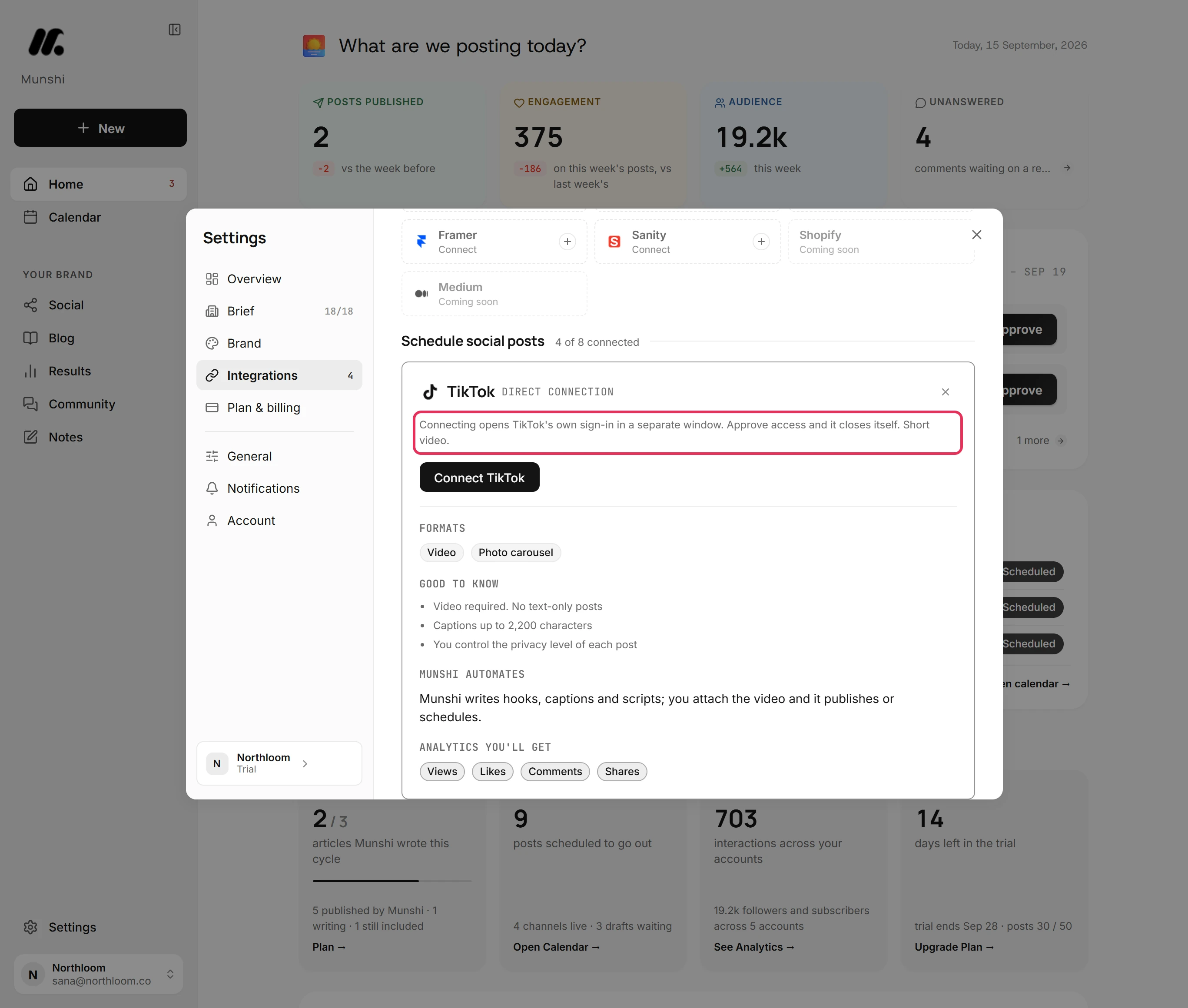
Open the TikTok tile in Integrations
Click Settings at the bottom of the sidebar, then Integrations. The networks sit under Schedule social posts, with a count of how many are connected. Click the TikTok tile. Its card says TikTok's own sign-in opens in a separate window, which closes itself once you approve access.
-
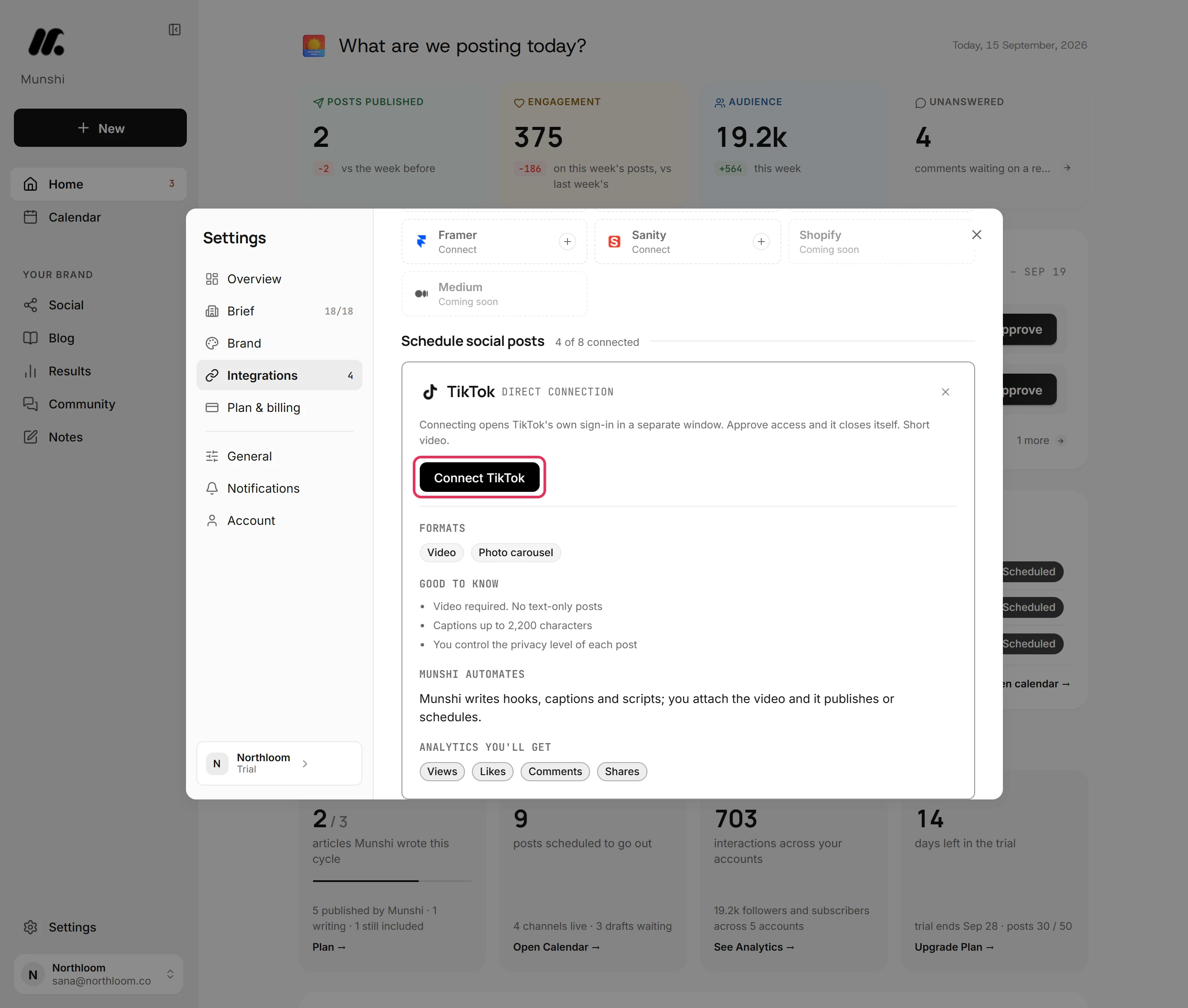
Click Connect TikTok and approve access
Click Connect TikTok and TikTok's sign-in opens in a separate window. Sign in with the account you want to post to, and approve the access. The button in Munshi shows it is waiting while the window is open. Allow popups for Munshi first, or the window cannot open and Munshi says so.
-
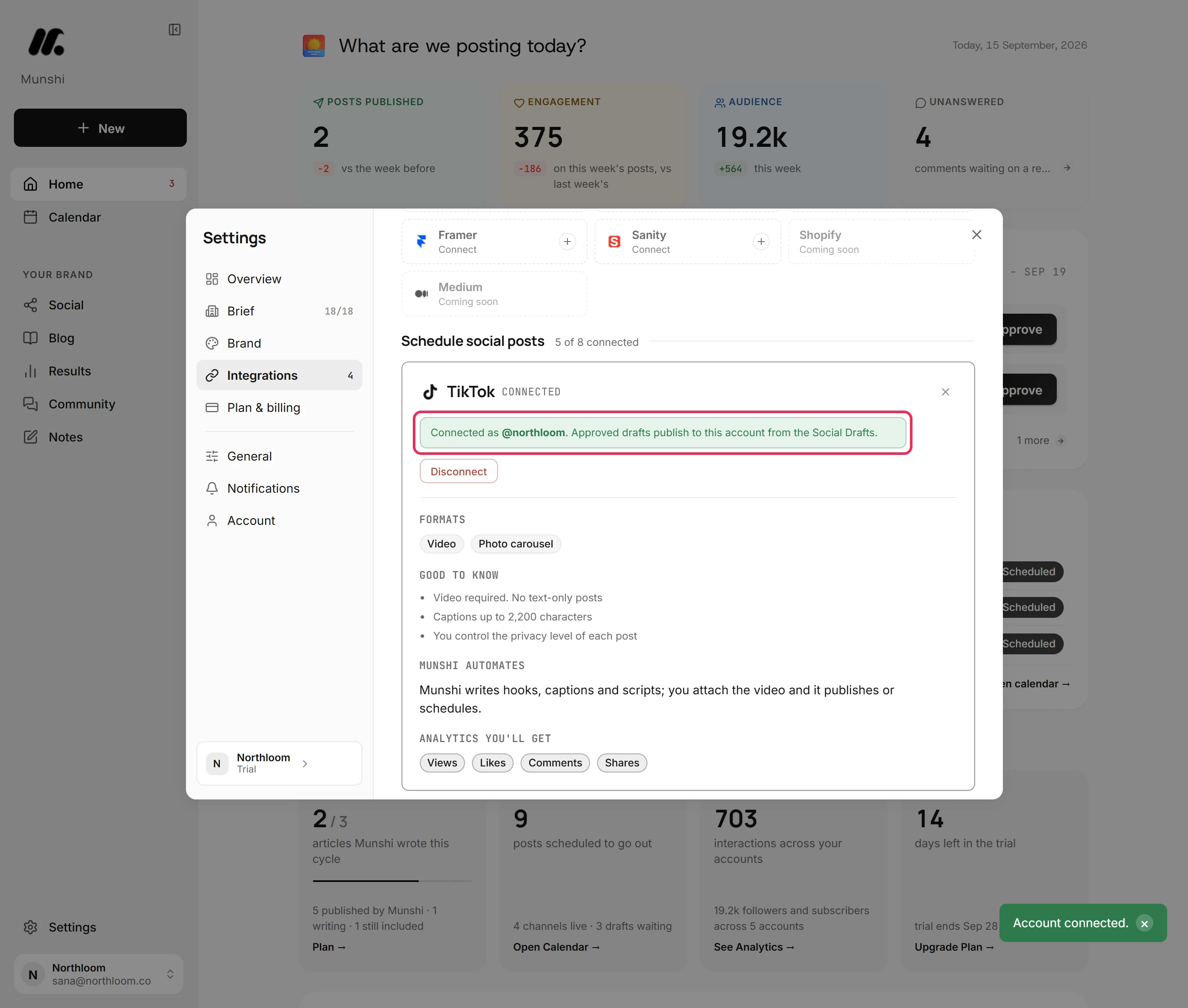
Check the account it connected
The window closes itself and Munshi shows Account connected. The card reads Connected as with your TikTok handle, and a line says approved drafts publish to this account. A workspace holds one TikTok account. To post to a different one, disconnect this one first.
-
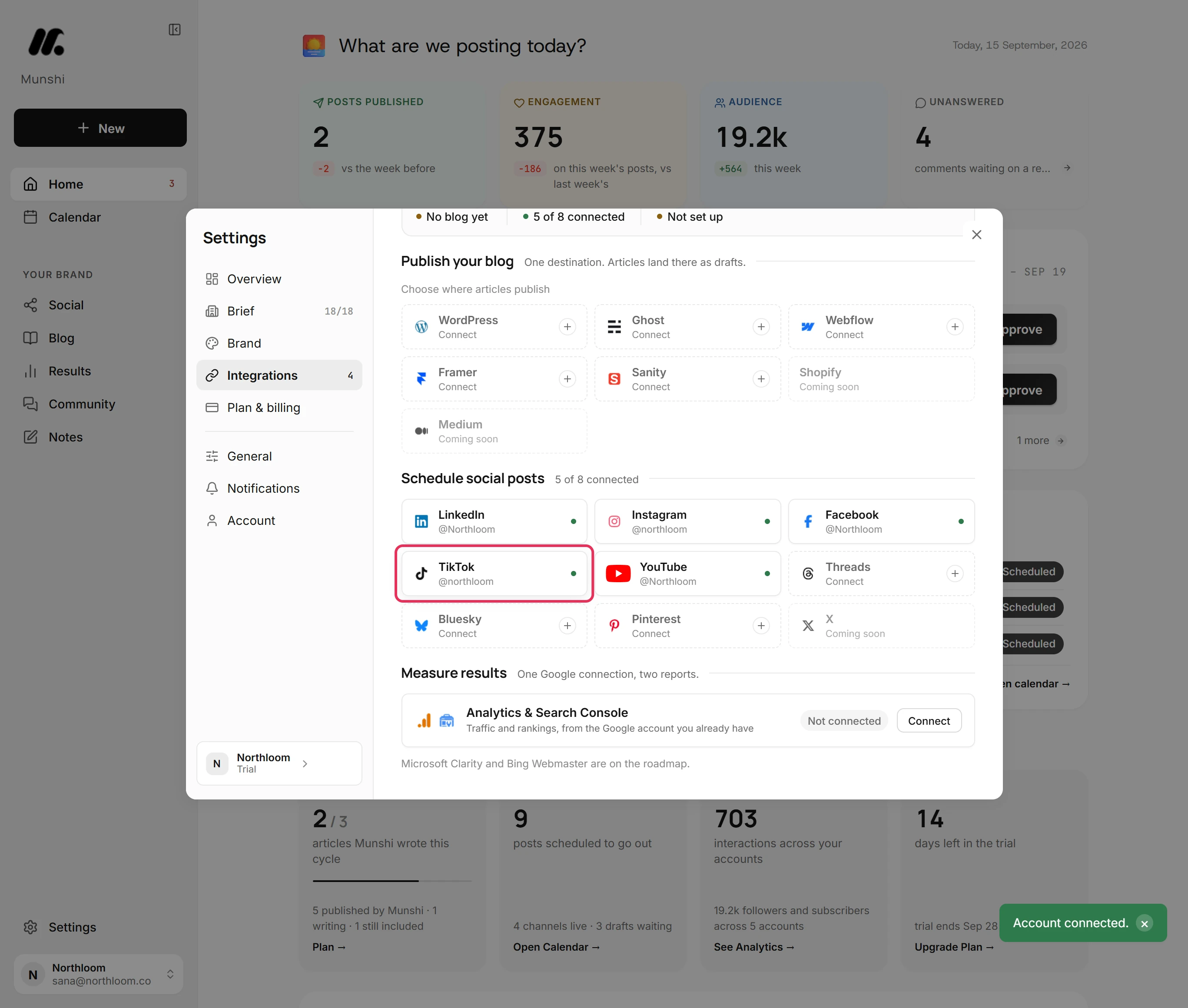
Check the tile and start a video post
Close the card. The TikTok tile shows your handle with a green dot, and the count beside Schedule social posts goes up by one. TikTok now appears on every Video post, without the plus that marks a network you have not connected.
Caption, title and who can see it
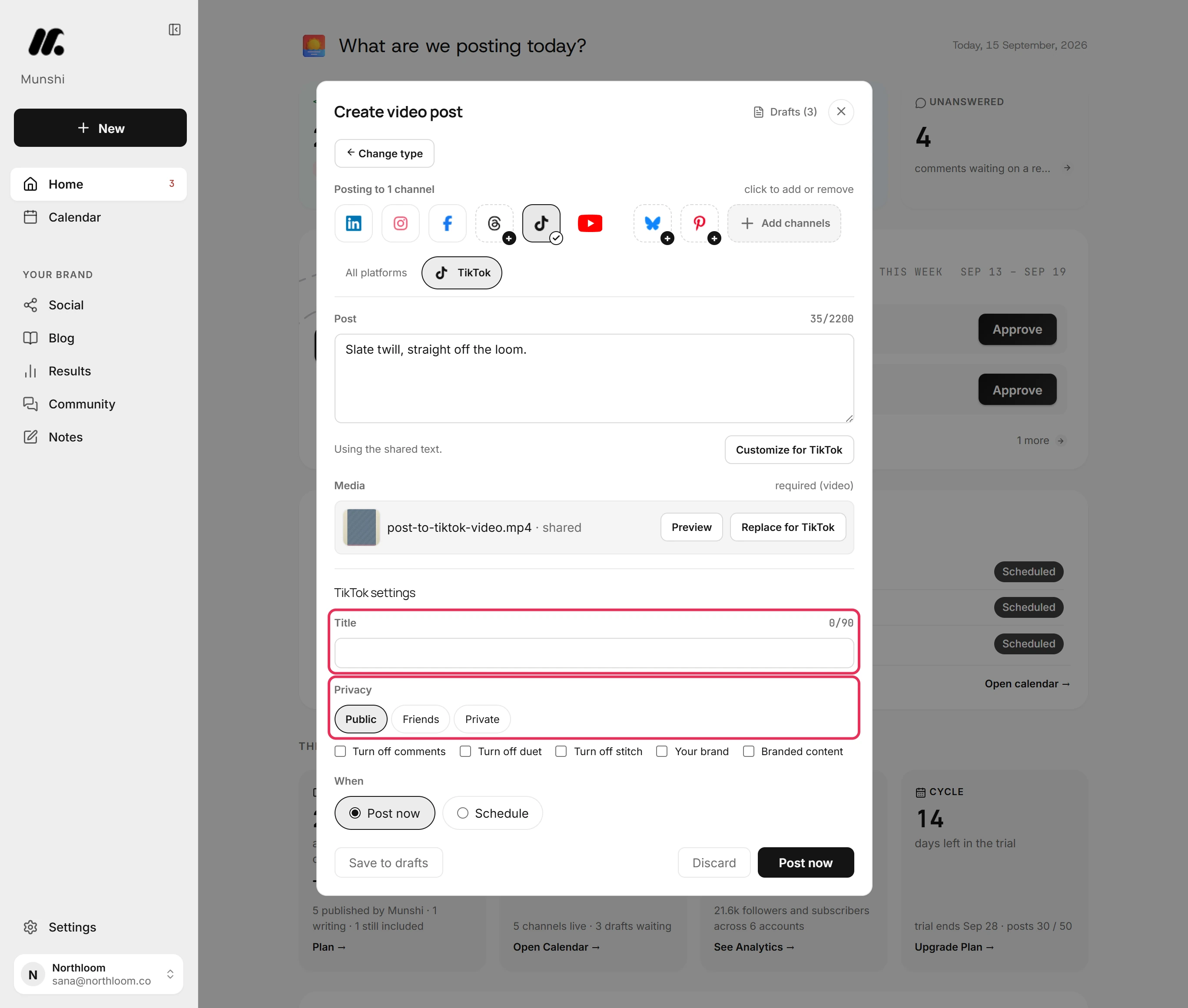
You write the post once in All platforms, and each network checks its own version. In the TikTok tab, the count beside Post reads against 2,200 characters, and the uploaded file is listed as shared media. Under TikTok settings, Title is optional and takes up to 90 characters. Privacy lists the levels your account allows, here Public, Friends and Private.
Customize for TikTok beside the caption gives TikTok its own words. Every other network keeps the shared text.
Can I turn off comments, duets and stitches?
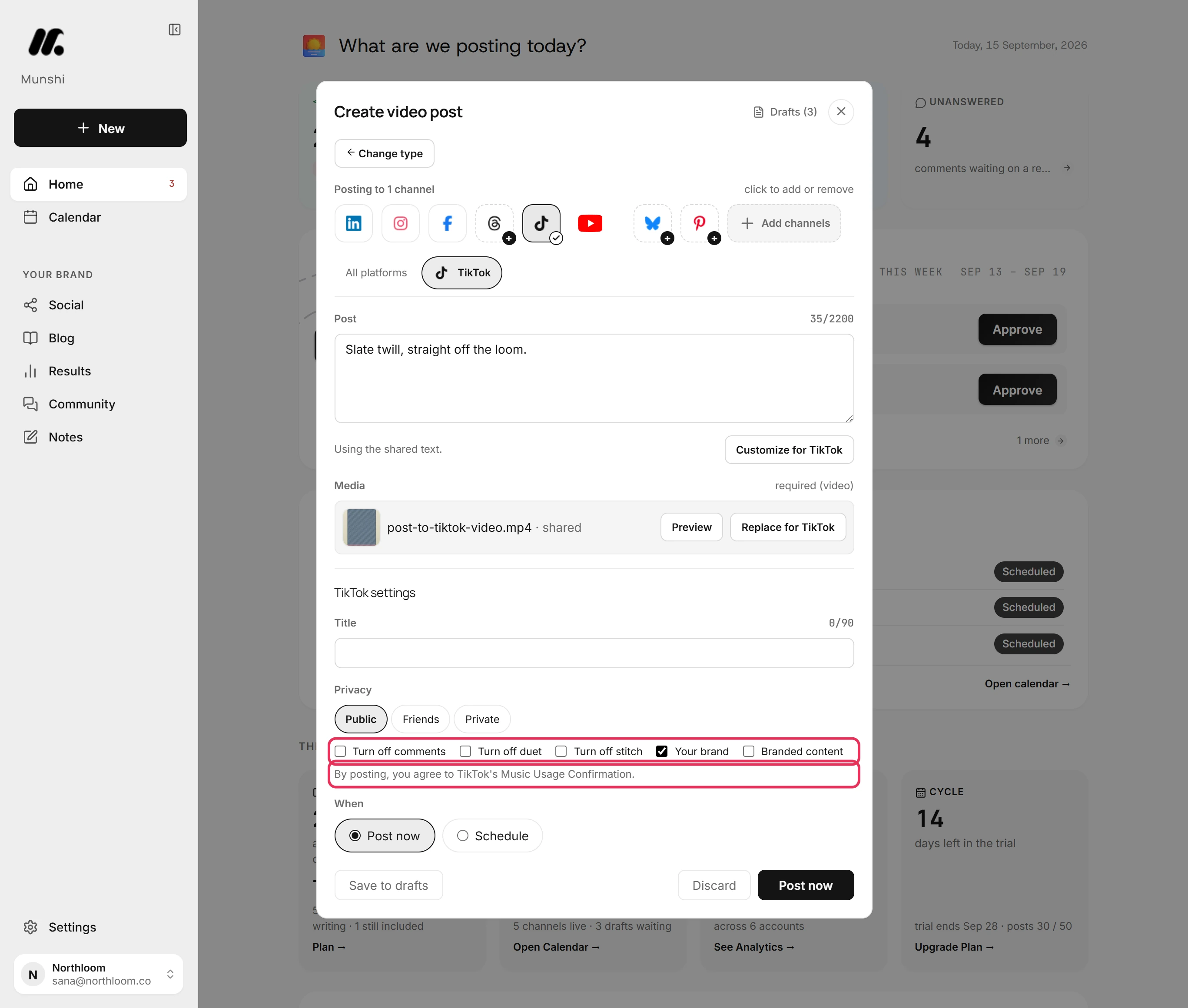
Yes. Three switches under the privacy row set what viewers can do with this video: Turn off comments, Turn off duet and Turn off stitch. They apply to one video, not the whole account, so one clip can be closed to duets while the rest are not.
Beside them, Your brand marks a video promoting your own business. Branded content marks a paid partnership with someone else. Ticking either adds a line saying that by posting you agree to TikTok's Music Usage Confirmation. Branded content also adds TikTok's Branded Content Policy. Branded content cannot be private, so Private cannot be picked while it is ticked.
What TikTok locks, and what it requires
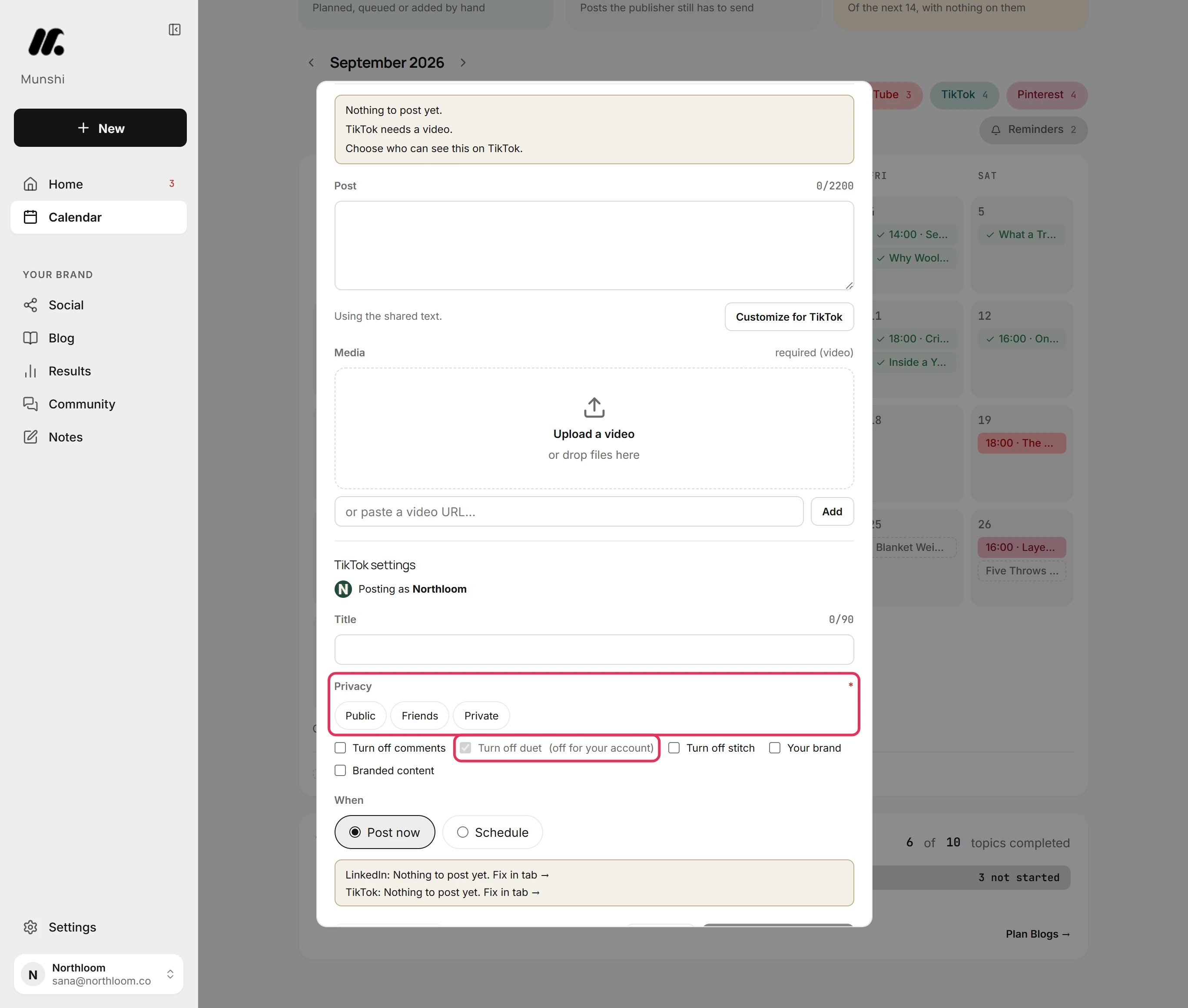
Sometimes the TikTok tab starts with Posting as and your account name. That means Munshi has read your account's own settings from TikTok. These cover which privacy options it allows, whether comments, duets and stitches are off, and the longest video it may post.
Privacy is then marked required. Until you choose, the line above the buttons reads TikTok: Choose who can see this on TikTok.
A switch your TikTok account already has off is ticked, locked and marked (off for your account). That setting belongs to TikTok, not to Munshi. A video longer than your account allows is held, with its length in seconds and your account's limit. A privacy option the account cannot use is not shown at all.
Post one video to several networks at once
The same upload can go to TikTok, Instagram, YouTube and LinkedIn from one composer. Each network's format is set on its own tab: a Reel on Instagram, a Short or a Video on YouTube, a TikTok here. TikTok takes MP4, MOV and WebM, and a post carries one video of up to 1 GB.
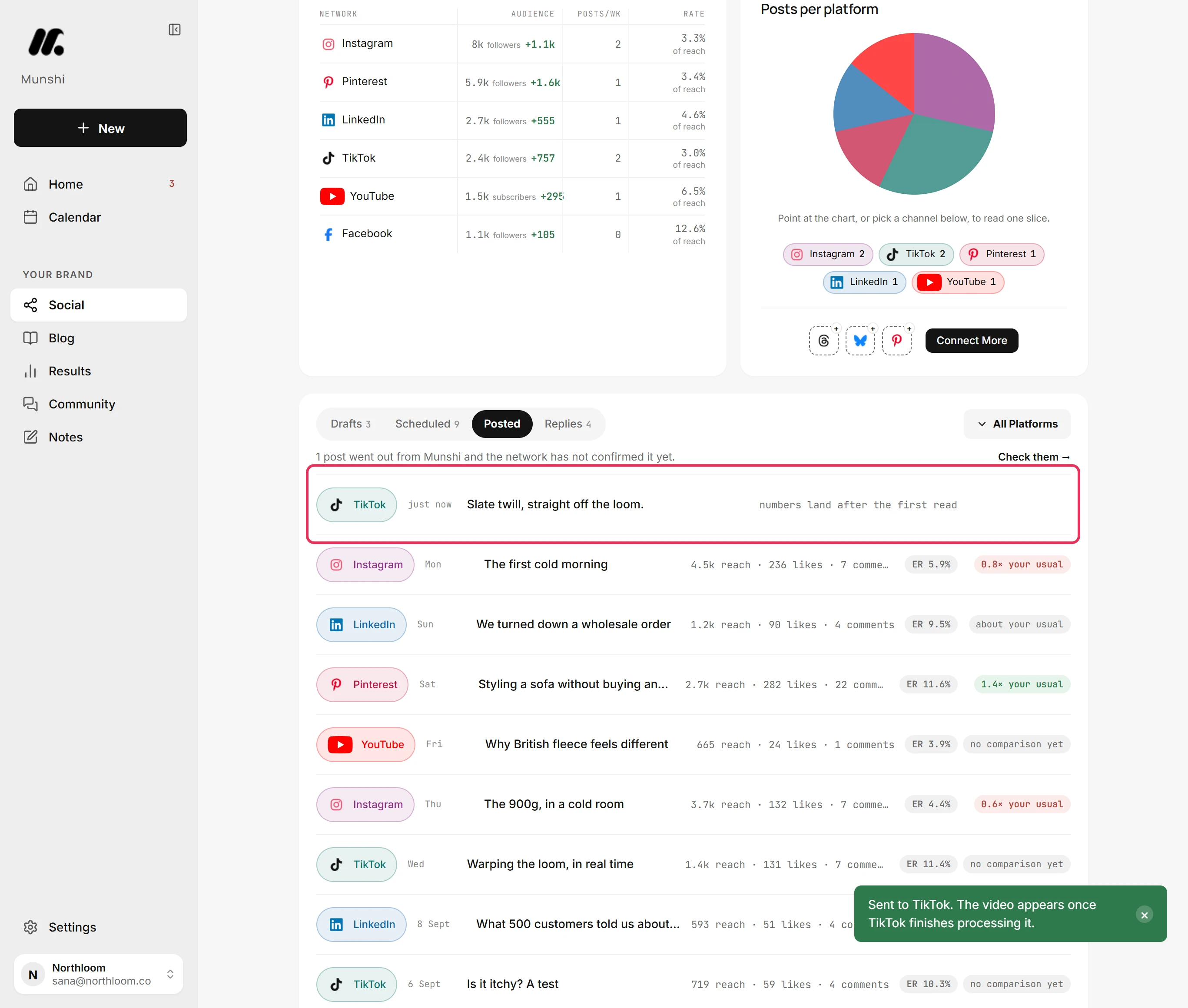
Click Post now and Munshi says Sent to TikTok. The video appears once TikTok finishes processing it. Or pick Schedule, and the video waits under Scheduled on the Social page with its day and time. Edit reopens it there.
The numbers come back, the comments do not
A TikTok video that has gone out appears under Posted on the Social page straight away, marked just now. A line says its numbers land after the first read. Views, likes, comments and shares then fill in, with each video's engagement rate and how it compares with your usual.
Comments are the one thing TikTok does not send back. Community brings in comments from Instagram, Facebook, Threads, YouTube, Bluesky and a LinkedIn Page. TikTok and Pinterest bring none in, so you reply to a TikTok on TikTok.
How many TikTok posts can Munshi send a day?
Up to 50 a day on TikTok, and 25 an hour to any one account. Networks read a burst of posts as spam, so Munshi limits how fast one account posts. Both limits run on the UTC clock.
A post that hits the limit is not sent. It waits under Drafts on the Social page, marked Failed, with the reason and Retry now on its card. This limit is separate from your plan's monthly allowance of posts, which has its own message.
Munshi and TikTok, answered
Does Munshi work with TikTok?
Yes. A video post with a caption written for TikTok. It is scheduled with everything else, so your video calendar and your text calendar are one calendar.
Can Munshi post to TikTok automatically?
Yes. An approved video uploads at its scheduled time, whether or not you are online. It goes out with the caption, title, privacy and switches you set. Nothing publishes before you approve it.
Can Munshi schedule TikTok videos in advance?
Yes. Pick Schedule under When and set the date and time in your workspace's clock. The video waits under Scheduled on the Social page until its slot. Edit reopens it, and Unschedule moves it back to Drafts.
Does Munshi choose who can see my TikTok videos?
No. TikTok leaves that choice to you, so Munshi will not pick one for you. Privacy in the TikTok tab lists only the levels your account allows. On a connection that reads your account, it is required before the video can be sent.
Can I stop duets, stitches or comments on a TikTok video?
Yes. Turn off comments, Turn off duet and Turn off stitch sit under the privacy row in the TikTok tab. Each is set for that video, not for the account. A setting your TikTok account already has off is ticked and locked, marked (off for your account).
How long can a TikTok caption be in Munshi?
Up to 2,200 characters, which is TikTok's own limit. The TikTok tab counts as you type, and nothing is scheduled until the caption fits. The separate Title field is optional and takes up to 90 characters.
Can I read or reply to TikTok comments in Munshi?
No. TikTok comments do not come into Community. Comments arrive from Instagram, Facebook, Threads, YouTube, Bluesky and a LinkedIn Page. You reply to a TikTok on TikTok itself.
Can I connect two TikTok accounts?
No, not in one workspace. A workspace holds one account per network. The Studio plan covers three brands, each with its own connected accounts and calendar, so a second TikTok account belongs to a second brand.
How many TikToks can Munshi send in a day?
Up to 50 a day on TikTok, and 25 posts an hour to one account. Both limits run on the UTC clock. A post that hits the limit waits under Drafts marked Failed, with Retry now on its card.
When TikTok says no
These are the messages people see most often, and what each one means.
“Choose who can see this on TikTok.”
Privacy is required, because Munshi has read your account's settings from TikTok. You can tell because the TikTok tab starts with a Posting as line. Open the TikTok tab and pick Public, Friends or Private, then schedule the video again.
“TikTok needs a video.”
TikTok takes a video and nothing else. Upload one in the All platforms tab, or take TikTok off the post. A picture in its place gets “TikTok needs a video, not an image.”
TikTok is not offered on my post
Either TikTok is not connected, or the post is a Text post. A TikTok tile showing a plus is not connected yet: connect it from its tab, and the post stays where it is. TikTok is never offered on a Text post, so click Change type at the top of the composer and pick Video post.
“Branded content can't be private on TikTok”
Branded content and Private cannot go together. Pick Public or Friends, or untick Branded content.
“Couldn't load which privacy options your TikTok account allows.”
Munshi could not read your account's settings from TikTok this time. Click Retry beside the message.
“Your browser blocked the popup. Allow popups for Munshi and try again.”
TikTok's sign-in window could not open. Allow popups for the Munshi site in your browser, then click Connect TikTok again. On a phone the window opens as a tab, so finish there and come back.
“That account is already connected to another workspace.”
A TikTok account belongs to one Munshi workspace at a time, including your own other workspaces. Disconnect it in the workspace that holds it, then connect it here.
TikTok, step by step
Each guide walks through one task in the real app, with a screenshot at every step.
- How to connect TikTok 2 min · 6 steps
- How to post to TikTok from Munshi 3 min · 10 steps
- “Choose who can see this on TikTok” and other TikTok refusals 2 min read
- How to post a video: Reels, Shorts, TikTok and the rest 3 min · 10 steps
- Caption and media limits, network by network 3 min read
- Which networks bring comments in, and which do not 2 min read
- “You have sent” too many posts to this account 2 min read
- How to reconnect a network that signed you out 2 min · 7 steps
Other networks: Instagram · X (coming soon) · LinkedIn · Facebook · Pinterest · Threads · YouTube · Bluesky · all integrations