Munshi and Bluesky
Munshi Social, the AI content marketing engine for small teams, writes and publishes posts toBluesky from the same weekly plan as every other channel. Posts are written for Bluesky and published on schedule, connected with an app password.
14-day free trial · No card required · 7-day money-back
A Bluesky post written to its 300-character length. The week's idea shows up there too, not only where your audience is biggest.
How the connection works
Bluesky uses an app password instead of a sign-in window. An app password is a password you create in Bluesky's settings just for Munshi. Paste it into Munshi, and revoke it in Bluesky whenever you like. Munshi never asks for your account password.
What comes back
Munshi reads reach, engagement and follower growth for every post it publishes. The numbers are captured daily onto the Results page, next to your other channels. Comments come into Munshi to read, and you reply on the network itself.
Bluesky's rules, checked first
- Posts are kept under 300 characters
What to know
- One Bluesky account per workspace
Munshi schedules Bluesky posts of up to 300 characters, with up to four pictures or one video. Replies to your posts are read into Community, so you can see what came back without opening the app. Likes, reposts and replies land on the Results page daily.
Bluesky is the one network Munshi connects without a sign-in window. You paste your handle and an app password, a separate password you create in Bluesky's own settings. The connection is made inside Munshi in about two minutes.
Munshi never asks for your account password, and you can revoke the app password in Bluesky whenever you like. Three hundred characters is the shortest limit of any network you can connect. The Bluesky tab counts as you type and holds anything longer.
What you can post to Bluesky
| Format | What goes out |
|---|---|
| Text post | Words alone, up to 300 characters. Bluesky is one of the networks that takes a post with nothing attached, so a Text post offers it. |
| Images | Up to four JPG, PNG, WebP or GIF pictures on one post, sharing the text. A fifth is refused on the Bluesky tab, with the number to remove. |
| Video | One MP4, MOV or WebM file of up to 1 GB, from a Video post. A Bluesky post carries pictures or a video, not both. |
| Its own shorter text | Customize for Bluesky on the Bluesky tab gives Bluesky a shorter version. Every other network keeps the long one. |
How to connect Bluesky
-
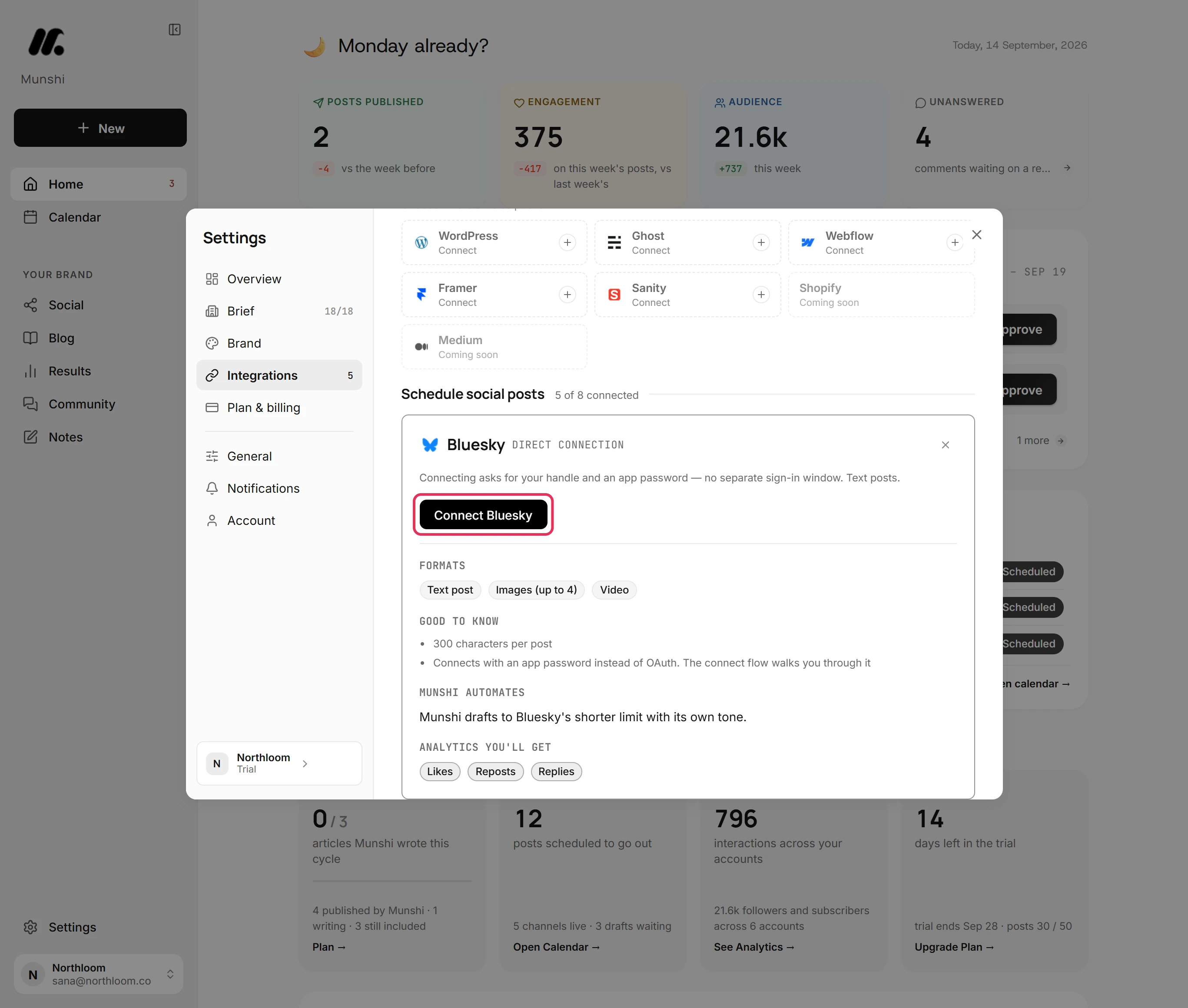
Open the Bluesky tile in Integrations
Click Settings at the bottom of the sidebar, then Integrations. Click the Bluesky tile under Schedule social posts. The card says Bluesky connects with your handle and an app password, so no sign-in window opens. It lists what Bluesky takes: a text post, up to four images, or a video.
-
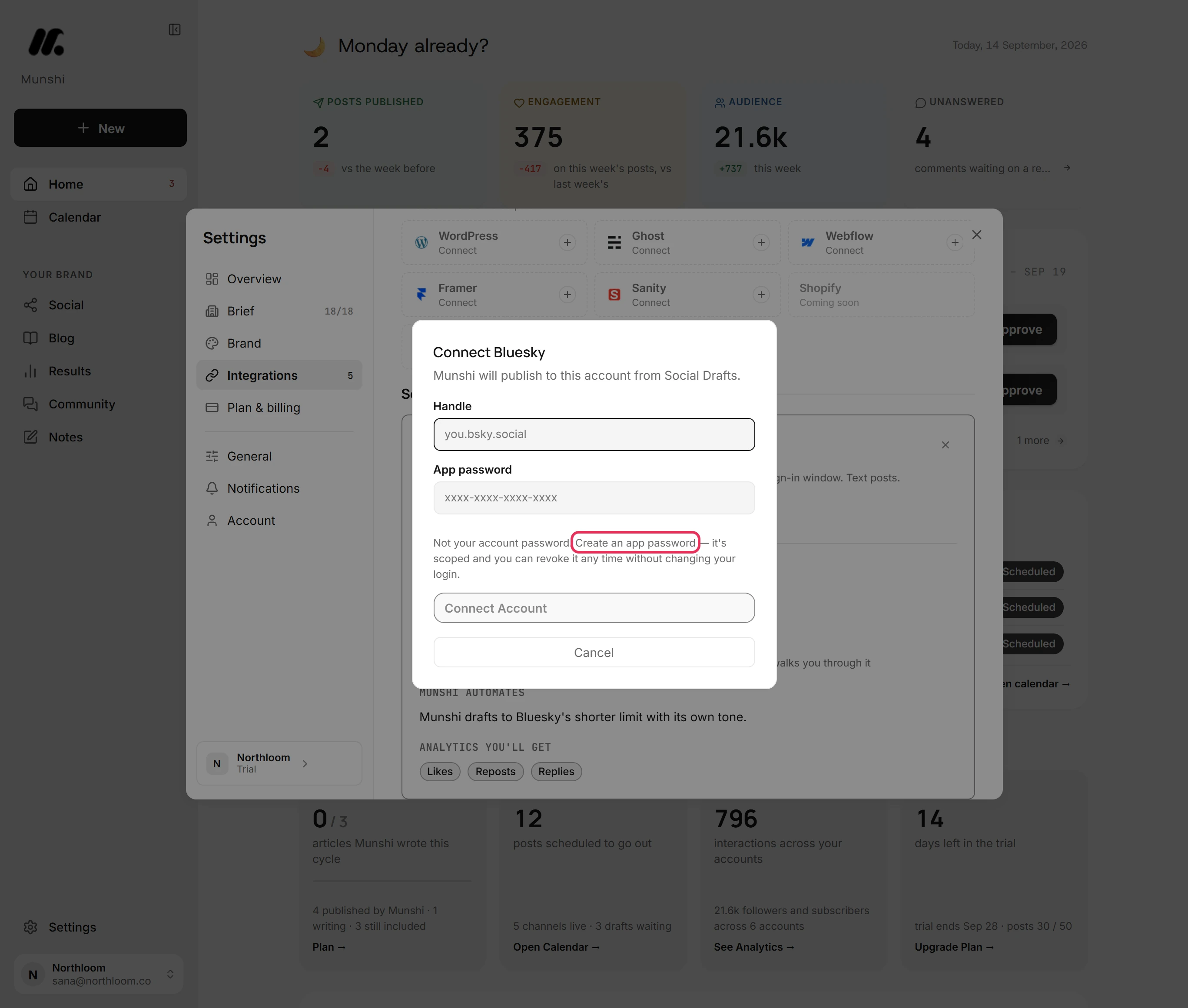
Create an app password in Bluesky
Click Connect Bluesky. A dialog opens inside Munshi and asks for your Handle and an App password. An app password is not your account password. Bluesky makes them on the App passwords page of its settings, and the Create an app password link opens that page in a new tab. Create one there and copy it.
-
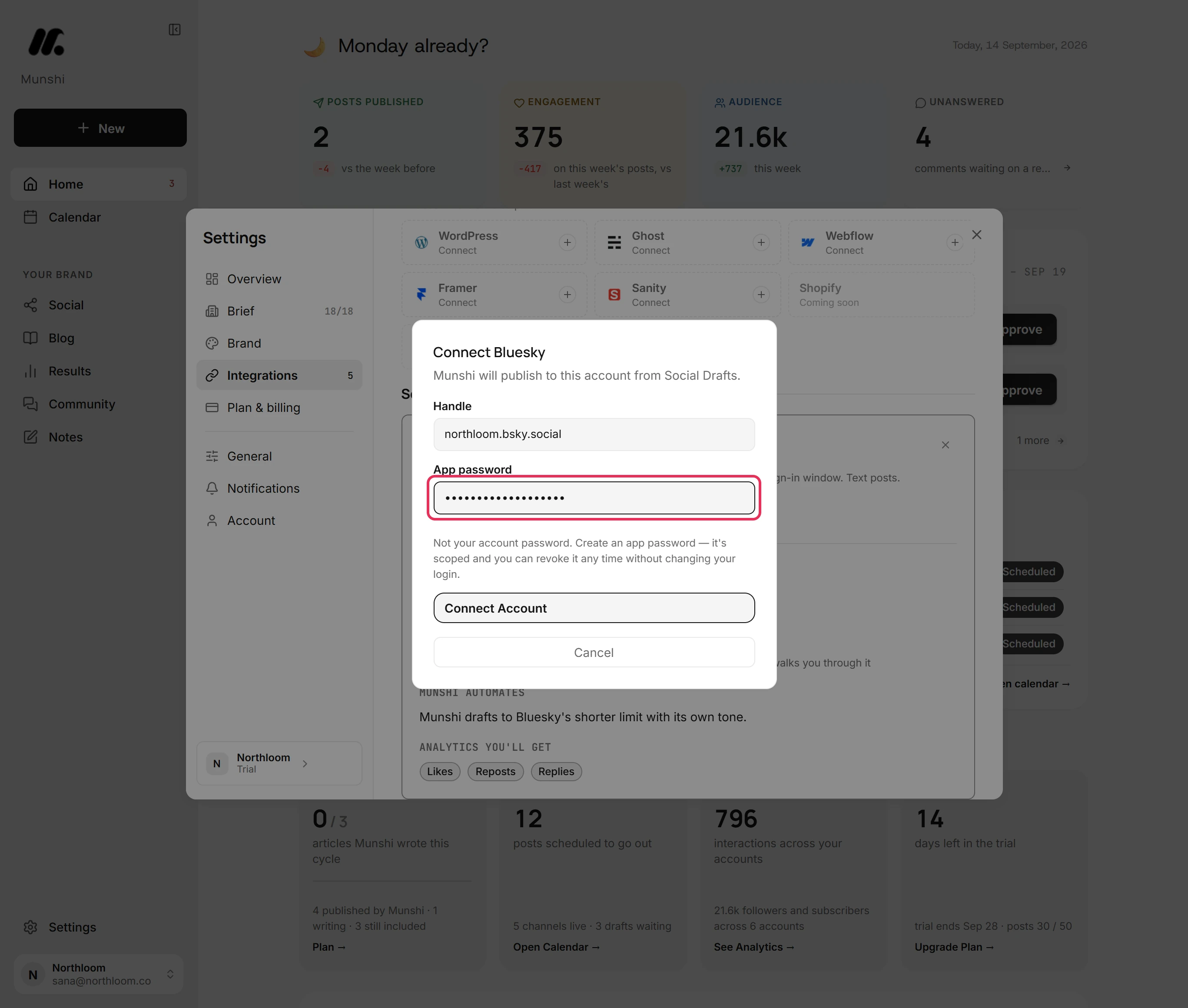
Enter the handle and paste the password
Type the handle you use on Bluesky, such as northloom.bsky.social. If you type the @ in front, Munshi leaves it off. Paste the app password into App password. It looks like xxxx-xxxx-xxxx-xxxx. Connect Account stays greyed out until both fields are filled in.
-
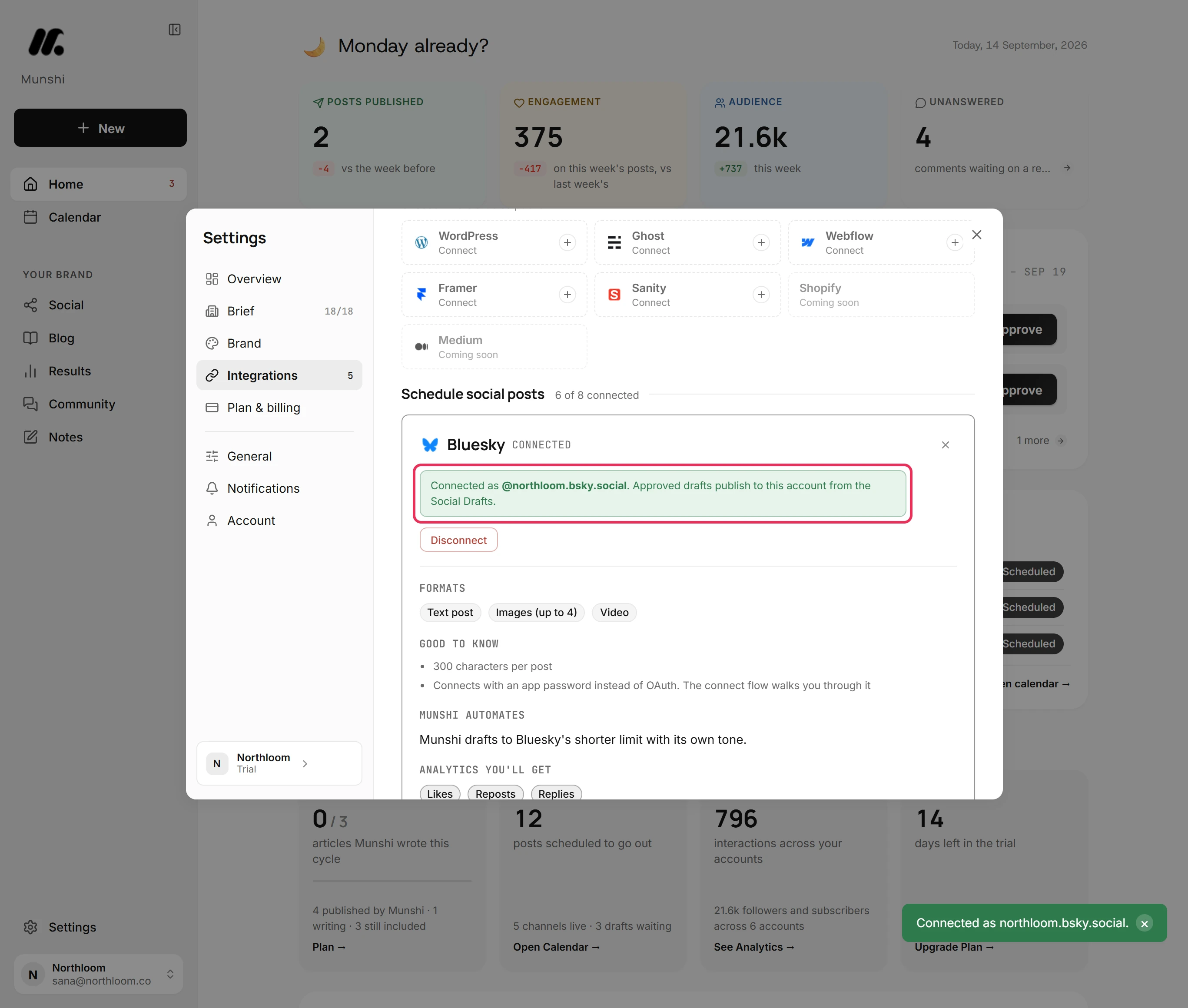
Connect, and check the card
Click Connect Account. Munshi checks the handle and app password with Bluesky. If they work, the dialog closes and the card reads Connected as your handle. If not, the reason shows in the dialog and nothing is saved. The Bluesky tile then shows your handle with a green dot.
How long can a Bluesky post be?
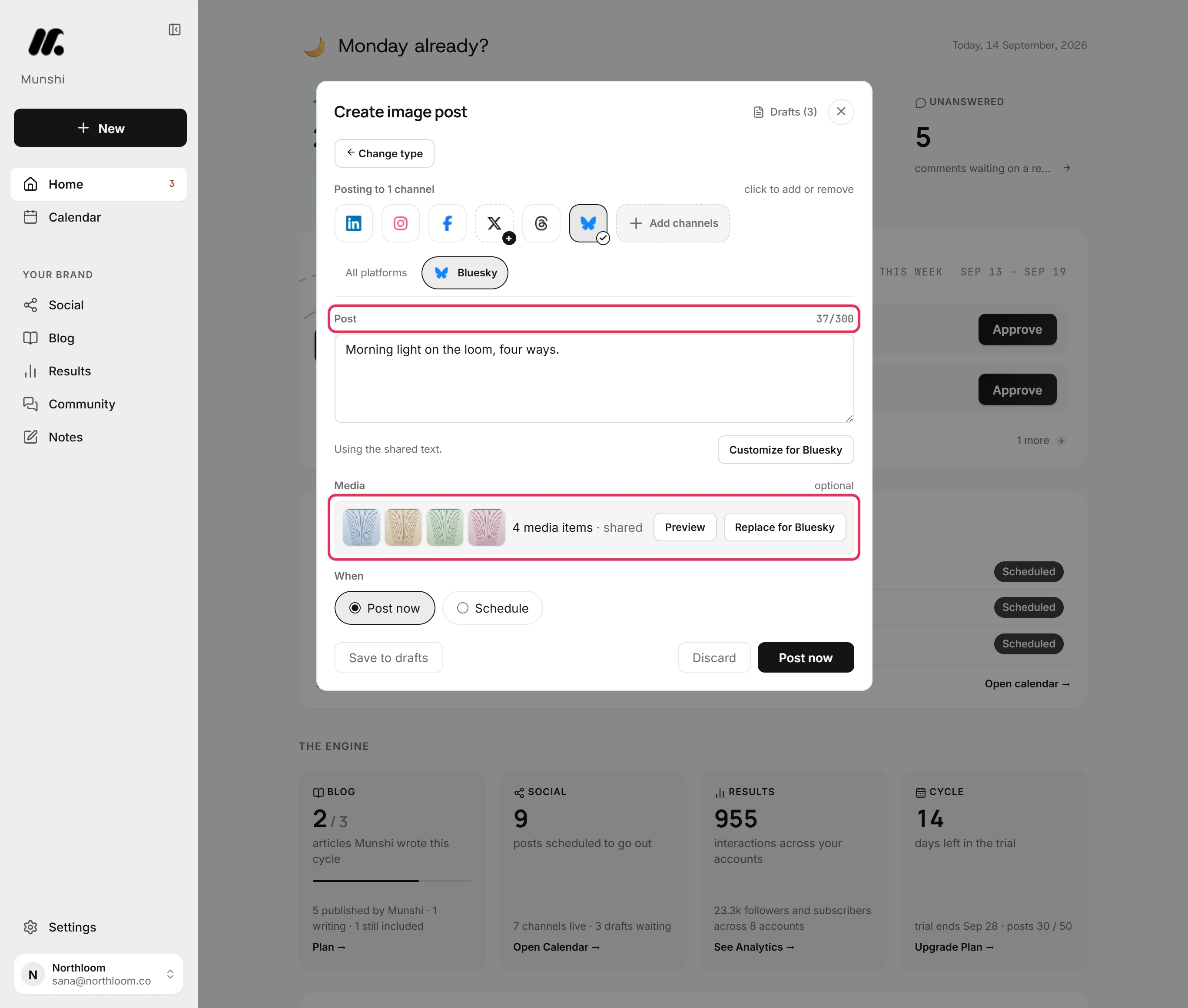
Up to 300 characters. You write the post once in All platforms, and each network checks its own version. In the Bluesky tab, the count beside Post reads against 300 characters, and Media below shows the pictures the post carries. Past either limit, the tab is marked and says how much to remove. Nothing is scheduled until it fits.
That is the shortest limit of any network you can connect. Threads and Pinterest allow 500, Instagram and TikTok 2,200, LinkedIn 3,000 and Facebook 5,000. Rather than cutting the long version down, use Customize for Bluesky to give Bluesky words of its own.
Up to four pictures, or one video
Bluesky takes up to four pictures on one post. Upload more and the Bluesky tab says “Bluesky takes up to 4 media items. Remove 1.” Remove the extras, or click Replace for Bluesky to give Bluesky its own smaller set. The other networks keep them all.
For a video, start a Video post instead, because a Bluesky post carries pictures or a video, not both. Munshi takes MP4, MOV and WebM video and JPG, PNG, WebP and GIF pictures, each file up to 1 GB.
Post now, or schedule it for later
Under When, Post now is already picked and sends the post to Bluesky at once. Pick Schedule to set a date and time in your workspace's clock. The post then waits on the Scheduled tab of the Social page until its slot, with Edit and Unschedule beside it.
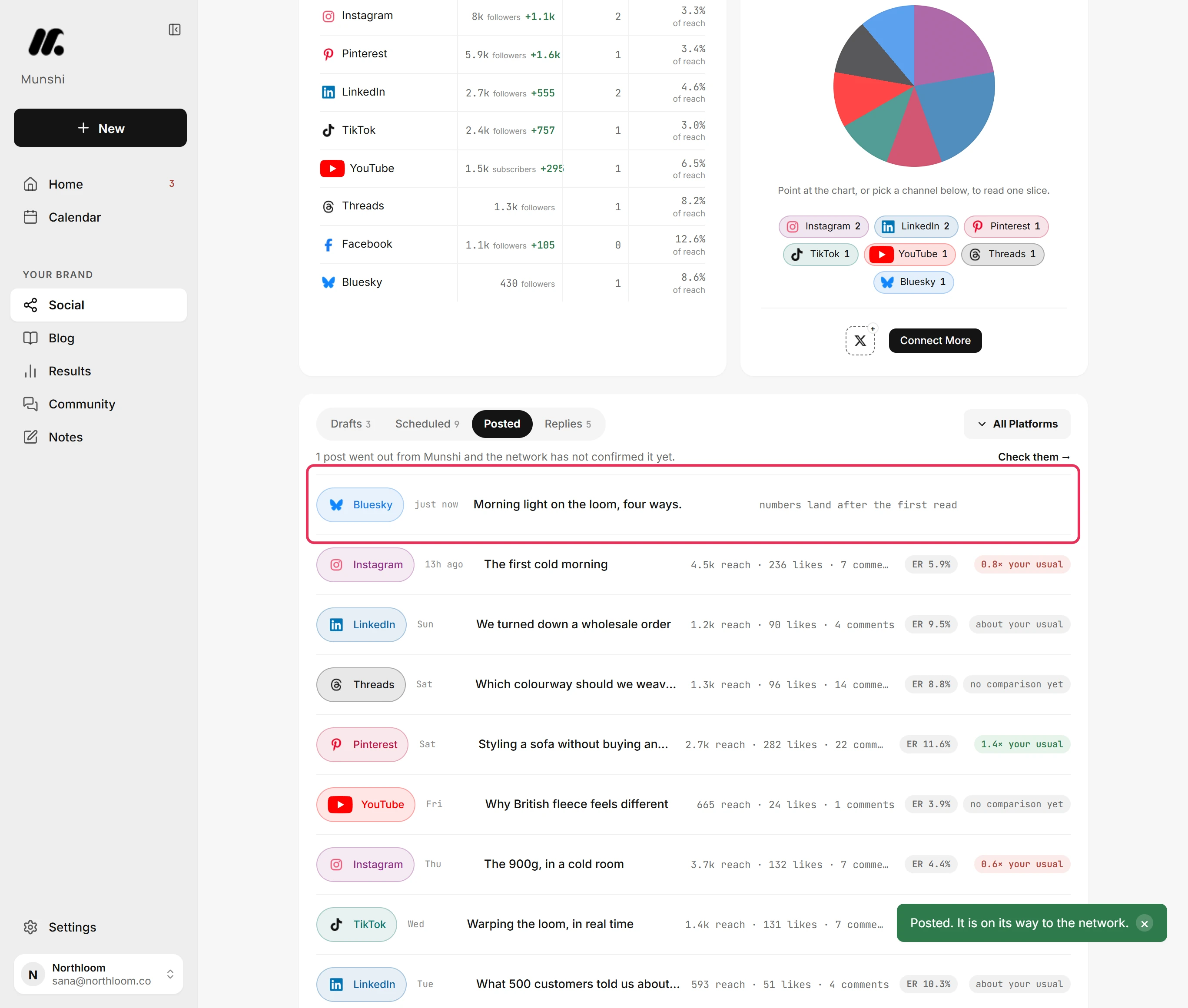
A published post appears under Posted straight away, marked just now. A line says its numbers land after the first read. Until Bluesky confirms the post, a line above the list says it went out from Munshi and the network has not confirmed it yet.
Can I reply to Bluesky comments from Munshi?
Not yet. Bluesky comments do come into Community, where you can read them and mark them resolved. When you select a Bluesky comment, a note replaces the reply box to say replying is not supported yet. You reply on Bluesky itself.
Munshi reads comments on your 60 most recent tracked posts. It reads them again when you open Community and the last read is more than 15 minutes old. Comments on older posts, or on posts Munshi does not track, do not come in.
Results, and how many posts Munshi sends
Likes, reposts and replies land on the Results page daily, beside your other channels. Followers show on the network table with the rest. After you connect, Munshi also brings in the account's past posts, so your history is there from the start.
To keep an account safe, Munshi sends at most 25 posts an hour to any one account, and 50 a day on Bluesky. Both limits run on the UTC clock. A post that hits the limit waits under Drafts marked Failed, with the reason and Retry now on its card.
Munshi and Bluesky, answered
Does Munshi work with Bluesky?
Yes. A Bluesky post written to its 300-character length. The week's idea shows up there too, not only where your audience is biggest.
Can Munshi post to Bluesky automatically?
Yes. An approved post goes out at its scheduled time with its text and pictures, whether or not you are online. Nothing publishes before you approve it.
Why does Bluesky ask for an app password instead of a sign-in window?
That is how Bluesky lets other apps in. You create an app password on the App passwords page of Bluesky's settings and paste it into Munshi. Munshi never sees your account password. Revoking the app password in Bluesky ends the connection without changing your login.
Is an app password safe to give Munshi?
Yes. It is scoped to apps, not to your login. You can revoke it in Bluesky at any time without changing your Bluesky password. An app password looks like xxxx-xxxx-xxxx-xxxx.
How long can a Bluesky post be in Munshi?
Up to 300 characters, which is Bluesky's own limit and the shortest of any network you can connect. The Bluesky tab counts as you type. Nothing is scheduled until the post fits.
How many pictures can a Bluesky post carry?
Up to four. A fifth is refused on the Bluesky tab, with the number to remove. For a video, start a Video post instead, because a Bluesky post carries pictures or a video, not both.
Can I give Bluesky different words from the other networks?
Yes. Customize for Bluesky on the Bluesky tab gives Bluesky its own text, and every other network keeps the shared version. Replace for Bluesky does the same for its pictures.
Can I reply to Bluesky comments from Munshi?
Not yet. Replies to your recent Bluesky posts come into Community to read and mark resolved. Selecting one shows a note that replying is not supported on Bluesky yet. Reply on Bluesky itself.
Can I connect two Bluesky accounts?
No, not in one workspace. A workspace holds one account per network. The Studio plan covers three brands, each with its own connected accounts and calendar, so a second Bluesky account belongs to a second brand.
When Bluesky says no
These are the messages people see most often, and what each one means.
Connect Account stays greyed out
Both fields need something in them. Fill in the handle and the app password, and the button turns on.
“Could not connect. Check the handle and app password.”
The handle or the app password is wrong. Check that the handle is the full one, such as you.bsky.social, and that you pasted an app password, not your account password. If the app password was revoked in Bluesky, create a new one and paste that.
“That Bluesky account is already connected to another workspace.”
An account belongs to one workspace at a time, including your own other workspaces. Disconnect it in the workspace that has it, then connect it here.
The post is over 300 characters
The post cannot be sent until it fits, and the Bluesky tab says how many characters over it is. Shorten it, or use Customize for Bluesky to give Bluesky its own shorter text. The other networks keep the long one.
“Bluesky takes up to 4 media items. Remove 1.”
The post carries more than four pictures. Remove the extras, or click Replace for Bluesky in the Bluesky tab to give Bluesky its own pictures. The other networks keep them all.
“Bluesky isn't connected yet.”
The workspace has no Bluesky account. Click Connect Bluesky in the Bluesky tab and enter the handle and an app password. The post stays in the composer while you connect.
The Bluesky card reads Reconnect needed
The access expired, so nothing publishes to the account and its numbers stop updating. Bluesky asks for an app password again, not a sign-in window, so create a new one in Bluesky and paste it in. Your posts and the numbers already read stay where they are.
Bluesky, step by step
Each guide walks through one task in the real app, with a screenshot at every step.
- How to connect Bluesky with an app password 2 min · 8 steps
- How to post to Bluesky from Munshi 2 min · 7 steps
- Caption and media limits, network by network 3 min read
- Files Munshi takes, and how big 2 min read
- Which networks bring comments in, and which do not 2 min read
- “You have sent” too many posts to this account 2 min read
- One account per network per workspace 2 min read
- How to reconnect a network that signed you out 2 min · 7 steps
Other networks: Instagram · TikTok · X (coming soon) · LinkedIn · Facebook · Pinterest · Threads · YouTube · all integrations