Munshi and WordPress
Munshi Social, the AI content marketing engine for small teams, writes SEO articles intoWordPress from the same weekly plan as every other channel. SEO articles land in WordPress as drafts, or go live on their own at the time you schedule.
14-day free trial · No card required · 7-day money-back
A finished article in your WordPress posts, with its title, body and cover image. The body arrives as WordPress blocks, and the cover goes into your media library. Publish now and it lands as a draft for you to check. Schedule it and WordPress puts it live at the slot on its own.
How the connection works
You connect through WordPress's own approval screen, which gives Munshi an application password for your site. Munshi never sees your WordPress password. You can revoke the application password from your WordPress profile at any time. WordPress.com sites connect the same way, through WordPress.com.
What comes back
Search Console and Google Analytics numbers for every article, on the Results page next to your social results.
How articles land
- Articles arrive as WordPress blocks, not pasted HTML, so they edit normally in your editor
- A scheduled article is handed to WordPress with its date and goes live at that time
- Ghost, Webflow, and Framer receive articles as drafts you publish from your own dashboard. WordPress takes drafts too, except scheduled articles, which go live at their slot. Sanity goes live, now or on schedule.
What to know
- Categories and tags are set in WordPress after the article lands
- One WordPress site per workspace
Munshi writes SEO articles and publishes them to your WordPress site. Each post arrives with its title, body, slug, excerpt and featured image. Click Publish now and the article is saved as a draft, for you to read and publish from your own dashboard.
Schedule it instead and WordPress puts it live at that time on its own, whether or not anything else is running. WordPress is the one blog platform that publishes a Munshi article by itself, on its own clock.
You connect on your own site. Type your address, sign in to WordPress in the window that opens, and approve Munshi. WordPress then issues an application password, a key Munshi uses to publish. Munshi never sees your WordPress password, and you can revoke the key from your profile at any time.
What you can post to WordPress
| Format | What goes out |
|---|---|
| The body | WordPress blocks, not pasted HTML. Headings, lists and links edit normally in the block editor, not stuck in one Classic block you have to unpick. |
| Title and slug | The article's title, and the Slug from its SEO fields. The slug becomes the end of the post's web address on your site. |
| Excerpt | The Meta description you set in Munshi becomes the post's excerpt, trimmed to 300 characters. |
| Featured image | The cover is uploaded into your media library and set as the featured image, so it keeps working after the article is published. Images inside the body are copied the same way. |
| Published now | A draft. Munshi says Saved in WordPress as a draft. Review and publish it from your WordPress dashboard. and the row reads Landed as a draft in WordPress. |
| Scheduled | A post with its date set, which WordPress publishes at that time on its own. The row in Munshi reads Queued in WordPress. |
How to connect WordPress
-
Open Integrations
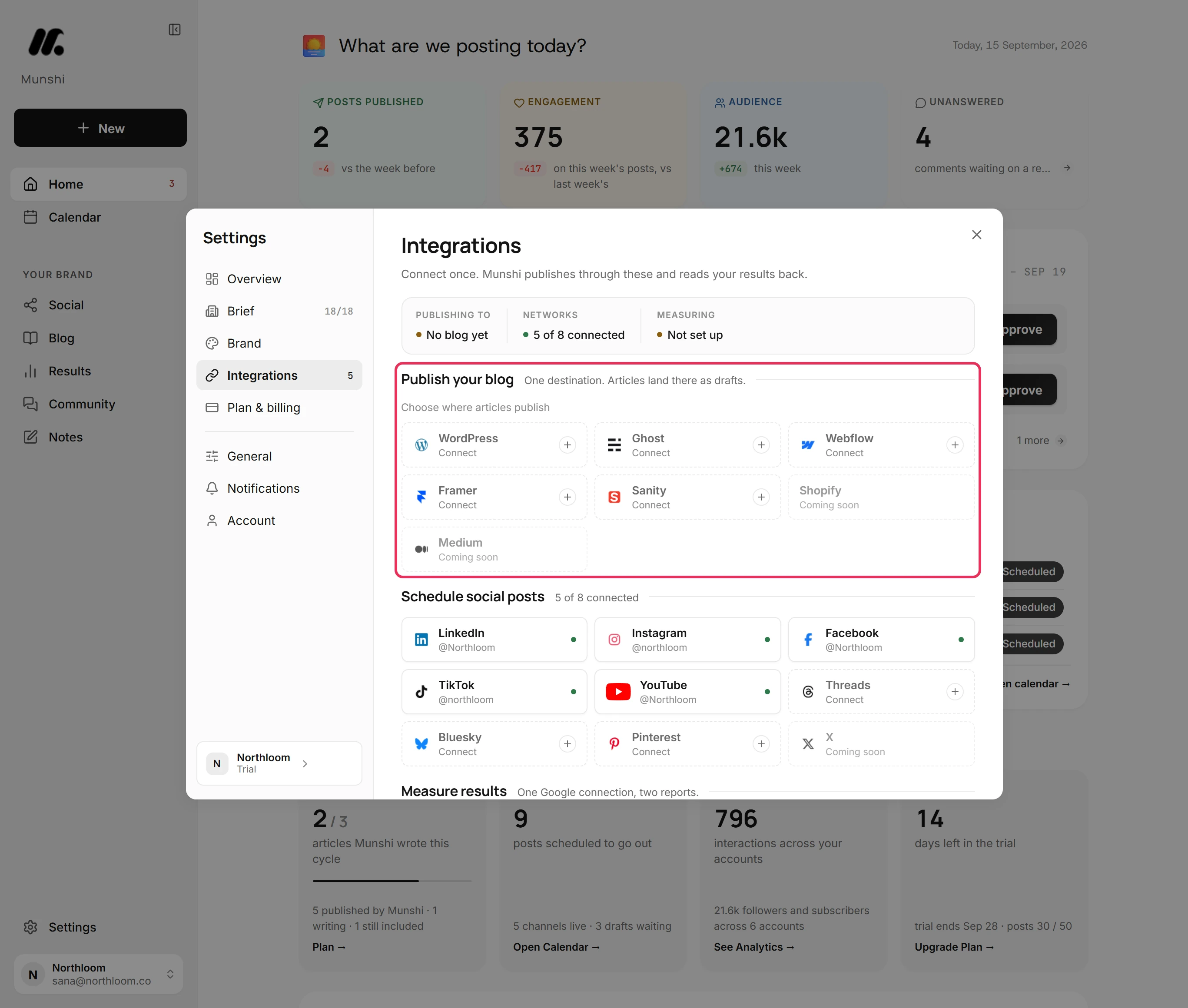
Click Settings at the bottom of the sidebar, then Integrations. Blogs sit under Publish your blog, networks under Schedule social posts, and the Google connection under Measure results. WordPress reads Connect until it is set up.
-
Open the WordPress card
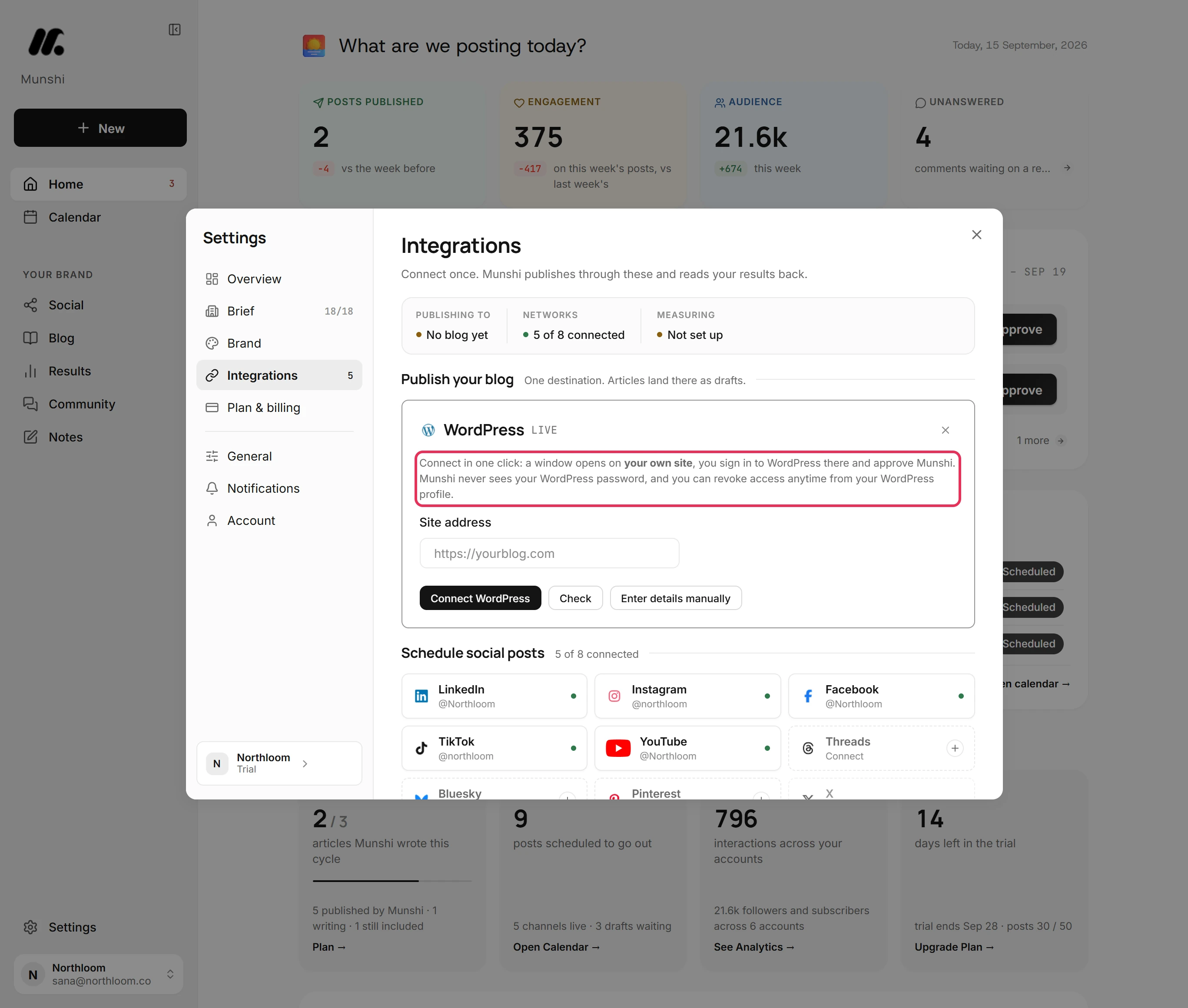
Click the WordPress tile. The card says what happens next. A window opens on your own site, where you sign in to WordPress and approve Munshi. You can revoke that access from your WordPress profile whenever you like.
-
Type your address and approve
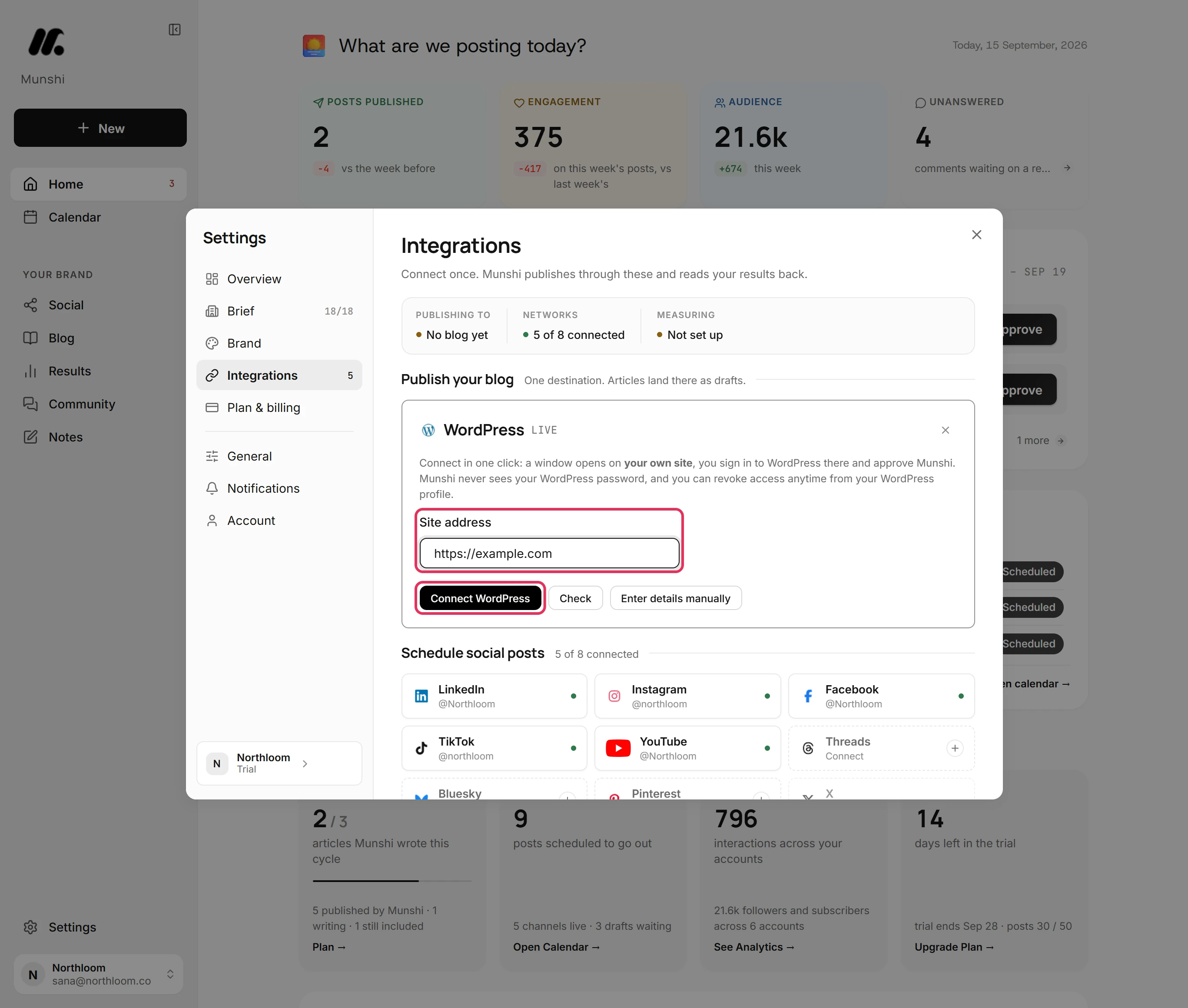
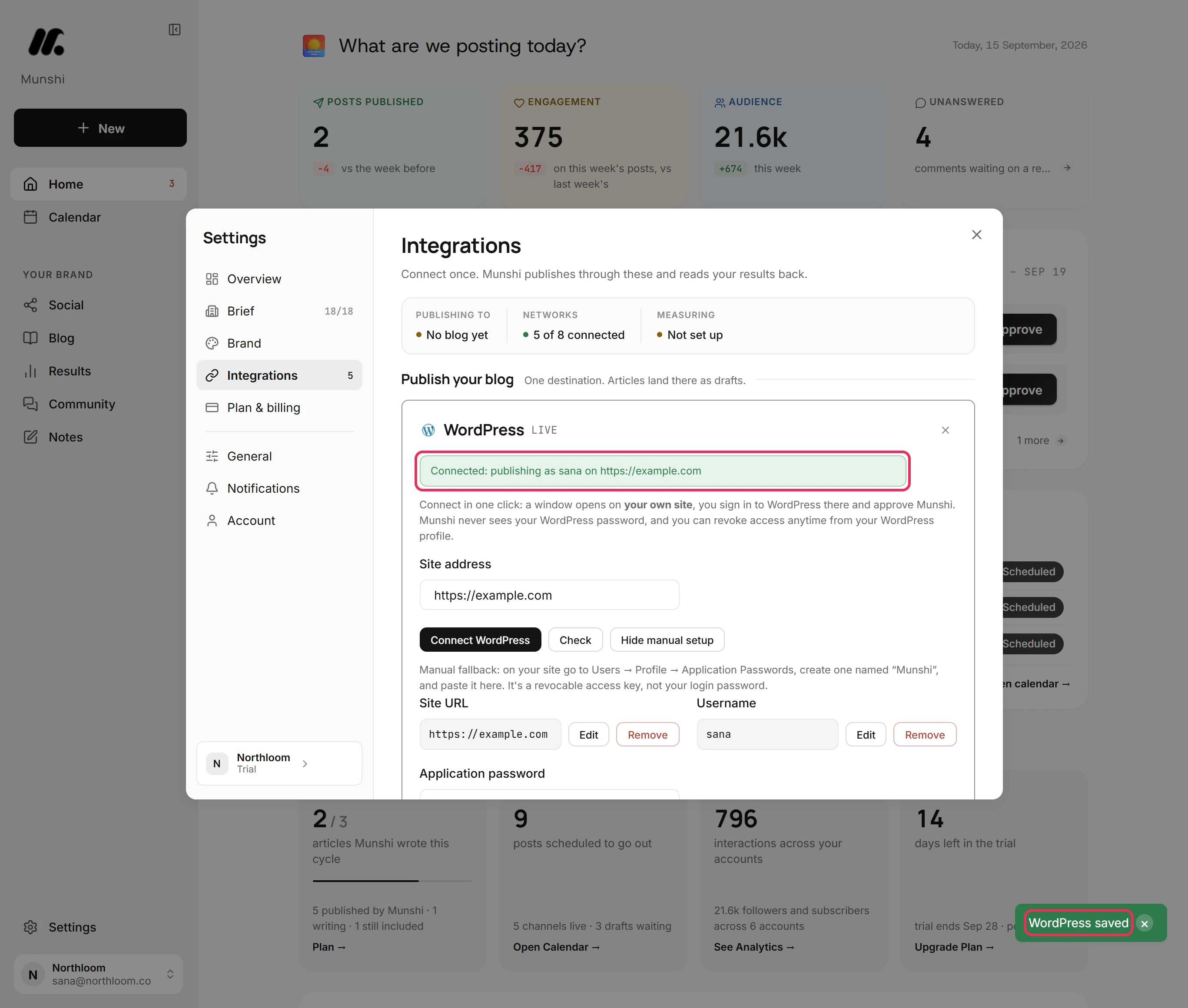
Type your site into Site address and click Connect WordPress. A window opens on your WordPress, where you approve Munshi Social. WordPress hands back an application password, the window closes itself, and Munshi checks the connection. Your site needs WordPress 5.6 or later, the version that added application passwords.
-
Or paste an application password
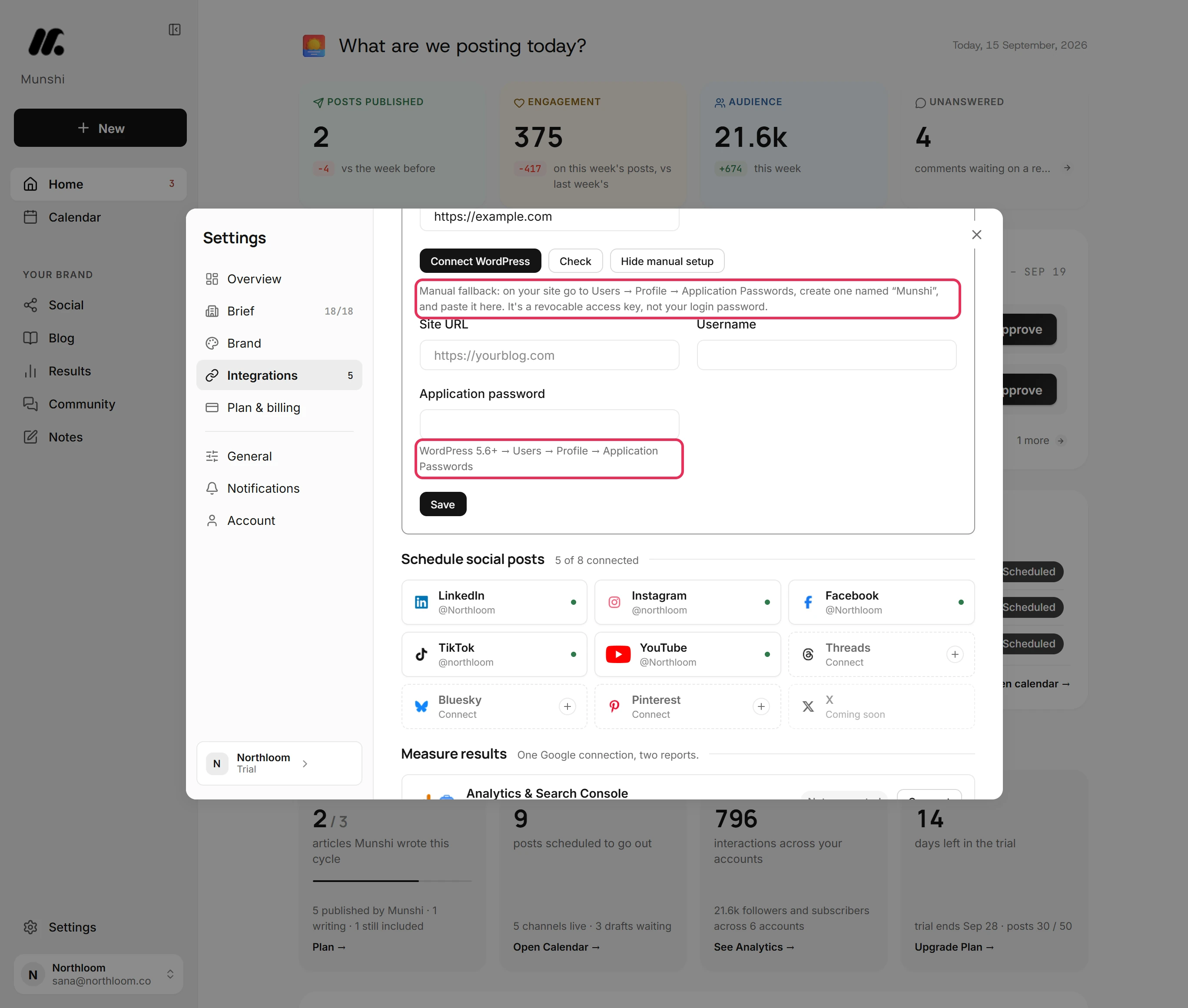
Some sites have application passwords switched off, or do not answer as WordPress. For those, Munshi opens the manual route. Click Enter details manually. In your dashboard, go to Users, Profile, Application Passwords and create one named Munshi. Paste it with your Site URL and Username. The address has to start with https://.
-
Check that it worked
Munshi stores the details and tries them against your site. The card then reads Connected: publishing as your WordPress name on your site. If your site turns the details away, the card shows the reason and the badge reads Check failed.
Does it publish live or as a draft?
Publish now leaves a draft, and a scheduled article goes live. With Publish now, WordPress keeps the article as a draft, so nothing appears on your site until you publish it there. Schedule… hands WordPress the article with its date, and WordPress puts it live at that slot by itself.
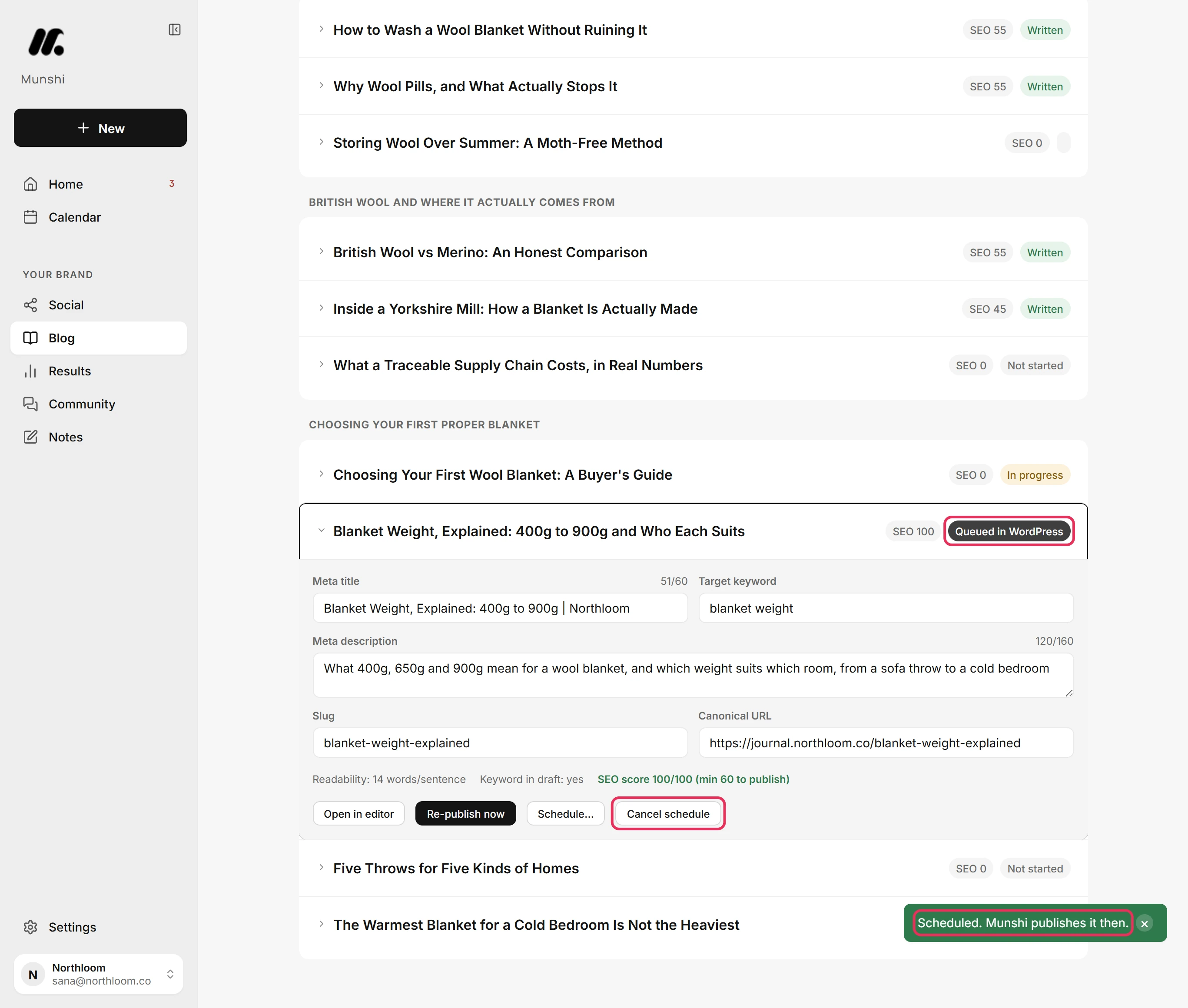
A scheduled article shows as Queued in WordPress on the Published tab, with Cancel schedule beside it. Cancelling clears Munshi's schedule only. WordPress still holds the post with its date, so change or delete it in your dashboard too, or WordPress publishes it anyway.
Which SEO fields go to WordPress
An article publishes only when it is finished and its SEO score reaches 60. Meta title, Meta description and Slug come filled in from the article's Meta, Title Tag & Schema step, with counters beside them. Target keyword and Canonical URL are yours to set.
A title of 30 to 60 characters earns 20 points, and a description of 70 to 160 earns 20 more. The keyword, the slug and the canonical URL earn 15 each. The keyword appearing in the article earns the last 15.
The description becomes the post's excerpt, and the slug becomes the end of its address. The canonical URL counts toward the score on WordPress but is not sent. Ghost is the one blog platform that receives it.
The cover goes into your media library
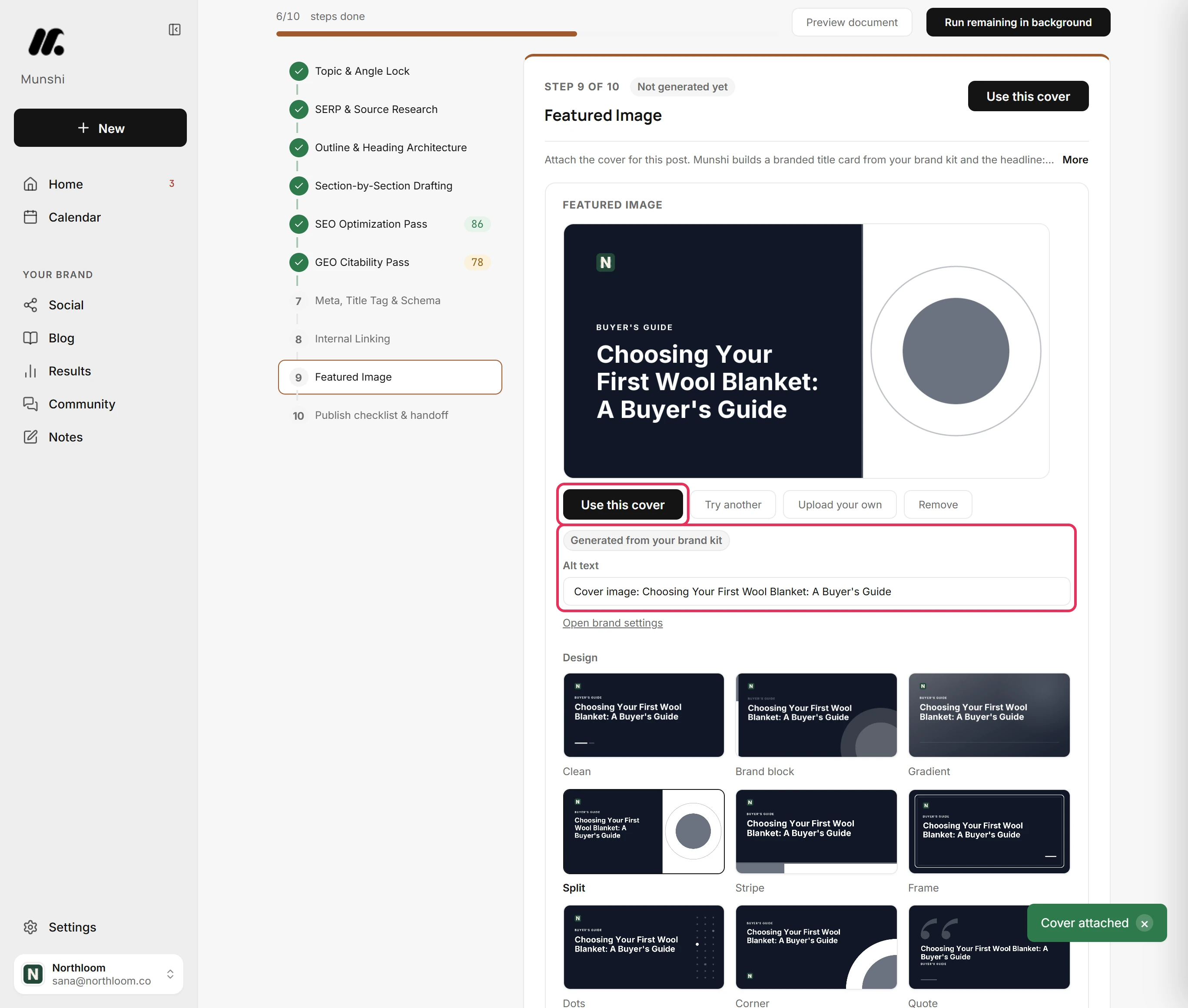
Every article carries a cover. Munshi draws one from your brand kit and the article's title at the Featured Image step. You can pick a design, edit the Headline and Kicker, and set the colour scheme and position. Or click Upload your own to use your own picture.
Covers Munshi builds are 1200 by 630 pixels. On the way to WordPress, the cover is uploaded into your media library and set as the featured image. It is not linked from Munshi, so it still works months later.
Images inside the article body are copied across the same way. An article published with no cover gets one drawn from your brand kit on the way out.
One blog per workspace, and you pick it
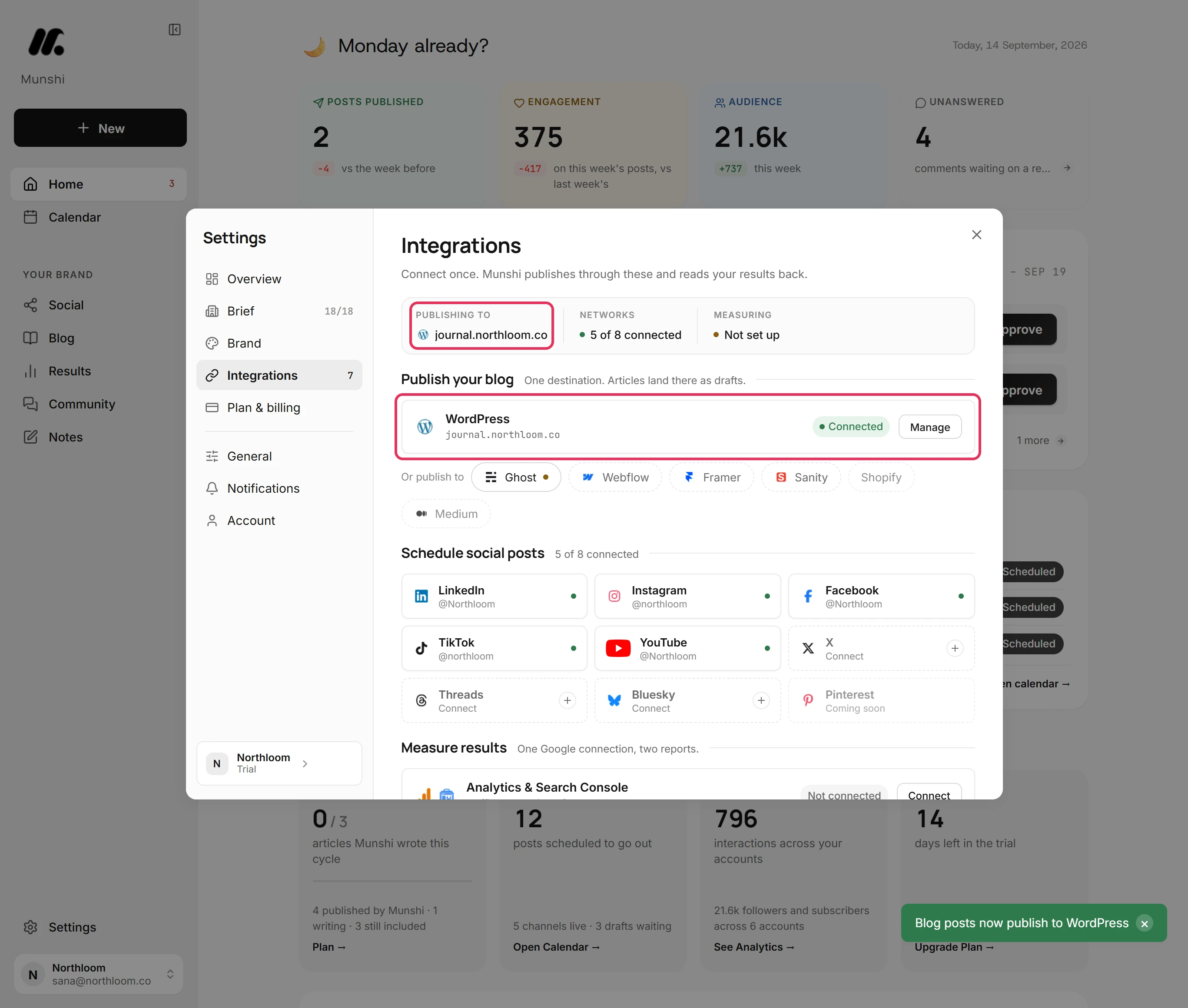
A workspace publishes its articles to one blog. With only WordPress connected, articles go there.
Connect a second blog and Munshi stops rather than guess. Publishing shows More than one blog is connected until you choose one under Publish your blog in Integrations. The blogs you did not pick stay one click away under Or publish to.
The chosen blog is named under Publishing to at the top of Integrations. It is named again at the top of the Published tab on Blog.
A green badge reading Connected means the details passed a check. Saved means they are stored but not checked since Integrations opened. Click Manage, then Check, to settle it.
Munshi and WordPress, answered
Does Munshi work with WordPress?
Yes. A finished article in your WordPress posts, with its title, body and cover image. The body arrives as WordPress blocks, and the cover goes into your media library. Publish now and it lands as a draft for you to check. Schedule it and WordPress puts it live at the slot on its own.
Can Munshi publish to WordPress automatically?
Yes, when you schedule the article. Munshi hands WordPress the post with its date, and WordPress puts it live at that time on its own. Publishing now saves it as a draft instead, for you to publish from your dashboard.
Does Munshi need my WordPress password?
No. You sign in on your own site, approve Munshi, and WordPress issues an application password. That is a key you can revoke, not your login. Revoke it any time from Users, then Profile, in your WordPress dashboard.
What kind of WordPress site does this need?
WordPress 5.6 or later, the version that added application passwords, with its REST API reachable. That covers a self-hosted site, and a hosted one whose plan lets you reach Users, then Profile, then Application Passwords. A site with application passwords switched off cannot connect either way.
What does the article look like in the WordPress editor?
Like a post someone wrote there. The body arrives as WordPress blocks, so headings, lists, links and images all edit in the block editor. The cover is a real featured image in your media library, not a link back to Munshi.
Are categories and tags set for me?
No. Munshi sends the title, body, slug, excerpt and featured image. You set categories and tags in WordPress after the article lands.
Can I connect two WordPress sites?
Not in one workspace. A workspace holds one blog connection per platform and publishes to one destination. The Studio plan covers three brands, each with its own connected blog and calendar, so a second site belongs to a second brand.
What happens if I edit the article in Munshi after it lands?
Publishing again updates the same WordPress post rather than creating a second one. While an article is queued, Publish now reads Re-publish now.
Can I stop an article that is already scheduled?
Yes, in two places. Click Cancel schedule in Munshi, and the row reads Written again. WordPress still holds the post with its date. Change or delete it in your WordPress dashboard too, or WordPress still publishes it at that time.
When WordPress says no
These are the messages people see most often, and what each one means.
“This WordPress site has application passwords turned off”
Munshi found no application passwords on your site, so it opened the manual setup. A security plugin or a WordPress older than 5.6 causes this. Both ways of connecting need them, so turn them back on in the plugin or update WordPress, then connect again.
“Your site issued a password but then refused it.”
Your site turned the application password away when Munshi tried it. Some security plugins block logins through the REST API, the route apps use to reach WordPress. Allow them in the plugin's settings, then click Check.
“Your browser blocked the popup. Allow popups for Munshi and try again.”
The approve window is a popup, and your browser blocked it. Allow popups for Munshi in your browser's site settings, then click Connect WordPress again.
“The site address must start with https://.”
Munshi stores secure addresses only. Type the address with https:// in front, such as https://yourblog.com, and click Save again.
“Landed as a draft in WordPress. Publish it there when you're ready.”
WordPress is holding the article as a draft, which is what publishing now does. Open it in your dashboard, read it and publish it. To have WordPress put an article live by itself, schedule it instead.
“More than one blog is connected”
Two or more blogs are connected and none is chosen, so Munshi stops rather than publish to the wrong site. Open Integrations and click the blog you want under Publish your blog. Then publish the article again.
WordPress, step by step
Each guide walks through one task in the real app, with a screenshot at every step.
- How to connect WordPress 3 min · 8 steps
- Draft or live: how an article lands in each CMS 3 min read
- How to set the SEO fields and publish, now or on a schedule 3 min · 10 steps
- How to choose a cover for an article 2 min · 8 steps
- How to choose where articles publish when two blogs are connected 2 min · 6 steps
- “More than one blog is connected” and other CMS refusals 2 min read
- “SEO score must reach” the minimum to publish 2 min read
- How to copy or download an article for a platform Munshi does not connect to 2 min · 7 steps
Other blog platforms: Ghost · Webflow · Framer · Sanity · all integrations