The best ContentCal alternatives
8 tools, ranked for what ContentCal's users relied on. Munshi Social, the AI content marketing engine for small teams, is fifth here, and the reason is stated under the method and under its own entry.
Prices dated on every entry · Updated September 2026
14-day free trial · No card required · 7-day money-back
Adobe announced it was buying ContentCal, the London content calendar, on 8 December 2021, and it shut ContentCal down on 31 March 2023.
Accounts did not move across: customers had to sign up for Adobe Express separately, and billing was not carried over. Posts had to be downloaded by hand and uploaded again, because Adobe deleted all ContentCal content and account data on 31 March 2023 and said it could not be recovered. Adobe renamed the product Content Scheduler inside Adobe Express and kept the calendar, drafting and publishing. At that stage Adobe itself described it as suited to individuals and small businesses, with features for larger teams and agencies still to come.
Adobe's ContentCal End of Life help page (last updated 9 January 2023) and its 8 December 2021 acquisition announcement, read 30 September 2026
ContentCal closed on 31 March 2023, and its official successor is Content Scheduler inside Adobe Express. Its free plan allows 1,000 posts a month with one account per network, and Premium raises that to three accounts per network. If you design your own posts and mainly need them scheduled, start there, because it costs nothing to try. If what you miss is a shared team calendar with an approval step before anything goes live, Planable is the closest match, with Loomly a close second. Munshi is fifth here, because ContentCal served teams who wrote and reviewed their own posts, and Munshi has two seats and one weekly approval. It moves up only for a former customer whose calendar now sits empty because nobody has time to write, since Munshi writes the articles and the posts itself for $15 a month.
What ContentCal customers need now
What ContentCal did for the people who used it, and what they lose now that it is gone, stated from its own published pages and its users' public reviews.
- A visual calendar the whole team could read at a glance. ContentCal described itself as a beautifully visual tool that anyone could grasp in 15 minutes, with shared calendars, duplicated posts and preset posting times
- Somewhere to park ideas before they became posts. Its Pinboard let you pin posts, park drafts, spark ideas and leave notes, and a web clipper and a Contributions feature collected ideas from across the business
- An approval step before anything went live. ContentCal was founded by agency marketers who wanted to share content with each client for feedback and approval, and its approval workflows kept feedback, review, comments and changes in one place
- Several brands, and several accounts on each network, in one login. When ContentCal closed, a former customer told Adobe's community forum that this was the major feature missing from Content Scheduler
- A replacement that covers all of that, not only the scheduling. Adobe has since added shared calendars and up to three accounts per network on Premium, but its help pages describe edit and view access on those calendars, not a post approval step
8 ContentCal alternatives, in order
Every list ranks tools by how completely they do a small business's content marketing. That means five jobs: strategy, writing, publishing to a blog, publishing to social, and measurement. Munshi does all five without a second subscription, which is why it is first on most lists. It is also the youngest, the narrowest on team features, and holds one account per network per workspace. Where the people leaving a tool are leaving for exactly those things, as agencies with many client accounts are, that need outranks the five jobs, the list says so under this line, and Munshi drops to where it belongs. Prices are quoted from each vendor's pricing page and dated. 1,000 posts and 8 networks are Munshi's own numbers, from our pricing page.
ContentCal was a planning and approval calendar for teams who wrote their own posts, and the four tools above Munshi are built for that work: several people, a review before anything goes out, and several accounts on one network. Munshi has two seats, one weekly approval and one account per network per workspace, so it ranks fifth on this list.
-
Planable
Planable is a collaboration and approval tool for social media teams and agencies. Posts preview the way they will look on each network, and teammates and clients comment, annotate and approve them in place. It is sold per workspace, one per brand or client, with unlimited users.
- Best for
- An agency or brand team whose posts pass through several people before they go out, such as clients, managers or legal. Required approval on Pro and multi-level chains on Enterprise are its core strength. Unlimited users mean a client costs nothing extra to invite.
- Price
- Basic $39/workspace/mo ($33 billed yearly). Pro $59/workspace/mo ($49 yearly). Analytics is a $14/workspace add-on
- The gap
- It does not write the content or publish to a blog. Universal content lets you draft and approve articles and newsletters, but you publish them yourself. Analytics and the inbox are paid add-ons per workspace, and posts are capped at 60 or 150 a workspace a month.
Pricing and features checked against planable.io/pricing, its pricing file for AI agents, its changelog and its help centre on 30 September 2026
-
Loomly
Loomly is a friendly social media calendar for brands, agencies and marketing teams. Each brand or client gets its own calendar, with post mockups, approval workflows, a Client role and an inbox for comments and messages. Its AI Assistant drafts posts and images when you ask.
- Best for
- An agency or marketing team where several people and their clients review every post before it goes out. Its roles, custom workflows and unlimited calendars suit that work, and four Facebook Pages are simply four calendars.
- Price
- Starter $65/mo billed monthly, or $49/mo billed yearly ($588). Beyond $332/mo, or $249/mo billed yearly ($2,988). Enterprise is quoted
- The gap
- It publishes what your team writes. There is no blog publishing and no keyword plan, and the AI drafts only when asked. Since the 2025 plan change, Starter is $65 a month for 12 accounts and 3 users, the next plan is $332 a month or $249 billed yearly, and X is not supported.
Pricing and features checked against loomly.com/pricing, loomly.com and Loomly's help centre on 30 September 2026
-
Buffer
Buffer is the lightweight scheduler most people try first. It has a queue, a calendar, clean analytics and a community inbox on every plan. It also has iOS and Android apps, and a free plan that is truly usable, not a demo.
- Best for
- A team that already writes its own posts and wants them queued reliably across two or three channels. It also suits anyone running several accounts on one network, because channels are unlimited on both paid plans. Five Facebook Pages is a normal setup on Buffer and an impossible one in Munshi.
- Price
- Free forever for 3 channels. Essentials $6 per channel a month ($60 a year), Team $12 per channel a month ($120 a year)
- The gap
- It publishes what you bring it. The AI Assistant drafts and reshapes one post at a time while you sit in the composer. There is no blog publishing at any price and no keyword plan. The bill grows with every account: eight channels on Essentials cost $48 a month, or $480 a year. A second login means the Team plan, at double the per-channel rate.
Pricing and features checked against buffer.com/pricing, buffer.com and Buffer's help centre on 17 September 2026
-
SocialPilot
SocialPilot is an affordable social media scheduler built for agencies. Plans are sold by account count, from 7 to 50. The higher tiers add client approval through a no-login portal, white-label reports, bulk CSV scheduling and a shared social inbox.
- Best for
- An agency or multi-location brand running many accounts, often several on one network, that needs clients to approve posts and reports that carry its own logo. Premium covers 25 accounts, six users and unlimited client seats for $100 a month.
- Price
- Essentials $30/mo, or $25.50/mo billed yearly. Standard $50, Premium $100 and Ultimate $200 a month, 15% less billed yearly
- The gap
- It publishes what your team writes. AI Pilot drafts one caption at a time on a credit balance, and there is no blog publishing or keyword plan. The $30 Essentials plan has no analytics, inbox or approvals, and annual plans are never refunded.
Pricing and features checked against socialpilot.co/plans, its pricing file for AI agents, its feature pages and its help centre on 30 September 2026
-
Munshi Social
Munshi Social is the AI content marketing engine for small teams. It plans the content and writes the articles and the posts. It publishes them to your CMS and your networks and reports the results, all from one weekly approval.
- Best for
- A business where nobody has time to write. The output is the product: 15 articles and 1,000 posts a month, finished and waiting, not a blank editor with an AI button. It suits one or two people running one brand, who would rather read a week's work and say yes than start from an empty composer.
- Price
- $15/mo founding price, locked for life, with two seats and 8 networks and no per-channel fee. Studio runs three brands at $29/mo. The price rises to $49 at public launch.
- The gap
- It holds one account per network per workspace, so four Facebook Pages do not fit. It has two seats, no role hierarchy and five blog destinations (WordPress, Ghost, Webflow, Framer, or Sanity). X is coming soon, the inbox handles comments but not direct messages, and the track record starts in 2026.
Skip Munshi if more than two people plan or approve your posts, if clients sign off before anything goes out, or if you run several accounts on one network. Those were the reasons many teams chose ContentCal, and the four tools above us handle them better. Munshi is the right pick only if the calendar kept running empty because nobody had time to write.
Our own pricing page and the app, September 2026
-
StoryChief
StoryChief is a content marketing platform for teams that write. It publishes articles and social posts from one calendar to seventeen CMS destinations. It also has editorial approvals with roles and comments, employee advocacy, and an AI assistant metered in credits.
- Best for
- A staffed content team or an agency that needs roles, a review chain and client workspaces. It also suits a site on HubSpot, Drupal, Wix or Contentful, thanks to its long CMS list. Agency plans price per client, not per seat, which is the right shape for that work.
- Price
- Social Calendar $22/mo yearly ($27 quarterly). Articles need Team Editorial at $81/seat/mo
- The gap
- Article publishing starts at $81 a seat a month, and the $22 plan is social only. Billing is quarterly or yearly, never month to month. The AI runs on a credit balance that runs out, and the whole design assumes a person who owns the draft.
Prices re-checked against storychief.io/pricing on 17 September 2026; features, roles and the CMS list checked against its help centre and integrations directory on 29 August 2026
-
CoSchedule
CoSchedule is a marketing calendar with social publishing built in. Blog posts, social messages, emails and events sit on one drag-and-drop calendar, and WordPress and HubSpot posts publish from it on every paid plan. AI assistants draft posts, campaigns and first drafts when you ask.
- Best for
- A team that writes its own content and wants every piece of marketing on one calendar. It also suits agencies: Professional adds client calendars, white-label reports and a free Approver role for client sign-off at $49 a month billed yearly.
- Price
- Starter $29/mo billed yearly or $39 monthly. Professional $49 or $59, and Suite is quoted from $69/mo
- The gap
- It organizes the work but does not do it. Nobody plans the keywords, and a person still writes the article. X costs $16 a profile a month on any plan, profiles past the included three or five cost $5 each, and there are no website or search analytics.
Pricing and features checked against coschedule.com/pricing, its product pages and its help centre on 30 September 2026
-
Metricool
Metricool is a social media planner with unusually deep analytics. It schedules to eleven networks and puts your ad accounts, your website traffic and up to 100 competitors in the same dashboard. It also has an inbox, a link in bio page, a Looker Studio connector on Advanced, and a free plan that never expires.
- Best for
- A social media manager or agency whose job is reporting, across five or more brands, at a low price per brand. It also suits a one-brand owner who writes their own posts and fits inside 20 a month on the free plan.
- Price
- Free for 1 brand. Starter $20/mo billed yearly ($25 monthly) for 5 brands, or $36 ($45) for 10. Advanced from $53/mo billed yearly ($67 monthly). Prices exclude VAT
- The gap
- It measures what you publish, but it does not write it. The AI assistant drafts one post at a time on 20 credits per brand a month, and there is no blog publishing and no keyword plan. A second login needs Advanced at $53 a month billed yearly, and X is $10 a month per account on every paid plan.
Pricing and features checked against metricool.com/pricing, Metricool's product pages and its help centre on 30 September 2026
Munshi, on the screens that matter here
If the calendar ContentCal used to hold now sits empty, this is what Munshi puts on it, and where the approval happens.
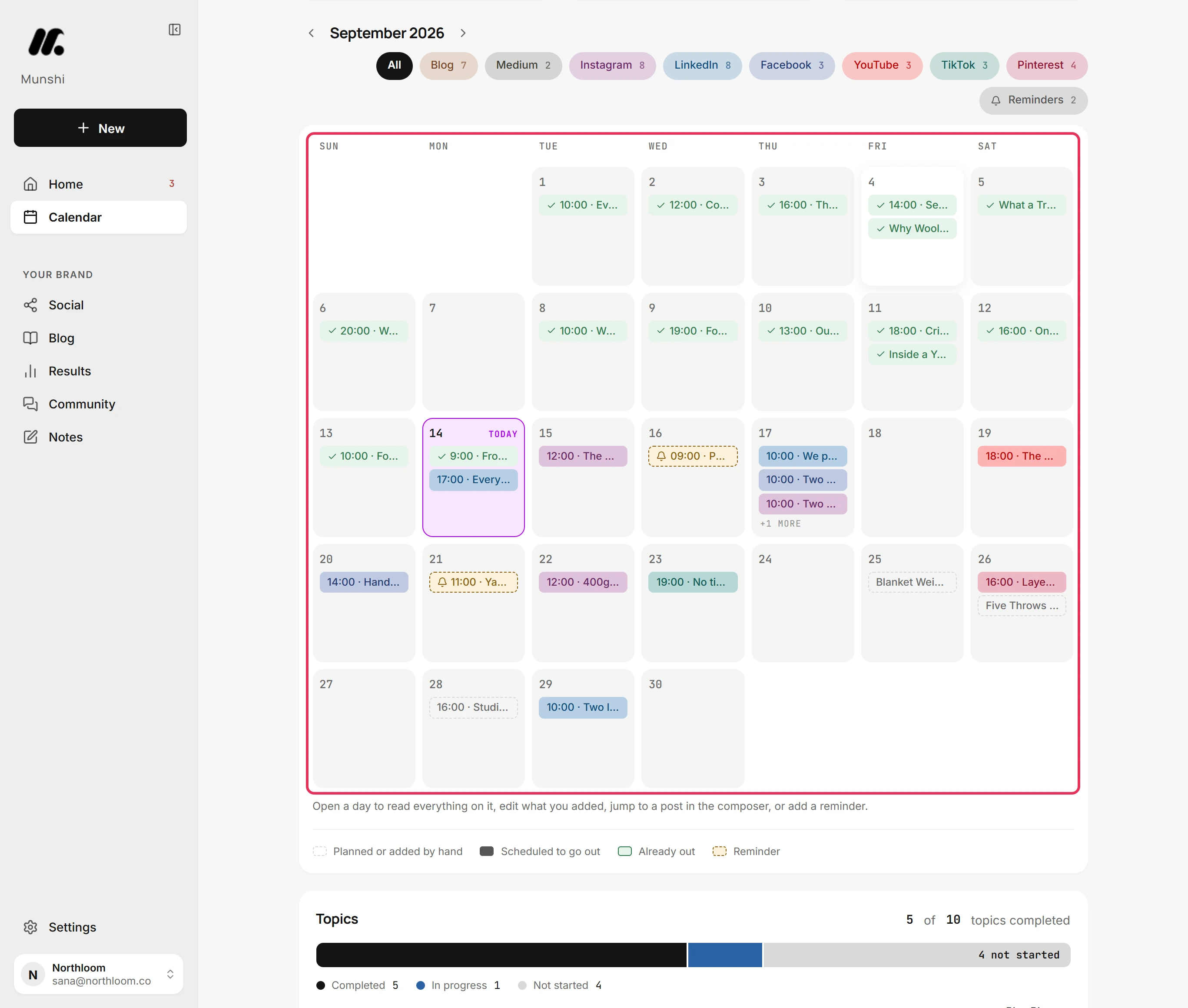
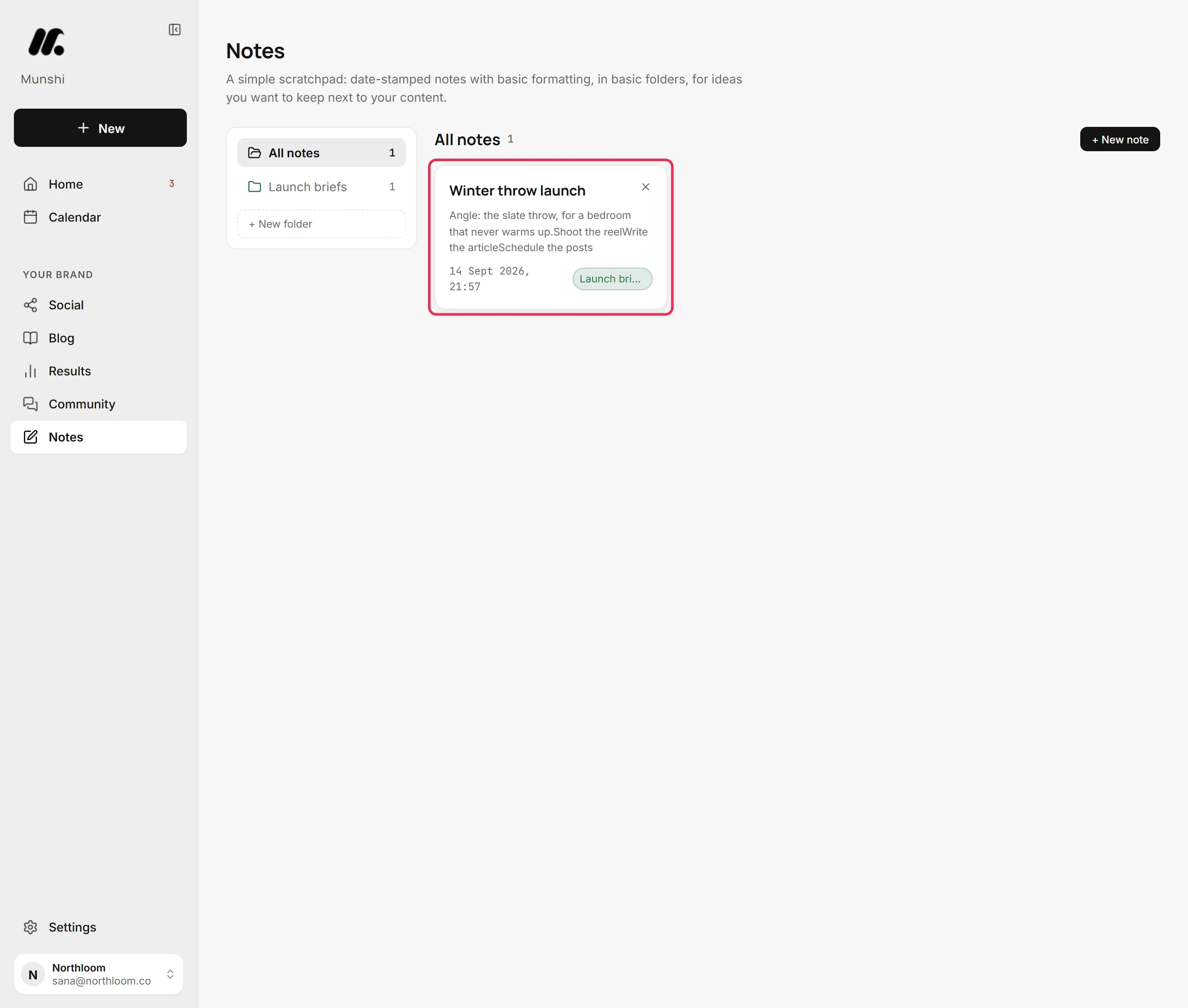
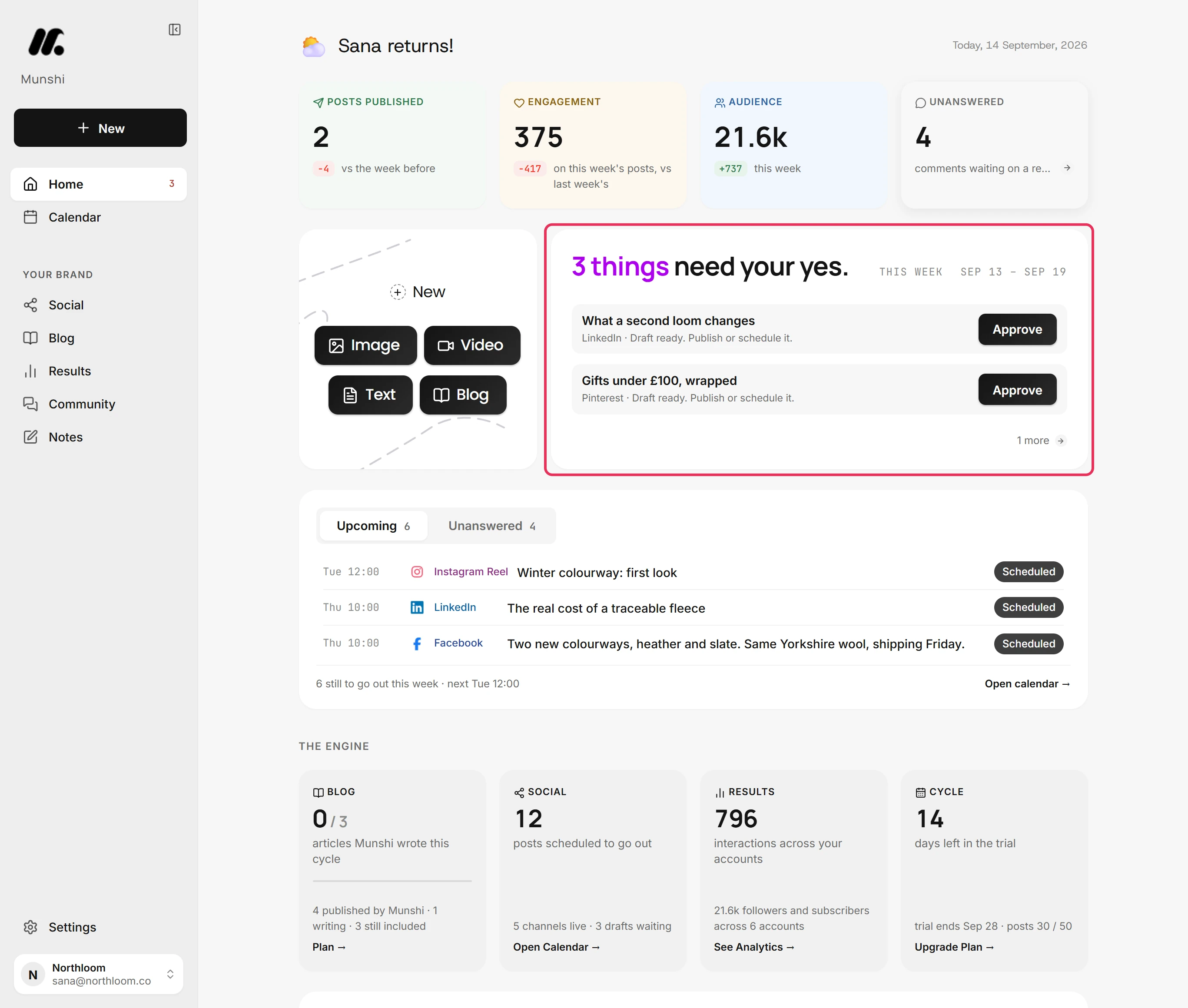
These are real captures from the app, not mock-ups. The walkthroughs behind them are in the docs.
How Munshi's calendar reads a month
Choosing a ContentCal alternative, answered
Is ContentCal still available?
No. Adobe discontinued ContentCal on 31 March 2023, and access stopped that day. Adobe's end-of-life page said all ContentCal content and account information would be deleted on that date and could not be recovered. The contentcal.io address now redirects to Adobe's Content Scheduler page.
What replaced ContentCal?
Content Scheduler, inside Adobe Express. Adobe's help page, last updated 19 August 2026, says it plans, previews, schedules and publishes posts to Instagram, Facebook, X, Pinterest, LinkedIn, YouTube and TikTok. The Free plan allows 1,000 posts a month and one account per network. Premium connects up to three accounts per network and lets you edit shared calendars, while Free users can only view them. Content Scheduler was built around Adobe's design tools, so it suits people who make their own graphics.
How much does Adobe Express cost now?
Adobe Express has a free plan, and Content Scheduler is included in it. Premium is $9.99 a month billed monthly, after a 30-day free trial, as its pricing page showed on 30 September 2026. Premium is what raises the limit to three accounts per network. Adobe also sells Adobe Express for teams on a business plan, with an admin console and pooled storage.
Can I get my old ContentCal posts back?
Not from Adobe. Its end-of-life page told customers to download their posts by hand before 31 March 2023, and said the content and account data would be deleted that day and would not be recoverable. Anything ContentCal already published is still on the networks it went to, so your post history lives there. Munshi can bring past posts in for reporting through its import, so their numbers show up in Results.
Does Content Scheduler have approvals like ContentCal did?
Not in the way ContentCal did. Adobe's help pages for shared calendars describe two access levels: Premium members can create, edit and publish posts, and Free members can view the calendar. We found no post approval step described there. Adobe Express does offer review and approval for templates, through Workfront, which is a different job. If the approval step is what you miss, the top four on this list are the better fit.
Is there a ContentCal alternative with somewhere to park ideas, like the Pinboard?
Adobe's Content Scheduler lets you save ideas as unscheduled posts and keep drafts on the calendar. In Munshi, ideas go into Notes, which holds briefs, folders and checklists, and a calendar day can hold a reminder or a planned slot before the post exists. Munshi also suggests the topics itself, from a keyword plan you approve, so the idea board fills without you.
Which ContentCal alternative is best for an agency?
Not Munshi. ContentCal was built by agency marketers for client feedback and approval, and for several brands with several accounts per network. A Munshi workspace has two seats, no role hierarchy and one account per network, and Studio covers three brands. The first four tools on this list are built for teams and clients working on the same calendar, so start there.
Can Munshi replace ContentCal for a small business?
Yes, if one or two people run one brand and nobody has time to write any more. Munshi puts the blog and all 8 networks it connects on one calendar and writes the articles and posts from a keyword plan you approve. Everything waits for one weekly approval, and the price is $15 a month flat. If your team still writes its own posts, you would be paying for writing you do not need, and a scheduler on this list fits better. The trial runs 14 days with 3 articles and 50 posts and no card, so you can check before you move.
Where every figure on this page comes from
Each price and plan limit above was read on the vendor's own page on the date shown. If a vendor has changed something since, their page is right and this one is out of date.
- Adobe blog: Adobe to acquire ContentCal (8 December 2021, with completion update) read 30 September 2026
- Adobe Help: ContentCal End of Life (Internet Archive copy of Adobe's page, June 2023) read 30 September 2026
- Adobe Community: ContentCal is now known as Content Scheduler (29 March 2023, with replies) read 30 September 2026
- Adobe Help: Content Scheduler overview read 30 September 2026
- Adobe Help: Create Shared Calendars read 30 September 2026
- Adobe Help: Shared Calendar access and permission read 30 September 2026
- Adobe Express: Content Scheduler feature page (where contentcal.io now redirects) read 30 September 2026
- Adobe Express pricing: Free and Premium plans read 30 September 2026
- ContentCal home page (Internet Archive copy, September 2021) read 30 September 2026
- ContentCal product tour (Internet Archive copy, November 2020) read 30 September 2026
The trial is the honest pitch
Describe your business and read what Munshi plans and writes for it. The trial gives you 14 days, 3 real articles and 50 posts, with no card. If the output is not better than what you had, you have lost an afternoon.
Other lists: StoryChief alternatives · Buffer alternatives · SocialBee alternatives · Hootsuite alternatives · Loomly alternatives · Later alternatives · Planable alternatives · CoSchedule alternatives · Metricool alternatives · Blotato alternatives · SocialPilot alternatives · every comparison